
Participant
November 3, 2017
Answered

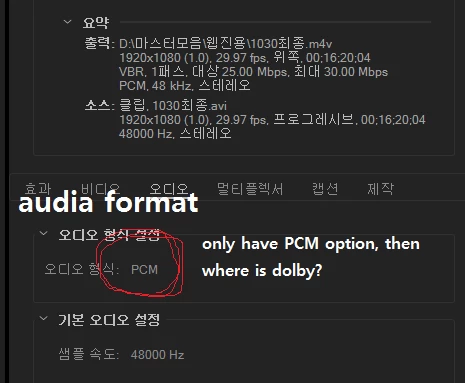
Audio formation problem; only have PCM option

  • November 3, 2017
  • 1 reply
  • 1456 views

When I export a media file, I used to have to options which are "dolby channel" and Linear "PCM";

HOWEVER, after I update to Premiere pro CC 2018, when I export files the audio format page shows me there is only PCM option.

anyone knows about this? please let me know what how to solve this problem!

I need to export with dolby option!
This topic has been closed for replies.
Correct answer Keith_Clark

they nixed dolby for CC18 and onward

https://forums.adobe.com/message/9894535#9894535

1 reply

Keith_ClarkCorrect answer
Inspiring
November 3, 2017

they nixed dolby for CC18 and onward

https://forums.adobe.com/message/9894535#9894535

Participant
November 3, 2017

thank you very much. I should downgrade mine!

Legend
November 3, 2017

In 2018 and forward, Dolby encoding  (like some other licensed codecs) is handled by the OS.

Win8.1 and forward, including Win10, and the last few MAC OS's have Dolby in the system codecs.

Win7 is really the only problem, with that ancient but venerable OS, you need to stay with 2017.

Neil


In 2018 and forward, Dolby encoding is handled by the OS.

I'm not sure that's correct.  The note from Adobe says Dolby decoding is handled by the OS, but support for encoding is dropped entirely.  Which means we would need to pay for a third-party tool to create Dolby files.

Changes to Dolby Decoding and Encoding Support