
Participant
December 14, 2016
Answered

Audio not showing up in Timeline

  • December 14, 2016
  • 2 replies
  • 24725 views

For some reason some of the video clips I try to drag into the timeline show up with no audio track. Yet, if I open up the file in QuickTime the audio sounds completely fine.

Any help with this? It's extremely frustrating and I cannot seem to find the solution anywhere else on here.

THanks,

Andrew
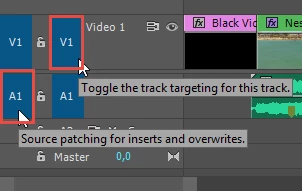
Correct answer Ann Bens

This has been discussed a million time on the forum.

its called souce patching.

My screendump is wearing out.

2 replies

Peru Bob
Community Expert
Community Expert
December 14, 2016

...and here is the link to the FAQ that answers it as well:

FAQ: Why does audio or video not go to the track where I drop it?

Gustavo Saliola
Participant
March 30, 2022

Thanks Peru Bob! A quick googling gave me this post and your link.


Mod note: Text was removed. Please do not disparage other humans on these forums.

Gustavo Saliola
Participant
March 30, 2022

Ann's answer was succint, direct, and ... exactly the same information as PeruBob's link ...


Neil


I'll desagree with that. Peru Bob was in deed short and utilitarian, and educated.
"This has been discussed a million time on the forum" is a non necessary add on. Just post the link and move on. Be easy on people, even if "Has been discussed a million time on the forum". This is my first time on this bug/setting, so (As i wrote) a quick googling gave me this post and Bob's link.

Hope been clear about it.
Regards.

Ann Bens
Community Expert
Ann BensCommunity ExpertCorrect answer
Community Expert
December 14, 2016

This has been discussed a million time on the forum.

its called souce patching.

My screendump is wearing out.

Participant
February 11, 2025

thank you so much. It worked