
Participant
November 5, 2020
Answered

Audio preview frame by frame

  • November 5, 2020
  • 2 replies
  • 14061 views

Hi!


Since this Monday when I created a new project in Premiere Pro, when I advance in the timeline frame by frame the audio is not reproduced. Before I could listen to the audio while moving forward with the arrow keys. Now I can't hear the audio when I pause and I can only hear it when playing, do you have an idea what could have caused this error and how to fix it?
Correct answer gerikp

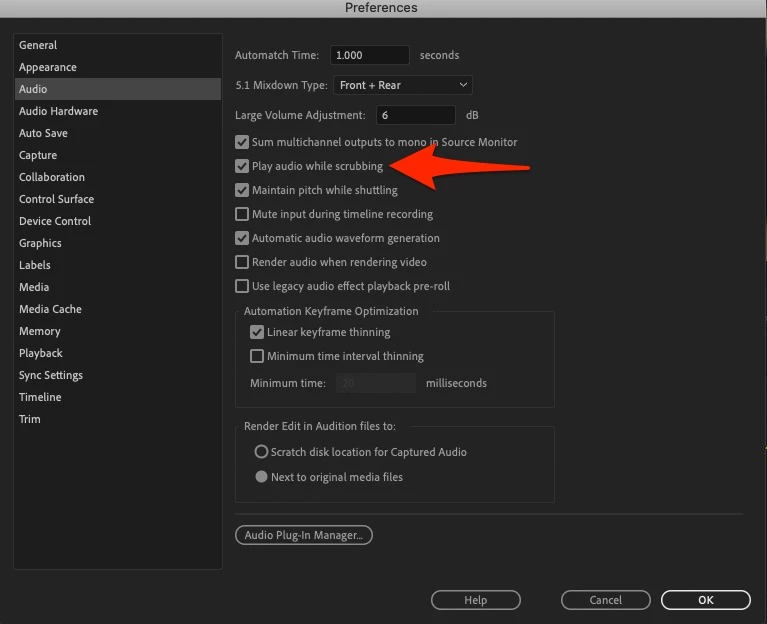
Make sure under Preference > Audio that you have play audio while scrubbing selected. If you do and it's still not working try resetting your preferences.  https://community.adobe.com/t5/Premiere-Pro/FAQ-How-to-reset-trash-preferences-in-Premiere-Pro/td-p/8236158


2 replies

gerikp
Community Expert
gerikpCommunity ExpertCorrect answer
Community Expert
November 5, 2020

Make sure under Preference > Audio that you have play audio while scrubbing selected. If you do and it's still not working try resetting your preferences.  https://community.adobe.com/t5/Premiere-Pro/FAQ-How-to-reset-trash-preferences-in-Premiere-Pro/td-p/8236158


Participant
November 5, 2020

I love you!


Thank you very much!

Ann Bens
Community Expert
Community Expert
November 5, 2020

Check your Audio Preferences: Play audio while scrubbing.

James Jackson TX
Inspiring
August 30, 2022

Thank you, Ann! I don't know how this feature got unchecked, but it fixed my problem two years after you provided this answer.