
Audio Source track randomly switched from A1 to A6
Hey guys,
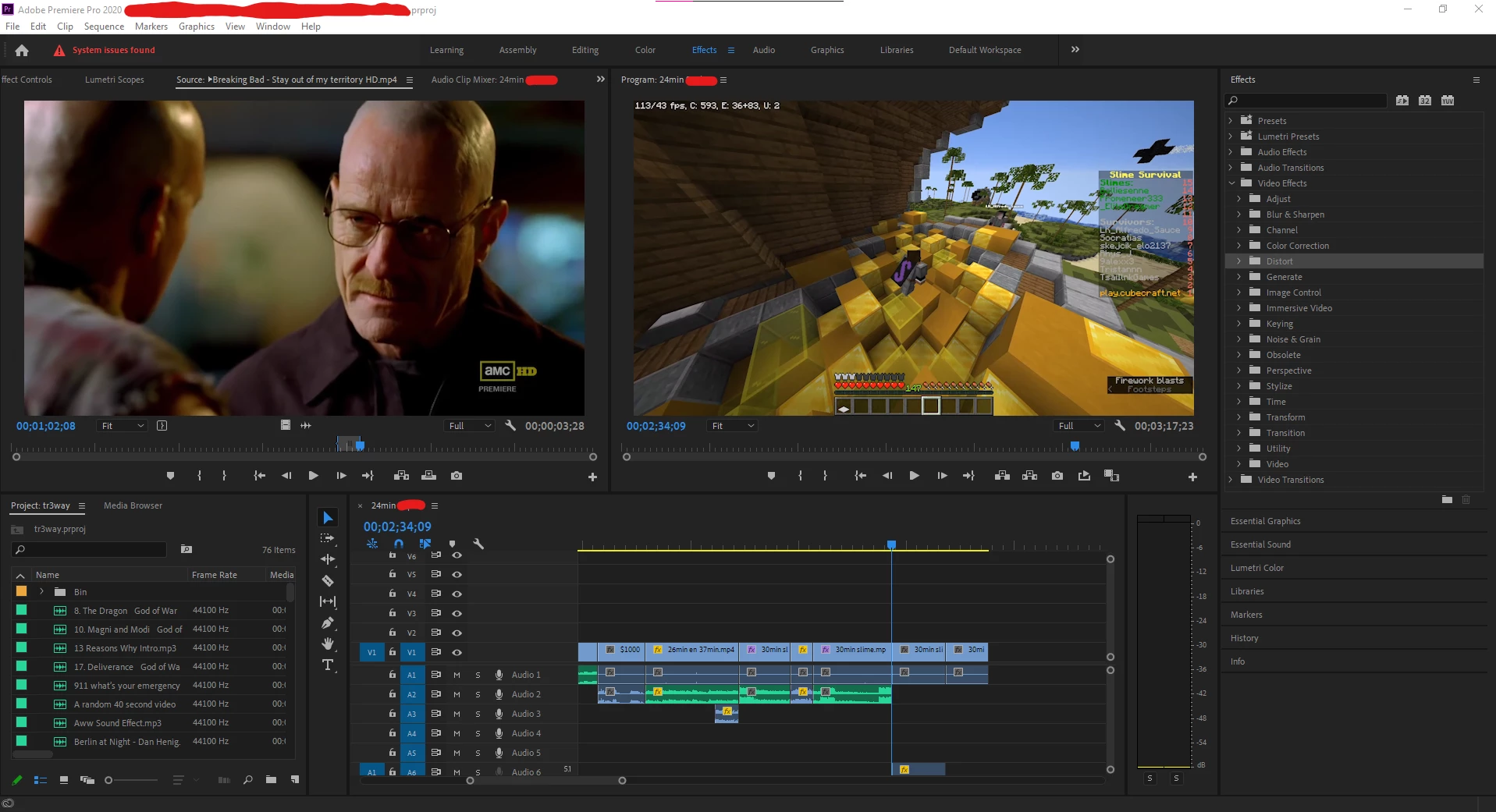
As I was casually editing today, I tried to put some audio into my timeline, as I had already done countless of times before in this project, but all of the sudden it created a completely new Audio track. Apparently A1 isn't able to take up Source footage and thus it makes an entirely new audio track which CAN handle s
ource footage. Unfortunately for me this is A6. I think you can understand where I am going now. How can I make A1 able to have Source footage again?
I use Adobe Premiere Pro CC 2020
(As you can see in the screenshot, there are two V1's but only one A1, meaning A1 can't assign Source footage anymore. If you look closely down the bottom, you can see that now audio track A6 has also an A1 in front of it. Somehow I also can't move up the audio from A6 to lets say A1 or A3. Just not possible.)
 AdChoices