

Audio Syncing Issue
Hi,
I'm probably overlooking something like an idiot, but I have an issue with "telling premiere" that my audio is indeed in sync.
Here's whats happened:
I imported a video and the audio was out of sync. I did some rearranging with the file from the other camera so I thought I maybe just accidentally moved either the video or audio while it wasn't linked (sometimes the audio is on the b cam, and I just usually link it to my a cam, so I thought I just messed up here) now I just manually placed the video back into sync and started editing, all was fine.
Now today when I opened the project (after updating today) I got this little 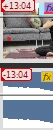 information box that tells me the audio and video isn't in sync I suppose? But it is indeed synchronised on playback.
When I added Warp Stabillizer onto a short clip, it apparently always "synchronised" it back but its now out of sync. How do I tell premiere to leave the audio in the position that it is because it is indeed synced? Or is a playback bug and the files are actually out of sync but it always just looks right in playback?
Thanks for your help.
 AdChoices