 Adobe Community

- Home
- Premiere Pro
- Discussions
- Audio Track Mixer Missing Pan Controls
- Audio Track Mixer Missing Pan Controls
Audio Track Mixer Missing Pan Controls

Copy link to clipboard
Copied
Hi all,
I'm experiencing a weird issue with a multicam sequence. I have two channels of mono audio, properly set up within Modify>Audio, as is the sequence. However, both audio clips are playing as if they're panned hard-left. But within the Audio Track Mixer panel, I have no pan controls, and instead there is an empty grey area where they'd normally be. Both clips are centered within Audio Clip Mixer and the Effect Controls panels.
This is an episodic project, and previous multicam sequences are as expected. My workaround will be to duplicate a previous multicam sequence, and paste the contents of the problematic sequence into it.
Any thoughts woiuld be appreciated.
Premiere 22.5.0 (Build 62)
Windows 10
i9-9900K CPU @ 3.60GHz
32.0 GB DDR4
GTX 1070


 5
Replies
5
5
Replies
5



Copy link to clipboard
Copied
A screen grab would be very helpful. Drag and drop it into your text reply box so we can see it easily.
Neil

Copy link to clipboard
Copied

I have teh same issue . It looks like this
Copy link to clipboard
Copied
I'm on. a Mac with an M1 chip running 22.5.0 - is Adobe still having issues with M1 chips?
Copy link to clipboard
Copied
I figured it out!! At least for my problem. Premiere wont let you control the CLIP panning until you drop that clip into a sequence. I had a big 2-CH clip that was going to be dropped all over a sequence at different spots that I needed panned Left and Right. So I tried to bring it to clip window and pan teh two channels so , wherever I dropped it, it would already be panned (seems like that should be the way to go) - but, while the volume sliders are accessible before editing in, the pan knobs are missing UNTIL you drop it into a sequence


Copy link to clipboard
Copied
If you want mono source to behave like stereo source, select the clip in the Project or Bin and then choose Clip > Modify > Audio Channels to open the Modify Clip dialog box.
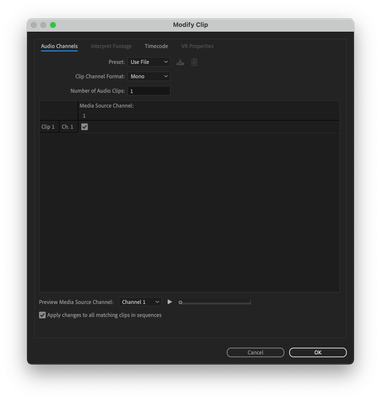
In the Modify Clip dialog box under the Audio Channels tab, change the Preset pop-up menu from "Use File" to "Stereo".
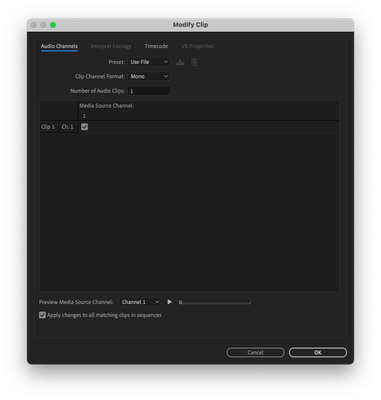
If you want the Left channel to also go to the Right channel, click the "R" check box.


 AdChoices