
Daniel Wulff
Participant
March 24, 2018
Answered

Audio track names

  • March 24, 2018
  • 2 replies
  • 2213 views

Hello,

I am currently working on a feature, I like to keep everything organized to ensure a smooth workflow (don't we all). The sound recorder on set told me, that he has named all the individual audio sources in his recorder. This way, I should be able to have a visual representation on my timeline, of what audio track belongs to which actor.

Something along the lines of:

V1        

Actor #1

Actor #2

Boom

The only problem is, the metadata isn't showing up in Premiere. I don't have the option to rename the individual audio tracks manually, either.

Please tell me, that the function is there and that I'm just overlooking something...

Best,

Daniel
Correct answer Kevin-Monahan

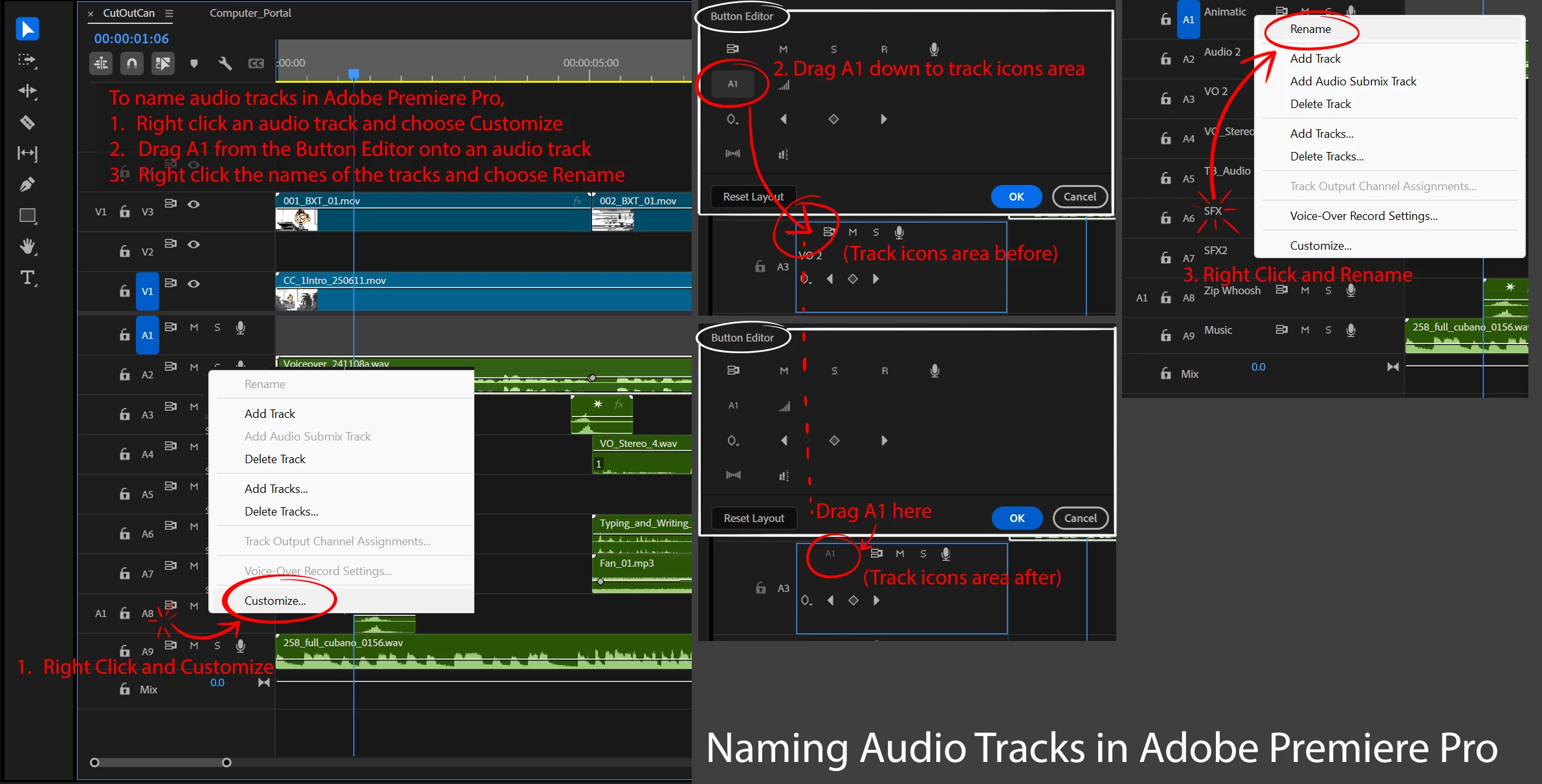
Hi everyone, here is a quick visual tutorial of how to get the track names to show up so they can be edited.


Thanks for doing this!


Kevin


2 replies

gerikp
Community Expert
Community Expert
March 24, 2018

"The only problem is, the metadata isn't showing up in Premiere. I don't have the option to rename the individual audio tracks manually, either."

You can rename your Audio Tracks in by Right-clicking the audio track in your sequence and choose "Customize" from the drop-down menu and this will get you into the button editor. Then click on the "A1" button and drag it down on to your track from the button editor menu. Now click OK to exit button editor. Now you need to right-click your audio track again and choose "Rename" it should no longer be greyed out.

Daniel Wulff
Participant
March 25, 2018

It's still greyed out.

mattwattsart
Known Participant
June 11, 2025

Hi Daniel,

It's working for me. Can you show us a screenshot of the new button in place on your track and the disabled shortcut menu?

Thanks,
Kevin


Hi everyone, here is a quick visual tutorial of how to get the track names to show up so they can be edited.

Legend
March 24, 2018

My first thought is that the metadata being used just isn't supported by PP.

Daniel Wulff
Participant
March 24, 2018

This really needs to be implemented then, it's going to be a headache for the sound mixer, since most scenes have 7-8 active players at a time. In previous versions of PP at least, it was possible to change the track names manually, but not anymore? This makes no sense whatsoever...

Legend
March 25, 2018

You can ask for new features below.

Feature Request/Bug Report Form

Chances are that won't help with this project, though.  One thing I can suggest is to always test out the entire work flow before production begins.  Nigglers like this often crop of when assumptions are made.