
BaronZamedi
Participant
March 22, 2017
Question

Audio tracks are all labelled "English" after export

  • March 22, 2017
  • 2 replies
  • 1132 views

Currently putting together videos for a client in 7 different languages. I got all my audio tracks routed and mixed correctly, everything works perfectly when exporting to .mov, but once I try to select any audio track from the exported file I get this (screenshot is from VLC, but also happens in all other media players i tried):
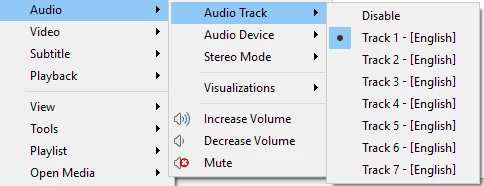
All my tracks are there and playing in the correct language, but for some reason they all say "English". Obviously these should read English/German/French/Spanish/etc - anybody know how I can fix this?

    This topic has been closed for replies.

    2 replies

    Warren Heaton
    Community Expert
    Community Expert
    July 3, 2022

    Flagging audio tracks as different languages is a DVD authoring and a Blu-ray authoring feature that's not supported in Premiere Pro.


    In a DVD/Blu-ray workflow, we use Premiere Pro to edit the video track and the corresponding audio tracks.  That is then exported in the desired file formats for use in the application being used for authoring where the corresponding language of the audio tracks is assigned (or "flagged").  In DVD authoring, for example, the language track assignment is carried forward to the resulting VIDEO_TS data structure when the DVD title is built for DVD players to recognize later.


    VLC Player supports appending external audio tracks and then converting the results.  You could give that a try after having exported the video as its own file with no audio and each of the language track mixes as their own files.

    Legend
    March 22, 2017

    I don't know if PP offers an option to change that metadata.

    BaronZamedi
    Participant
    March 23, 2017

    I have changed all the language metadata fields in audition (XMP AS-11) before importing the wav's to premiere, they're all pointing to the correct language.

    Participant
    July 20, 2021

    How did you export the multiple languages?