
Audio tracks keep disappearing in Premiere Pro 2017
This is not the first time it happens, it usually happens every time i edit stuff.
I don't know why it is happening, but i know what causes the problem.
What happens is that i was just editing some videos for my YT channel, and the audio 1 panel just disappears to nowhere. I cannot find it, i tried reset the workplace, but nothing...
As i said, this is not the first time this happens, and i know that i'm doing something wrong because i figured it out why it happens.
So what triggers this is when i select all the edited-cutted audio and video and i drag it to the left (to match with other footage, so there won't be any emptyness)
And when i drag it, the whole audio 1 panel disappears. I guess it's because Premiere thinks that i wan't to do something else, but i just want to match the files...
This is incredibly frustrating, because PP is one of the best editors out there, yet it doesn't understand if i want to move footage from the right to the left...
And again, this happens now like the 15th times. Previously i have no idea how i solved it, so please help.
I think the problem is that somehow audio track 1 was shrinked to so small, that i can't find it. 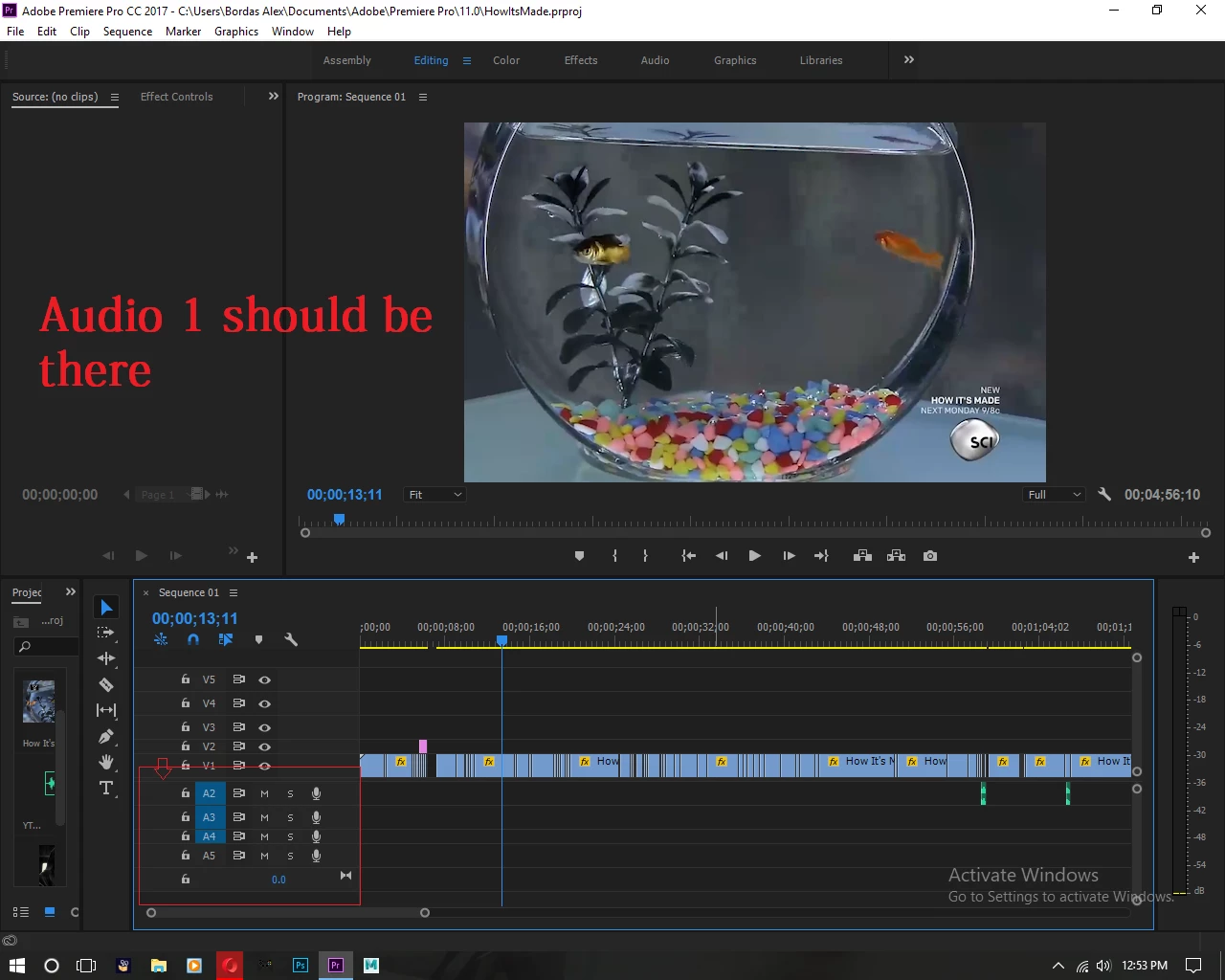
 AdChoices