
Known Participant
August 6, 2024
Question

Audio waveform hard to read since 24.5 update (not colours)
  • August 6, 2024
  • 3 replies
  • 973 views


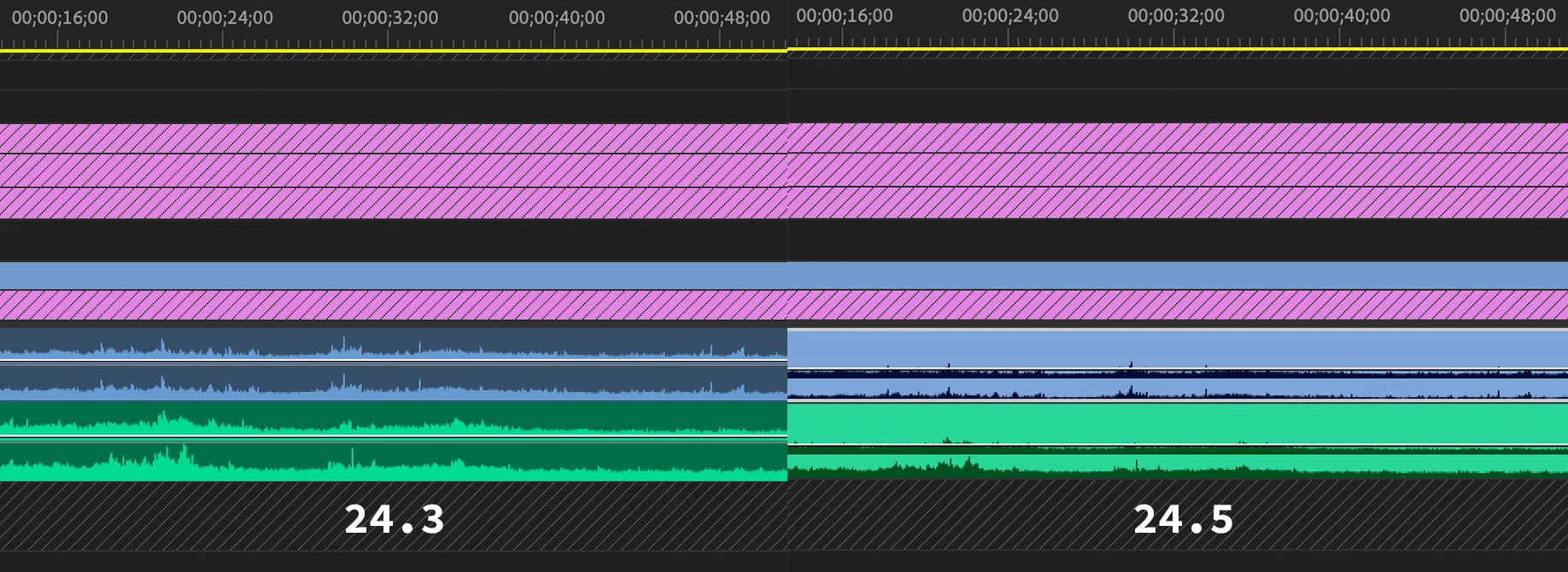
Since updating from 24.3 to 24.5 the audio waveform is much harder to read. I have changed to the  'classic' colours and understand the audio colour can be changed to a darker colour to invert the waveform back closer to how it was before this update.


However, what is going on with the waveform scale, alignment and white space? Comparing the waveforms above, which are of the exact same audio, the 24.5 version on the right looks really small and squashed with the left and right audio not having equal height, and there seems to be empty space at the top of the waveform now.


I would really struggle to edit with the new waveform design as I can barely make anything out. It is even worse if I untick 'Logarithmic Waveform Scaling'. Surely this must be a bug, as I can not imagine this is the intended design.


Is anyone else seeing this issue with the new waveform design? And to reiterate, I am not talking about the colours.


This topic has been closed for replies.

3 replies

R Neil Haugen
Legend
August 6, 2024

PG73 ...


Don't know why you'd need examples. It's so fast to simply drag to a new height and see what you think yourself. Not so pleased we need to do this now, but among all the other pains in the Universe, it ain't huge either.


Tom ... you might feel better, but I gotta tell you, the comment just looked well ... silly.


You don't like something, so what, you think everyone is just like you? Well, I'm not a fan of this change either.


But I can realize that there are tons of others who loved the changes. No accounting for tastes it seems, but there it is. I think thee & me is rather outnumbered over the entire user base.


It's like some of the color changes I've wanted for years. Well, they're not something that the devs think enough people would even use, or at least, correctly. So I've been told don't count on 'em.


Because my wants ain't what the vast majority of users would even understand. I get that. Don't like it but I understand.

Everyone's mileage always varies ...
PG73Author
Known Participant
August 6, 2024

R Neil Haugen, sorry I didn't realise you meant to just increase the height of that track, that is not the issue, I tried that and unless I make the track an inch high it is hard to make anything out. The issue is what is going on within the track as I explained in my post. That is why I wanted to see examples, to see if it was perhaps just an issue I'm having. 

R Neil Haugen
Legend
August 6, 2024

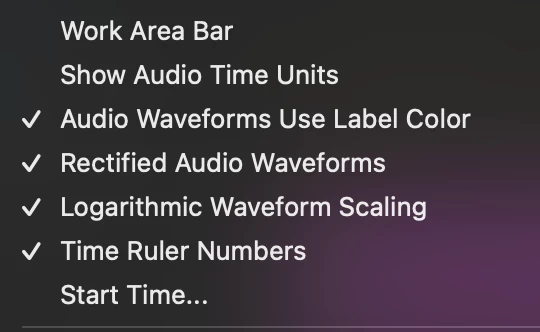
You might be more comfortable with turning off 'rectified' waveforms. At least that gets the waveform back up in the middle of the track. Not ... ideal, shall we say ... but ... ah well.

Everyone's mileage always varies ...
PG73Author
Known Participant
August 6, 2024

Thank you R Neil Haugen, I will give that a try when I install the update again, I had to revert to an older version. I was worried I would be stuck trying to edit with that "improvement"!


Do you have before and after images to show the difference in doing that? Thanks.

R Neil Haugen
Legend
August 6, 2024

You need to make track height presets, which can be popped by keyboard shorts. Then you can get the track heights back where you can see stuff.


Sorry you need to do this, but they "improved things!" for us a bit too much, perhaps ...

Everyone's mileage always varies ...