
Participant
January 6, 2025
Answered

Automation Blocks : Copying to Another tracks and then deleting those clips

  • January 6, 2025
  • 1 reply
  • 792 views

Hello! Mathias Moehl

Thank You for wonderful Extention!
I was trying out something but i don't know how to do it. 


My requirements are something like this,


Let's say i have 50 to 80 photos on V1. Now,
 what i want is,

1,5,9 ..... numbers clips or photos are on the V2. (On the same place as V1). 

2,6,10 .... numbers clips or photos are on the V3. (On the same place as V1).

3,7,11 .....numbers clips or photos are on the V4. (On the same place as V1).
4,8,12 .....numbers clips or photos are on the V5. (On the same place as V1).


i just want those 50 to 80 photos on differnet Tracks based on above conditions. How can i do that? Thank you!
 

Correct answer Mathias Moehl

Oh, yes, I confused inPoint with startTimeInSequence.

Therefore, the clips where inserted at the wrong time and therefore, you probably didn't see them at all.

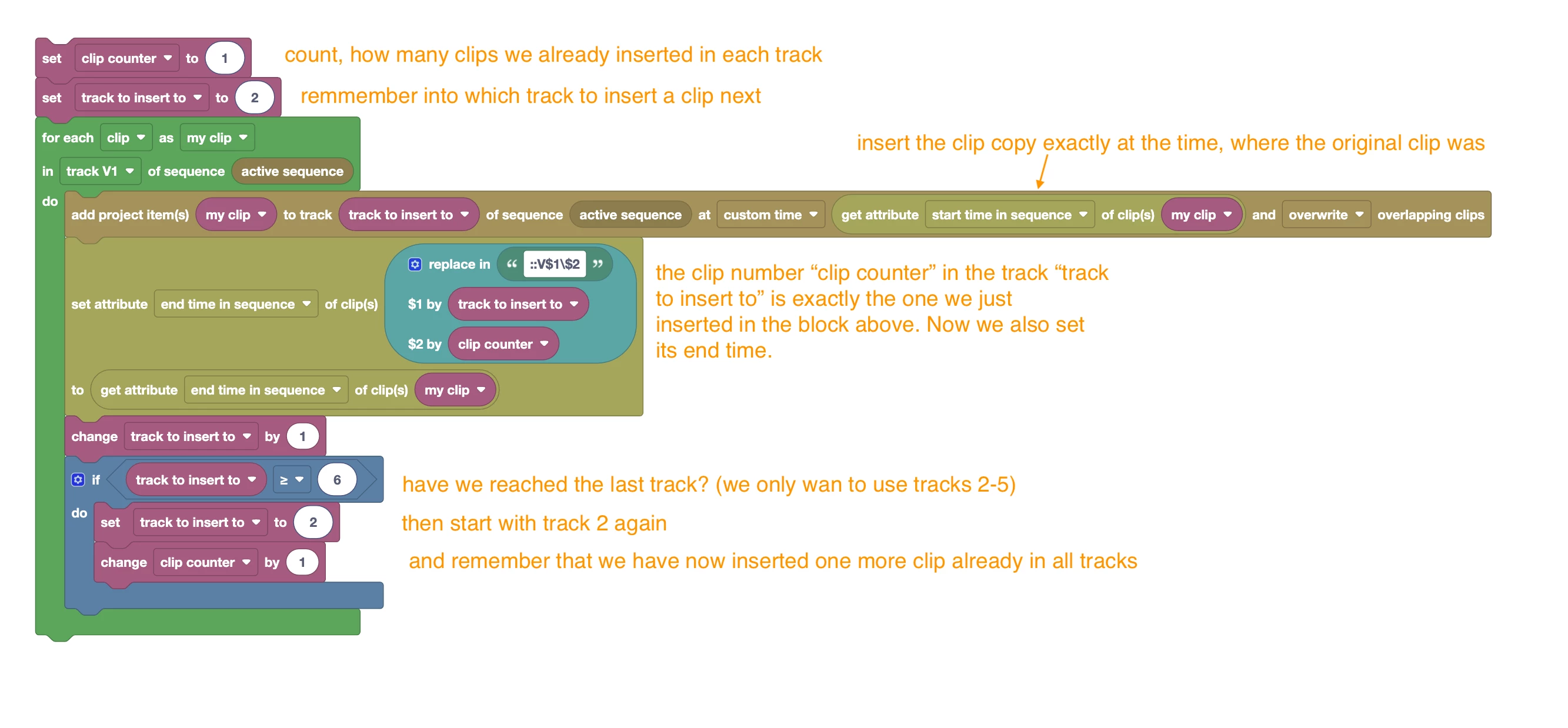
Here is a revised version, which also sets the end point properly:


Setting the end point was actually a bit tricky, since we needed to coount how many clips we already inserted in order to adjust the end point of the correct clip. (See here how to create paths to access a particular clip)


Code attached.

1 reply

Mathias Moehl
Community Expert
Community Expert
January 6, 2025

I haven't tested this code, but this should get you started:

In a nutshell, I loop over all clips of V1 and insert foe each of them one copy in another video track. Which video track is used, is saved in the variable "track to insert to". This variable starts with value 2, hence, the first clip is inserted in V2. After each insertion, the value is increased by one, such that the next clip is inserted in V3 etc. the if statement checks if we have reached the last track we want to use. So instead of inserting at track V6, we go back to V2 again.


(code attached)

Mathias Möhl - Developer of tools like BeatEdit and Automation Blocks for Premiere Pro and After Effects
Participant
January 6, 2025

Hello! Thank You for the Reply! Really appreciated. 

I try to run this script in my sequence, but nothing happend. 

consolve :
insert project items into sequence '2'

insert clip \main.prproj\RawContent\4\6.1_4.jpg at time 3599.9964

insert project items into sequence '2'

insert clip \main.prproj\RawContent\4\6.1_2.jpg at time 3600.66373333333

execution result:undefined

destructor final end point 'main script' reached

(Sorry, I am very noob at this.)

Kevin-Monahan
Community Manager
Community Manager
January 7, 2025

There's a follow up, @Mathias Moehl...Possible to assist?


Thanks,
Kevin


Kevin Monahan - Sr. Community and Engagement Strategist – Adobe Pro Video and Audio