

Automation Blocks - Delete selected clips based upon graphic parameter
- September 22, 2024
- 1 reply
- 657 views
Hi
I am a novice to scripting:
I use the "import properties of clips from spreadsheet" script, to alter parameters in my mogrt clips on my timeline (timeline is V1-V12, each Videotrack contains a seperate mogrt clip).
On default there is Graphic Parameter named "Text" that contains the word "DELETE"
This way when I run my script, the altered rows will have the parameters changed to "XXX,YYYY etc" , the unaltered rows will still say "DELETE"
For instance clip 1 on V1:
Clip Name | Parameter | Value | Clip Path in Project |
GAME1_Team1_Team2 | Graphic Parameters\Text | DELETE | \YYMMDD_MDXX\GAME::V1\1 |
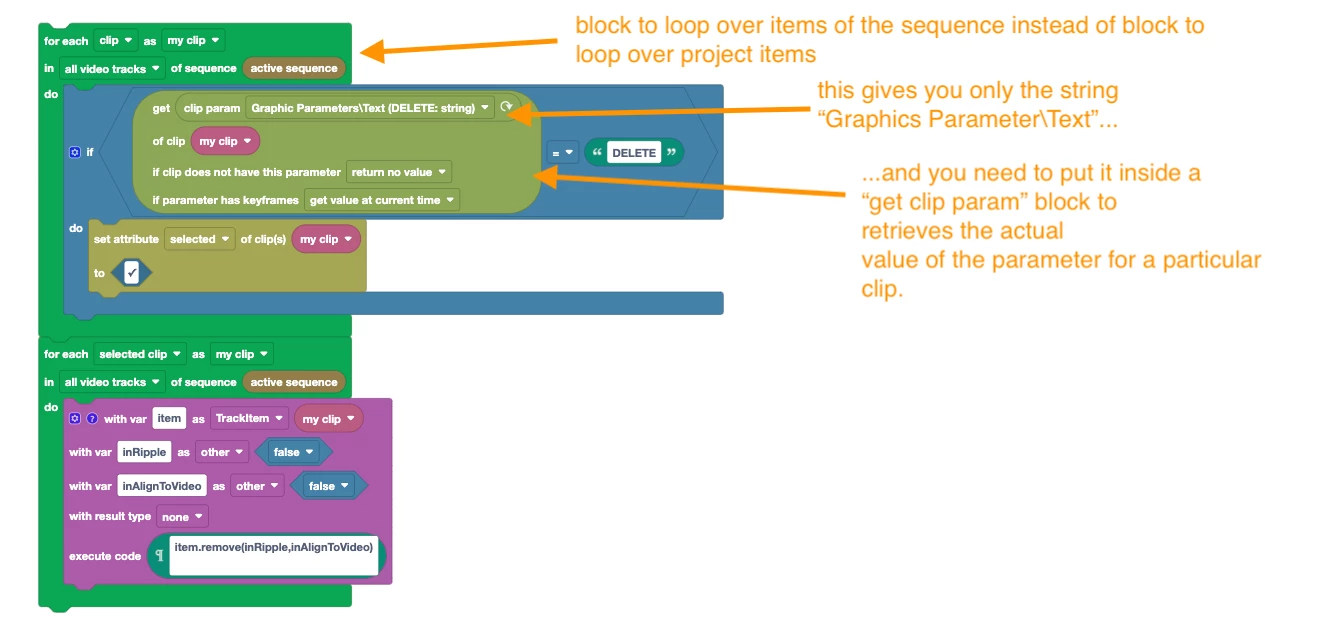
I basically want to write a script that first:
- selects only the clips in my sequence that contain the word "DELETE in the "Graphic Parameter\Text
and then
- deletes those selected clips
I thought by using the clip param block it would work, but sadly it doesn't.
Kind Regards,
Floris
 AdChoices