
Known Participant
October 12, 2020
Question

.avi codec

  • October 12, 2020
  • 3 replies
  • 3417 views

I've been making digital copies of my old VHS tapes using a renkforce RF-GR2 av-grabber. It saves the video on a micro SD card in .avi format. 

The problem is Premiere doesn't suport .avi


Is there a codec that I can install so I can edit my videos without having to use handbrake, I have a lot of tapes that are longer then 2,5 hours and it takes handbrake over 9 hours just to convert 1 video. This is going to take me months to convert all of my videos

Here is a screencapture of a video I would love to be able to edit directly
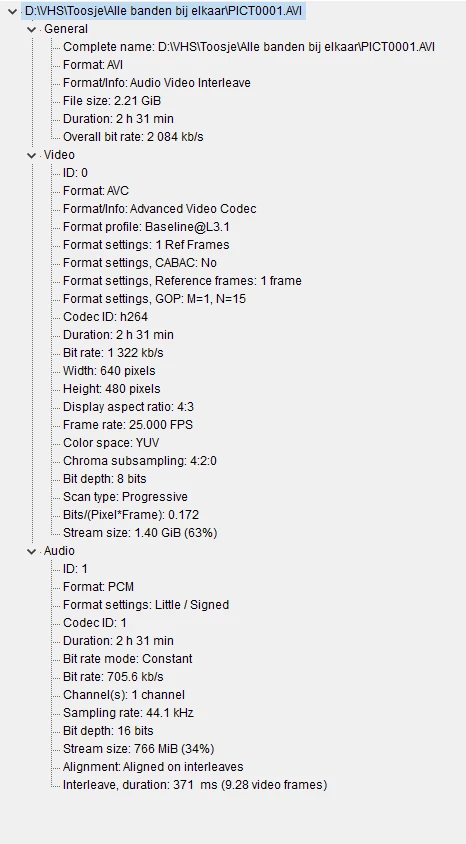
Please help


This topic has been closed for replies.

3 replies

Inspiring
October 13, 2020

If you use Windows your best bet is to use a Firewire based DV converter. In the video I use a Mac Mini but it is the same thing on a PC. Firewire DV converters are no longer made. You can buy them used for less that $100.00 on ebay. The DAC-100, ADVC 110 and ADS A/V Pyro all work.

https://youtu.be/vATw63nn3OQ

AgaNagAAuthor
Known Participant
October 14, 2020

Great video,
unfortunately I couldn't find one of those converters for a reasonable price, found the ADVC 110 for €345,- and a whole lot of other people looking for the same devices. 

I also found a video on youtube where somebody used an AV to HDMI upscaler and a game capture card. I'm going to try this out myself to see if I get some better quality.

I bought a DVD recorder on the market that has build in upscaler with HDMI-out, connect my VCR and HDMI-capture card and see what happens

------------------------------------------------------------------------------------------------------------------------------------------- Windows10Home64-bit/IntelCorei7-4810MQ CPU@2.80GHz/16GBRAM/NvidiaGeForceGTX880M
AgaNagAAuthor
Known Participant
October 17, 2020

Which camera is this?


It's an old Sony Handycam (ccd tr417e) I got from one of my neighbors, no fancy outputs just a video and mono tulp. Using it to get those hi8 tapes on my laptop.


------------------------------------------------------------------------------------------------------------------------------------------- Windows10Home64-bit/IntelCorei7-4810MQ CPU@2.80GHz/16GBRAM/NvidiaGeForceGTX880M
Ann Bens
Community Expert
Community Expert
October 12, 2020

My goal is not losing too much quality

You already lost a good deal of resolution by using the grabber.

Settings in Handbrake are incorrect.


Best is to use Philips suggestions (rerapping) or mine for VLC.

AgaNagAAuthor
Known Participant
October 12, 2020

You are not really helping me out here.

Like I said, I'm not that technical. What is wrong with the grabber ? Why are my Handbrake setting incorrect ? 
How do I rerap an .AVI file ? tsMuxeR doesn't support my kind of .AVI. Your VLC suggestion also doesn't work

------------------------------------------------------------------------------------------------------------------------------------------- Windows10Home64-bit/IntelCorei7-4810MQ CPU@2.80GHz/16GBRAM/NvidiaGeForceGTX880M
Ann Bens
Community Expert
Community Expert
October 12, 2020

The grabber made the vhs tape 720x576 into 640x480 and changed the framerate to variable which means also a pain to edit in Premiere if you want to use the audio.


If you set Handbrake to lossless the file will be huge and will take a long time.

Framerate should be set to 25 and Constant Framerate, extention to mp4.

Try a short clip first.

Ann Bens
Community Expert
Community Expert
October 12, 2020

Premiere does support avi but not with the H.264 codec inside.

Sorry to say but if you want to use those files in Premiere you need to transcode them first to an editable format.

AgaNagAAuthor
Known Participant
October 12, 2020

Is there any other software that does support .avi with H.264 inside ?

------------------------------------------------------------------------------------------------------------------------------------------- Windows10Home64-bit/IntelCorei7-4810MQ CPU@2.80GHz/16GBRAM/NvidiaGeForceGTX880M
Averdahl
Community Expert
Community Expert
October 12, 2020

Try to rename the file/s from .avi to .mp4 or .mts or .ts or .m2ts. This will force the MPEG Importer to handle the files instead of the AVI Importer.