Known Participant
April 28, 2016
Question

AVI file import gives "Unsupported format or damaged file" but file plays everywhere else

  • April 28, 2016
  • 3 replies
  • 29318 views

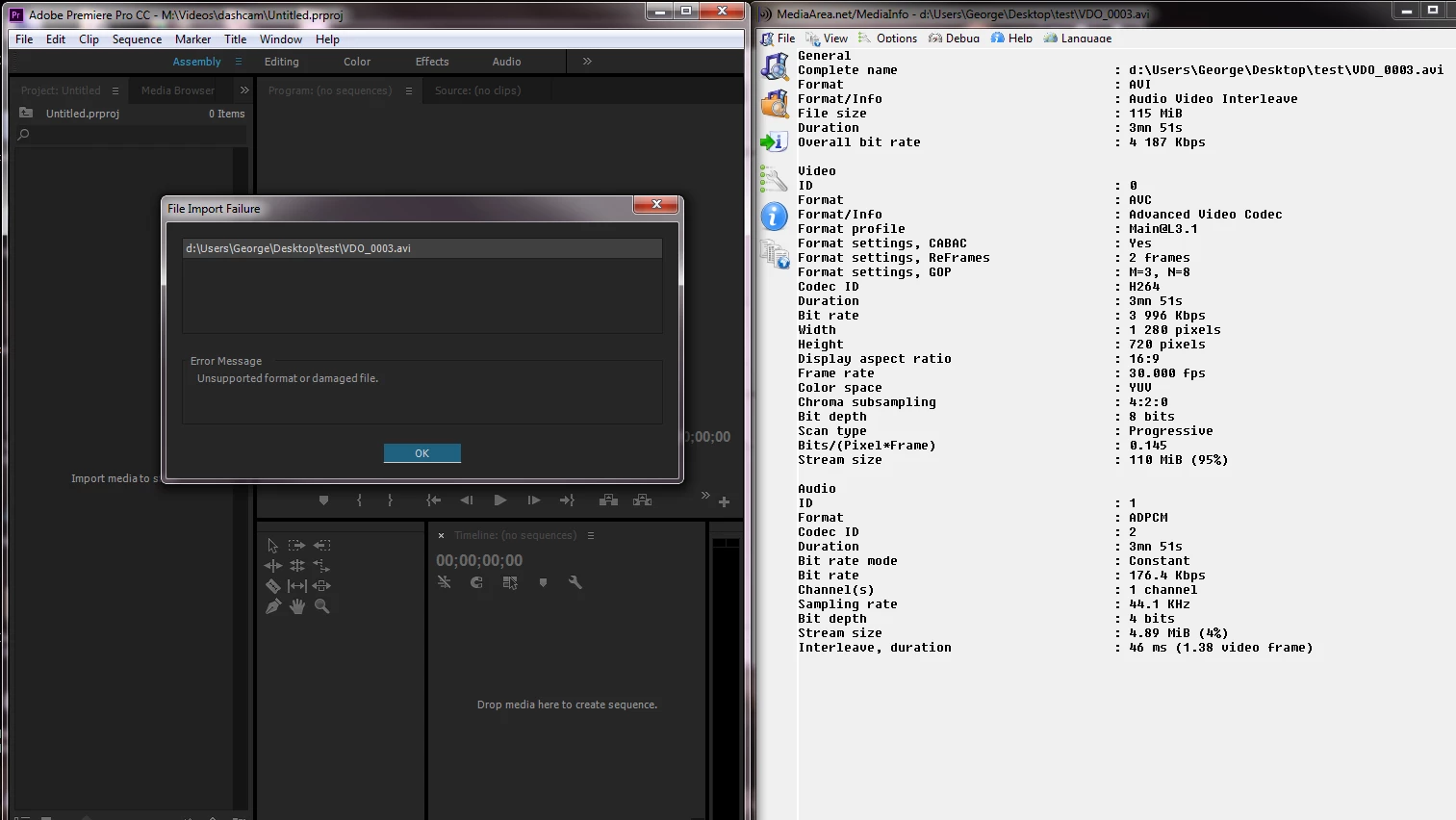
See attached screen capture: This is an AVI file attempting/failing to import, with the file's attributes shown next to it on the same screen capture. This file is from a Garmin 20 dashcam. I cannot see anything unusual in the attributes.

My system is a 3 year old Intel I-7 3770 with 32gb memory, NVIDIA GTX 560 dual monitor. Running windows 7.  Premiere V 9.2.0(41).
I use files from many multiple sources and it seems this product along with media encoder is getting worse at importing anything in the last 2 years. The file I'm trying to import can even be played by MS media player (which can hardly play anything). The file is obviously not "damaged".  What do you suppose is the issue here?   Thank you.
This topic has been closed for replies.

3 replies

Participant
November 10, 2023

It's been almost 10 years. PP still doesn't support a common format. What a joke.

Mike Dziennik
Community Expert
Community Expert
November 10, 2023

Wow, this is an old thread.
One option you can use now is to rewrap your media using something like ShutterEncoder. The codec stays the same but the wrapper (in this case .avi) is changed. The process is very quick because no encoding is done and the quality of your video stays the same. the wrapper will be .mp4 and you should be able to use in Premiere.

Participating Frequently
July 11, 2018

Similar problem here. I have several avi format animations in my project that used to play fine, but ever since I upgraded to the 2018 version they seem to have become "unsupported". I think it is outrageous, that Adobe just dropped a widely used format. 

Very very unhappy with this latest version, Adobe! Besides this issue, which I've only just noticed, there's the performance issue and the search bar issue and I'm sure others that I just haven't discovered yet.

Ann Bens
Community Expert
Community Expert
April 28, 2016

Premiere does not support h.264 in an avi container.

convert first before importing e.g. with HandBrake to mp4

Known Participant
April 30, 2016

Thanks. I was afraid that would be the case. According to my stopwatch, that means about 95 hours of dedicated CPU time to convert everything, and from an already lossy source.

Anyone know where we put in enhancement requests?  This should be a supported format.  It seems like Premiere and Media encoder where able to read more formats in the past, or at least wasn't having to convert as many of them.

John T Smith
Community Expert
Community Expert
April 30, 2016