
Known Participant
July 25, 2020
Question

Best adobe tools for removing background in THIS video clip?

  • July 25, 2020
  • 5 replies
  • 1257 views


*Update: I've attached the video file below


Hello, creative people! I'm new to the video-based adobe software, and would love your oppinion on the best route for a project I'm making in premiere pro.

I'd like to see if there's a way I could remove the background in the image below.
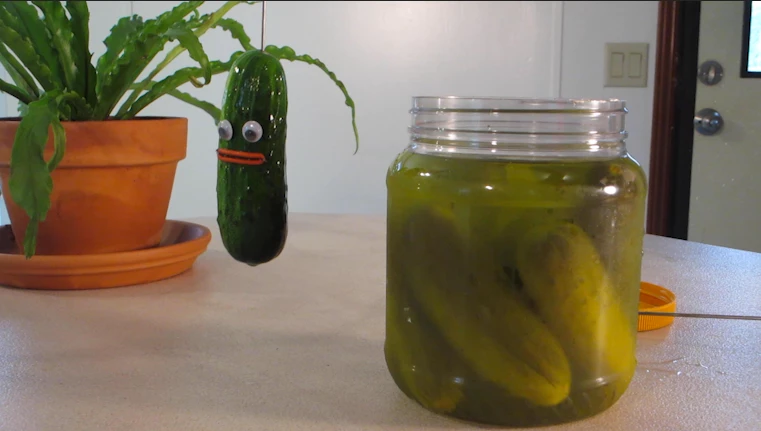


The image is from a 1 second video clip of a pickle jumping out of a jar, and landing on the table. I belive its at 30 fps. It's for a really goofy kid's music video, of course. What I'd like to do is remove all of the background from the video. (the plant, table, wall behind... and just have the pickle and jar remaining). I'll probably edit out the rod holding the pickle too. Then, I'll create a background to layer behind the images.

I'm considering redoing the shots completely, perhaps with some greenscreen, but I'd love to know how to go about this type of edit in the future if I need to. I know I may need to edit the images frame by frame in photoshop, but I'd like to see if there's any other solution. OR, any workflow you'd suggest for editing frame by frame.

I know it's a big question. if anything comes to mind, I'd be grateful to hear it!


This topic has been closed for replies.

5 replies

Inspiring
July 26, 2020

Good going, Steve. That was real nice advice re: tools in AE and fun 'sample' of pickle out of jar, which is a creative type thing I'd love to see more of here.


Inspiring
July 26, 2020

... yeah, totally agree. The creative questions are almost as fun answering as doing the creative work! Well almost.

Inspiring
July 26, 2020

When working with non-keyable backgrounds the 'roto-brush tool' in After Effects is your friend! 


Here's a rough and ready look at the result you can get from Roto Brush + some pixel based motion blur. The pickle was rotobrushed + a bit of matte choker to soften the edges. Then pixel blur added.

https://vimeo.com/user14840024/review/441707051/bd4d5167bb 

You mention you are new to Adobe software ... so After Effects is going to be a learning curve but oh-so worthwhile!

Known Participant
July 26, 2020

Holy cow! It really is possible. That result looks great, and thanks for pointing me in the direction of those tools. I'll start learning those ones first. 

I switched from Final Cut Pro specifically because I figured I'd be needing a lot of after effects for what I want to do.


about how much time did it take you take you to get this result? I'm sure it'll take me a long time at first, but I'm curious about what kind of timeframe an edit like this can be done in. 

Inspiring
July 26, 2020

Took approx 18 minutes and as I said it's a bit rough. If doing it for broadcast - another half hour would get it looking perfect. Though to be fair I'd also be using some third party After Effects plugins. Like lightwrap. I'd also clone the top part of the jar and mask it to hide the rod holding the pickle.


I get to do this sort of work semi-regularly so it does not take me long ... but from starting from scratch you might need a few (frustrating but fun) hours. A lot of that might be following some online tutorials for the specific tools you'll need to use (like roto-brush). You may also need to learn how to use precomps in After Effects. In this case the roto-brushed layer was precomped because if you apply the 'pixel motion blur' to your roto-brush layer directly - the masks dissapear. Precomping solves that issue.


It's a 'very good' way to learn when you actually have your own project to work with. If you get stuck anywhere, head over the the After Effects forum here. There are many more (and better) AE users than me that can point you in the right direction.

Community Expert
July 25, 2020

TV was traditionally Bluescreen but in the mid seventies, ITV in the UK started experimenting with green, that was untill we got the commission to produce the Muppet show so the green frog forced us back to blue. As was said at the time-

'It's not easy keying green'

Known Participant
July 25, 2020

whoa - I did not know that bit of history. Very cool, and thanks for sharing that. I'm a muppets fan


Peru Bob
Community Expert
Community Expert
July 25, 2020

"I'm considering redoing the shots completely, perhaps with some greenscreen"

You mean bluscreen, of course. 

Known Participant
July 25, 2020

Haha - Yes! I've been able to use green with this type of subject, but no point making it harder than it needs to be.


Inspiring
July 25, 2020

hmmm... that's an interesting problem to solve. Can you post the 1 second video someplace so people can download it and try doing it ??  Basically it's masking out the pickle (with tracking ) and masking the jar ( without tracking if camera is static on the jar ) and sending everything else to alpha channel ( transparent).

Biggest problem might be where the pickle is coming out of jar cause jar will get in way of the pickle tracking (foreground of jar mouth )... but that might be OK with a duplicate clip and using some blending options for that part... don't know... hard for me to imagine it without messing around with it.


Known Participant
July 25, 2020

Wow - thanks for your thoughts! That's helpful to have some direction towards learning to use masking and blending. I just attached the video to the original post.

I'll start learning about using masking.