
December 1, 2016
Answered

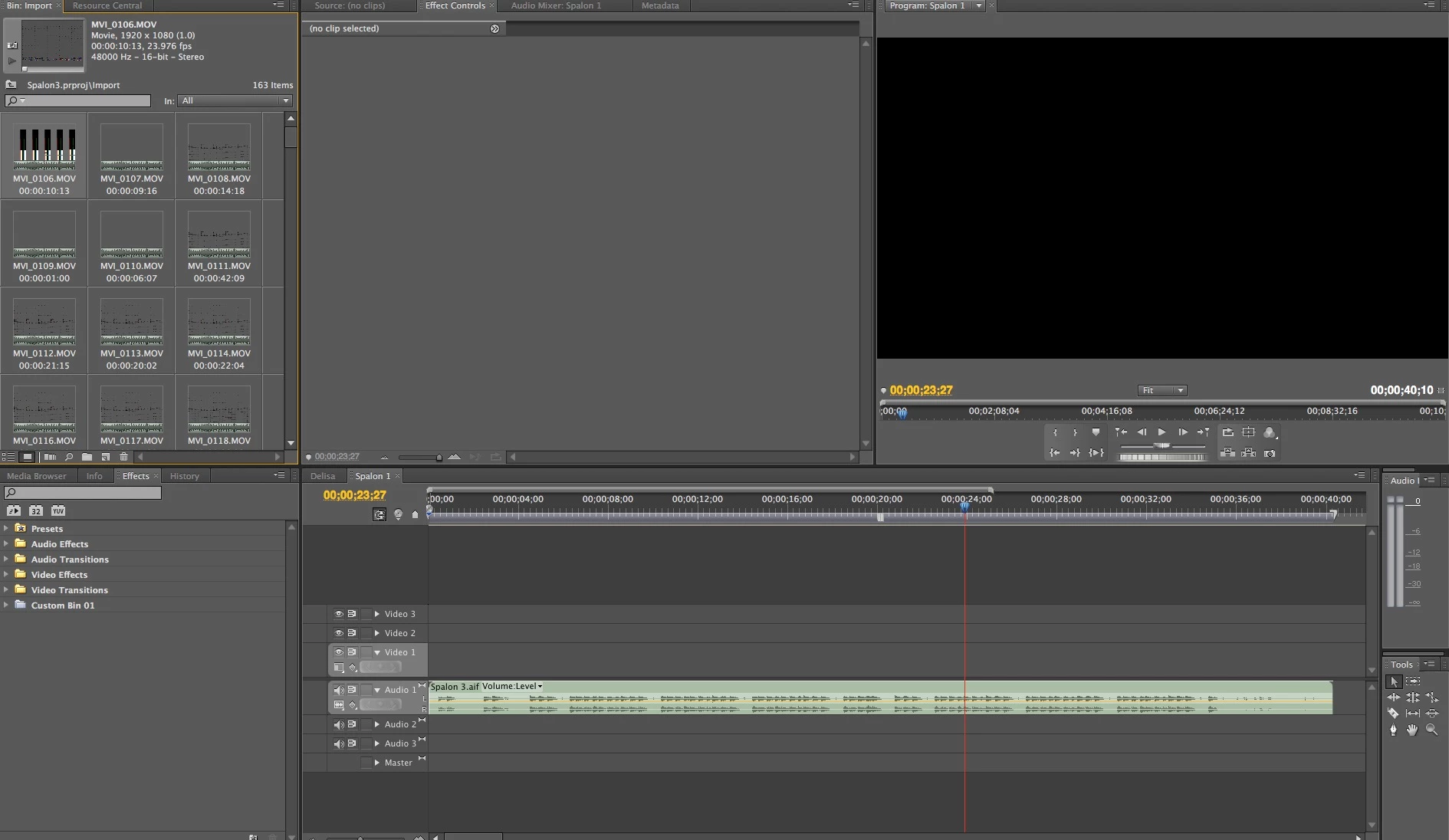
Bin Thumbnail Not Showing in Premiere Pro CS5.5 and OS X 10.11

  • December 1, 2016
  • 4 replies
  • 3490 views

My thumbnails in Adobe Premiere Pro Import bin look translucent.  I cannot see any video or images.  Any suggestions?

Im using : iMac

                Processor 2.66 GHz Intel Core 2 Duo

                Memory: 8G 1067  MHz DDR3

                Graphics: NVIDIA GeForce 9400 256 MB

Adobe Premiere Pro CS5.5
This topic has been closed for replies.
Correct answer Kevin J. Monahan Jr.

Hi AMoss,

Im using : iMac

CS5.5, eh? Which version of OS X are you running on your iMac? System Requirements show that you should be using Mac OS X v10.5.8 or v10.6.3; Mac OS X v10.6.3 required for GPU-accelerated performance. If you are running later versions of OS X, you may get unexpected behavior such as what you're experiencing.

Another thing to check is to make sure that your video clips have a video stream to begin with. You can open them in a player application like VLC, or QuickTime to check them.

Thanks,

Kevin

4 replies

Participant
March 17, 2017

I have the same problem. Did you find a solution?

I am using Premiere Pro CS5.5 on OS X 10.10.5 Yosemite. I have tried all of the previous suggestions, as well as the following, without success:

  • In Preferences: Media, changed location of Media Cache Files and Media Cache Database to a non-system drive. Also tried cleaning Media Cache Database.
  • In Preferences: Memory, changed Optimize rendering from Performance to Memory.
  • Checked that all folders containing source media files and Media Cache Files were set to Read and Write.

I've tried various movie and image formats including QuickTime movies, P2 files, JPEGs, and PNGs. None of them display thumbnails in the bin, but they all play fine in the Source Monitor and Timeline.

I am able to see thumbnails in Bridge, so that's a potential workaround.

As Kevin suggested, this issue may be caused by using a later OS. Just wondering if there's a way to fix it.

Mac Pro 5,1 (mid-2010)

Version 10.10.5 Yosemite

Processor: 3.2GHz Quad Core Intel Xeon

Memory: 24GB 1066MHz DDR3 ECC

Graphics Card: ATI Radeon HD 5770 1024MB

Participant
October 28, 2018

If you're trying to get thumbnails to show in media browser, at the bottom of that pane are two icons.  One is the Thumbnail view.  I'm not sure if you're having the same problem, but I was and found that fixed it, so I'm posting here in case anyone else needs it. 

December 5, 2016

Btw...I did an update for the latest bug fixes too...to no avail. :-/

This is so inconvenient as I can't see my photos I imported to rearrange them as needed for the slideshow.

December 5, 2016

It didn't work...Same thing  :-/

Kevin J. Monahan Jr.
Community Manager
Kevin J. Monahan Jr.Community ManagerCorrect answer
Community Manager
December 2, 2016

Hi AMoss,

Im using : iMac

CS5.5, eh? Which version of OS X are you running on your iMac? System Requirements show that you should be using Mac OS X v10.5.8 or v10.6.3; Mac OS X v10.6.3 required for GPU-accelerated performance. If you are running later versions of OS X, you may get unexpected behavior such as what you're experiencing.

Another thing to check is to make sure that your video clips have a video stream to begin with. You can open them in a player application like VLC, or QuickTime to check them.

Thanks,

Kevin

Kevin Monahan - Sr. Community and Engagement Strategist – Adobe Pro Video and Audio
December 2, 2016

Hi Kevin,

Thanks for responding.  I am using OS X  v10.11.6 El Capitan...which I absolutely Hate.  Everthings been slow ever since the upgrade.

The video clips play fine through Quicktime as well as Mpeg Streamclip.  If I double click on the video clips within Premiere, they will play in the preview window.  It's just a bit inconvient to not be able to see the clips in my thumbnails.  I can't tell what's what.

December 2, 2016

Hi AMoss,

Where did these clips originate? A video camcorder? How did you import these files?

Thanks,
Kevin


I filmed it on my Canon 70d...imported to a folder on my imac; then imported the clips into adobe premiere from the designated folder.

I also did another project where I did a slide show, imported the photos from a folder on my desktop and same results.