
April 11, 2012
Answered

Blue ray Error - "Device not ready", Code:"3", Notes - Any ideas what this means?

  • April 11, 2012
  • 4 replies
  • 22931 views

After I clicked ok, then I saw where 23.98 of 24.98 GB was written.   Looked at bottom of BD and it was about 90% written to.   Any suggestions as what this may be or where I should be looking for the definitions for error codes?    I am lost on this one.  Don't even know where to start looking.

Thanks in advance for any suggestion you might have.

BTW, I am using CS5.5, most recent version.  

Duane

Tempe, AZ
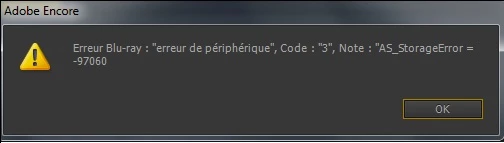
Correct answer gregstephen

John T Smith, me too I exported ISO and shorted name without free space.

But I had a code 3 with a bad blu-ray disc (LG).

I changed to a sony blu-ray disc and it worked.
Bye

Steph

4 replies

Participant
August 17, 2018

Solution: go to

[Edit] into Encore Program

[Preferences]

             [General]

                     [Media] check, save media cache files next to original

                         and click on [Clean] at Media Cache Database menu

                     Be Sure that you have at least 100GB free on you external or internal Hard Drive,

håkanm56548427
Participant
June 30, 2024

This works for me.

Make at ISO file in Encore CS6. Burn the disc in Encore CS6 from that file.

June 3, 2012

I also got Error Code 3 & Error Code 25 while using Encore CS5.5 for Mac while burning a 3:15 hour long wedding video on a 50 GB BD. Problem got solved when i renamed ppro time line to a short name with no spaces or other special characters. made a new project in encore, imported time line into it, just with name change transcoding time reduced too much and buring when normal.

gregstephen
gregstephenCorrect answer
Participant
April 12, 2012

John T Smith, me too I exported ISO and shorted name without free space.

But I had a code 3 with a bad blu-ray disc (LG).

I changed to a sony blu-ray disc and it worked.
Bye

Steph

April 12, 2012

Steph, thanks so much for your post.  Your error message looks much like mine except I have nothing following the "Note:".    I am using BD by Philips.   I chose that brand because many users had stated that they had the best results with them.   Before I switch to Sony, I am going to first try a few of the suggestions that Stan and John had made.  My player is a LG that writes at 12x speed.   Encore did not list any speed nor did it give me any choices for speed.   If it tried to burn my 6x BD at 12x speed, then their my problem.   Later today I am going to down load the software they told me about and try burning at 1x speed.  The Philips BD is rated 1x-6x.  I will let you all know later how well this works.

Again thanks,

Duane

John T Smith
Community Expert
Community Expert
April 12, 2012

I use Imgburn for ALL disc writing... including files and folders for general data backup

I have Imgburn's default set to 1x writing... and it then uses the slowest POSSIBLE speed of the media after it reads the parameters of the blank media

I don't do BluRay, but I have never had a DVD fail

Stan Jones
Community Expert
Community Expert
April 12, 2012

What does it say after "Notes"?

Did you try running "as administrator"?

Do this before retrying:

http://forums.adobe.com/message/2934387#2934387

Also, try buildnig to image or folder to eliminate any burnder issues.

April 12, 2012

Thanks Stan.   There was nothing after "Notes"   It appears that the message box was to small and it cut off everything after "notes.

By Administrator, I assume that the user has Administrator privileges.  I do.  Besides I have burned DVD's before.   This is my first Blue-ray.

The folder that I was referenced to does not exist in the Project tab.

I will try buning it to disk.   Come to think of it, I did burn a l Blue-ray a while back.  So, burning a Blue-ray does work on here.

I will get back to you tomorrow on burning this to a folder.

Also, it is as if there may be something wrong with the timeline.  After all, about 90% of the BD was burned.   But then, why would I get a "Device not ready"  after 90% of the BD had been burned.   Maybe it was a bad BD?   Or, my brand new burner just went bad.   I will try it to a folder and see what happens.

Duane

John T Smith
Community Expert
Community Expert
April 12, 2012

>By Administrator, I assume that the user has Administrator privileges

.

As well as the below, right click the Encore icon and select Run as Administrator, which is NOT the same thing as running the computer with the Administrator account, and which fixes several "odd" problems... To create a two layer DVD (or a BluRay?), you MUST have Encore set to use the Run as Administrator option

.

Run as Administrator http://forums.adobe.com/thread/771202

-Set to always "run as" via icon http://forums.adobe.com/thread/969395

.

Odd Errors http://forums.adobe.com/thread/670174

.

Media Offline http://forums.adobe.com/thread/790686?tstart=30

.

Long File Names or odd characters cause problems

Read http://forums.adobe.com/thread/588273

And #4 http://forums.adobe.com/thread/666558

And This Message Thread http://forums.adobe.com/thread/665641

.

CS3 (maybe later?) Two Layer Problem http://kb2.adobe.com/cps/407/kb407236.html

.

Encore "No Drive" Error http://forums.adobe.com/thread/569230

.

Things and Software to AVOID when authoring/burning a DVD

.

Start --> http://forums.adobe.com/thread/608660

#2 has WHY Explained http://forums.adobe.com/thread/607390

Plus http://forums.adobe.com/thread/562941

.

Create an ISO (Encore) or folder on your hard drive (Encore or Premiere Elements) and then use the FREE http://www.imgburn.com/index.php?act=download to write files or folders or ISO to disc for DVD or BluRay (send the author a PayPal donation if you like his program)

.

Imgburn will read the ACTUAL disc brand from the disc, which is not always the same as the box label (Memorex is notorious for buying "anything" and putting it inside a Memorex box)

.

When you write to disc with Imgburn, use the SLOWEST possible speed setting, so your burner has the best chance to create "good, well formed" laser burn holes... since no DVD player is required to read a burned disc, having a "good" one from a high quality blank will help