Participating Frequently
July 17, 2022
Answered

Blurry Screen Issue

  • July 17, 2022
  • 3 replies
  • 1326 views

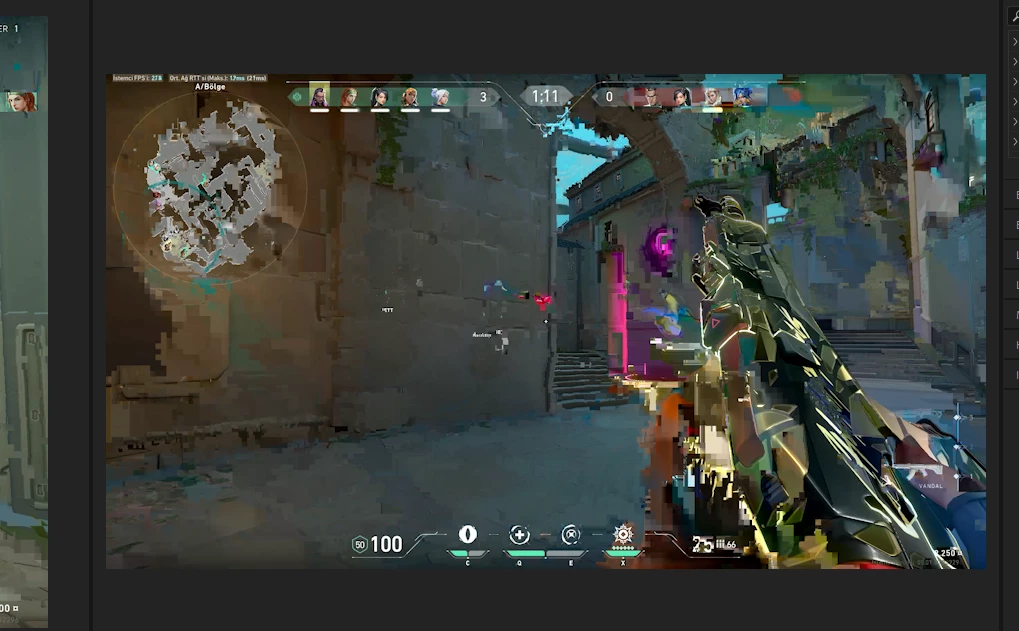
My problem is blurring of the screen like this in Premiere Pro, can you help? It happens when I pause the video and occasionally while playing the video.

This topic has been closed for replies.
Correct answer Michael Grenadier

is your source material from a screen recording?  If so, the issue may be that your source has a variable frame rate which can cause intermittent and unpredictable problems in Premiere


use mediainfo to determine whether your source is variable or constant frame rate
https://mediaarea.net/en/MediaInfo/Download
if it's variable use handbrake to convert to constant frame rate setting the quality slider in the video panel to maximum
https://handbrake.fr
and here's a tutorial on how to use handbrake
https://www.youtube.com/watch?time_continue=34&v=xlvxgVREX-Y

3 replies

Participating Frequently
July 18, 2022

I made the video a constent frame rate and the problem was solved thank you.

Legend
July 18, 2022

thanks for posting that it worked...  hopefully will help others...

Michael GrenadierCorrect answer
Legend
July 18, 2022

is your source material from a screen recording?  If so, the issue may be that your source has a variable frame rate which can cause intermittent and unpredictable problems in Premiere


use mediainfo to determine whether your source is variable or constant frame rate
https://mediaarea.net/en/MediaInfo/Download
if it's variable use handbrake to convert to constant frame rate setting the quality slider in the video panel to maximum
https://handbrake.fr
and here's a tutorial on how to use handbrake
https://www.youtube.com/watch?time_continue=34&v=xlvxgVREX-Y

Participating Frequently
July 18, 2022

Format : MPEG-4
Format profile : Base Media
Codec ID : isom (isom/iso2/avc1/mp41)
File size : 5.25 GiB
Duration : 25 min 11 s
Overall bit rate mode : Variable
Overall bit rate : 29.9 Mb/s
Writing application : Lavf58.20.100

Video
ID : 1
Format : AVC
Format/Info : Advanced Video Codec
Format profile : Main@L5.1
Format settings : CABAC / 1 Ref Frames
Format settings, CABAC : Yes
Format settings, Reference frames : 1 frame
Format settings, GOP : M=1, N=60
Codec ID : avc1
Codec ID/Info : Advanced Video Coding
Duration : 25 min 11 s
Bit rate mode : Variable
Bit rate : 29.7 Mb/s
Width : 2 560 pixels
Height : 1 440 pixels
Display aspect ratio : 16:9
Frame rate mode : Variable
Frame rate : 59.401 FPS
Minimum frame rate : 3.529 FPS
Maximum frame rate : 60.235 FPS
Original frame rate : 60.000 FPS
Standard : Component
Color space : YUV
Chroma subsampling : 4:2:0
Bit depth : 8 bits
Scan type : Progressive
Bits/(Pixel*Frame) : 0.135
Stream size : 5.22 GiB (99%)
Color range : Limited
Matrix coefficients : BT.709
Codec configuration box : avcC

Audio
ID : 2
Format : AAC LC
Format/Info : Advanced Audio Codec Low Complexity
Codec ID : mp4a-40-2
Duration : 25 min 11 s
Duration_LastFrame : -10 ms
Bit rate mode : Constant
Bit rate : 183 kb/s
Channel(s) : 2 channels
Channel layout : L R
Sampling rate : 48.0 kHz
Frame rate : 46.875 FPS (1024 SPF)
Compression mode : Lossy
Stream size : 33.0 MiB (1%)
Default : Yes
Alternate group : 1

Peru Bob
Community Expert
Community Expert
July 18, 2022

As suspected by mgrenadier , it is Variable Frame Rate.


Shutter Encoder may also be used to convert to Constant Frame Rate:
https://www.shutterencoder.com/en/

Ann Bens
Community Expert
Community Expert
July 17, 2022
Participating Frequently
July 17, 2022

PS: I translated the English translation, forgive me if I am wrong.
What version of Premiere Pro?  -  Premier Pro 2022 22.5
Have you installed the recent updates - Yes i uploaded
What operating system? -  Windows 11 21H2 / OS build 22000.795 / Windows Feature Experience Pack 1000.22000.795.0
What kind(s) of source footage? - .mp4 - H.264
If you are getting any error message(s), what is the full text of the error message(s)? -  No error.
What were you doing when the problem occurred? - I couldn't do anything, it just goes away when I continue the video, but it pops up from time to time and happens again when I stop it.
Did you update your project from one major version of Premiere Pro to the next, and then saw problems in the project? - No this is a new project
Tell us about your computer hardware. - Windows 11 Pro x64 Bit, Ryzen 5 5600,  Patriot  Viper Steel DDR4 32gb 3600mhz Pvs432g360c8k, ASUS DUAL AMD RX 6700 XT OC (22.5.1)
Is the drive connected to a high speed port on the computer? Yes, its fast
Are you using Mercury Playback Engine GPU Acceleration?  - Nope
Do you still have the issue when choosing Project Settings > General > Renderer > Mercury Playback Engine (Software Only)? - Yes the problem still persists
Does the problem only happen with your final output, with previews, or both? - In preview only
Can you provide a screenshot or sample movie? - Yes, I have attached
What other software are you running? - Nothing
Do you have any third-party effects or codecs installed? - Nope

Peru Bob
Community Expert
Community Expert
July 17, 2022

Delete the Media Cache and Media Cache files:
https://community.adobe.com/t5/premiere-pro/faq-how-to-clear-your-media-cache-in-30-seconds-in-premiere-pro-2020/m-p/11017257/thread-id/260446?page=1
Then try pressing Enter to render the timeline and turn the red line above the timeline to green.