
Participant
August 9, 2017
Answered

Bose QuietcComfort 35 Output problem

  • August 9, 2017
  • 10 replies
  • 6368 views

I have my headphones paired up with my mac everything works, under the MIDI preferences the "format" of output for the headphones is a 2 channel 32-bit float and everything sounds great. BUT when i open up premiere the headphones start sounding like crap because it automatically changes the output format to a 1 channel 16-bit Integer. How do I fix this?!
    This topic has been closed for replies.
    Correct answer paulhoenhorst

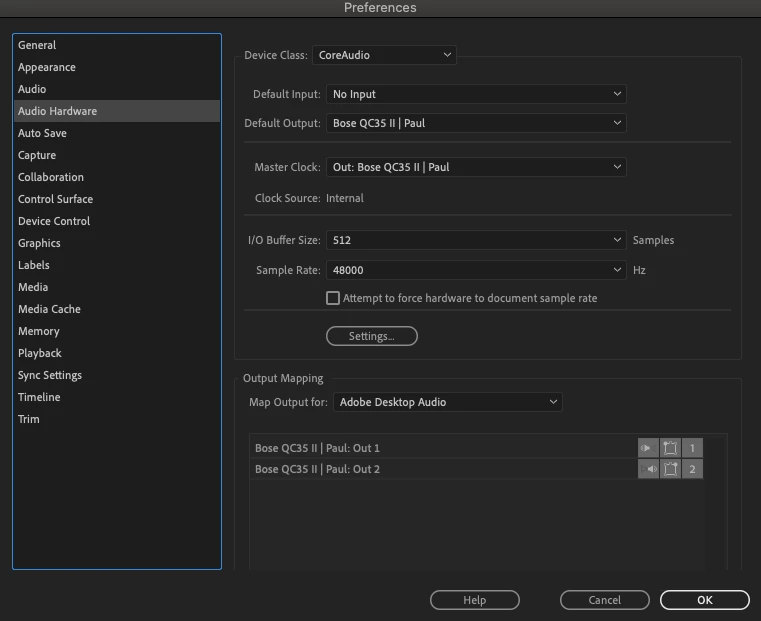
    fixed it! Change the Input under Preferences, restart the programm and the headphones and you are done.

    10 replies

    paulhoenhorstCorrect answer
    Participant
    January 3, 2020

    fixed it! Change the Input under Preferences, restart the programm and the headphones and you are done.

    guillaumer74442949
    Participant
    June 11, 2020

    Thanks ! I was stuck with the same problem, as the software requires input and selects the default headset the headset switches to call mode and the sound is terrible ! 

    Change input is definitely the answer ! 🙂

    Participant
    September 4, 2018

    I have not solved the problem with wireless. But if you use the wire it works.

    Participant
    August 17, 2018

    Would love to see this fixed, I've given up trying to use my Bose noise cancellation headphones with Prem Pro.

    Participant
    July 6, 2018

    I had the problem where it sounded like I was in a call using by bose QC 35 II and I just had to switch the audio input in Ppro to my macs built-in mic and it switched off the mic on my bose. seems to work.

    jjkimorange
    Participant
    May 29, 2018

    I was having same problem.

    Windows 10 is my OS and just bought QC35 last night.

    Same thing happened, audio quality was horrible only on Ppro (CC2018)

    Here is what I did to fix it (at least for now)

    I turned off all other apps. open Ppro, set the audio hardware output as Headphones NOT headset.

    Preferences, audio hardware, settings, click on "headphones", properties, advanced tab, test, apply, make headphones, default, apply.

    It's been working fine even if I close Ppro, open spotify, then open Ppro again. crossing my fingers that it will work again tomorrow..

    spaceshipdev
    Participant
    May 5, 2018

    Premiere seems to stop the noise cancelling effect and almost feedback sound from the Bose headphones to the headphone speakers themselves. Very annoying.

    george@katz
    Known Participant
    September 7, 2017

    Heres a screen shot of the settings i had to get in order for it to work. The key one is DEFAULT INPUT. If you cant get the Premiere pro 8.0 then restart the MAC and Blast your prefs when opening Premiere. DEFAULT INPUT is the key to making it work.

    george@katz
    Known Participant
    September 7, 2017

    Having the same problems all around our shop. You can screw around with the audio hardware settings an eventually get it to pop in. The other thing ive done that has "tricked " premiere is to click on a streaming music service like pandora or Spotify, while premeire is open.

    Based on the Audio Hardware settings, my best guess is that Premiere cannot detect the 44100 sample rate and defaults to 8000. You can open up the MAC OS AUDIO MIDI SET UP. And then watch your 44100 device switch to 8000 as soon as you open Premiere.

    I have no doubt that this will be fixed in the next update

    Legend
    August 10, 2017

    The only thing I can think to recommend is to hook up a set of speakers to the machine's speaker output and plug the headphones into the jack on the speakers.

    Participant
    August 9, 2017

    I've tried earlier versions (cs6) of premiere and everything sounds fine. Whats the problem here?! Anyone?