Participating Frequently
January 13, 2020
Answered

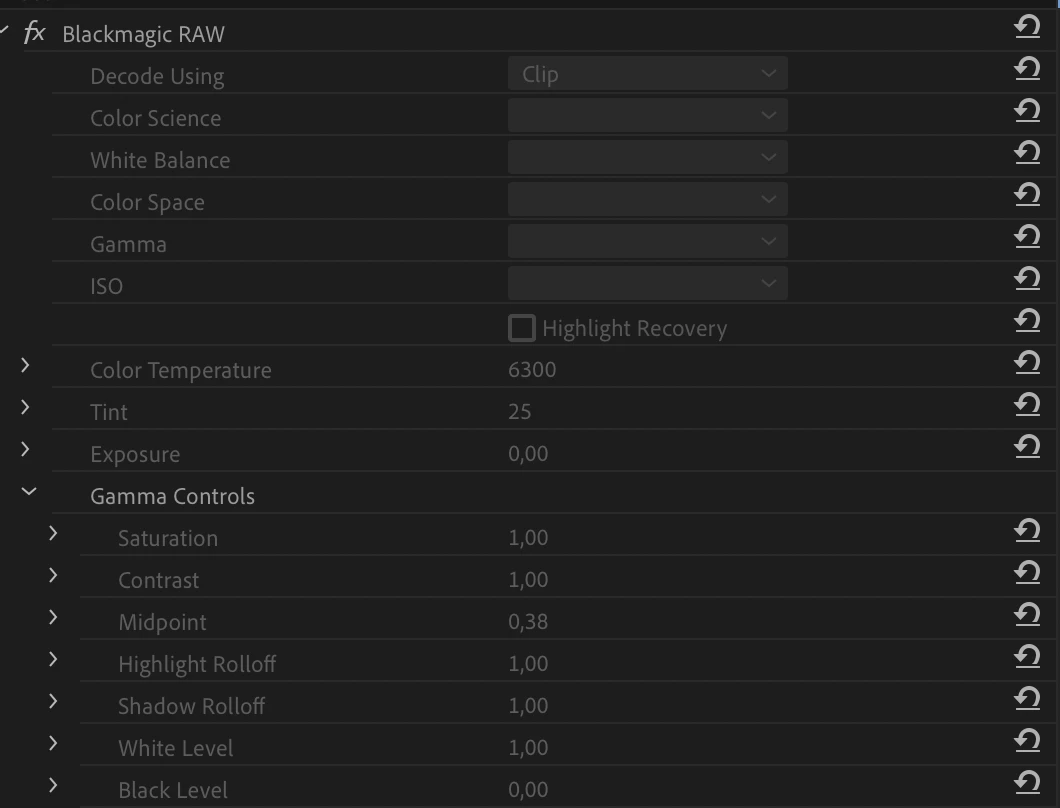
BRAW Master Clip Settings greyed out

  • January 13, 2020
  • 7 replies
  • 9695 views

For some reason my master settings for a braw-clip are greyed out from time to time. After a restart it's mostly solved for some time. Is there any setting I don't see to solve this? 

Thank you!
 

This topic has been closed for replies.
Correct answer Hovrevik

I have exactly the same problem. Haven't moved any files or re-linked anything, but still this appears seemingly out of the blue. A premiere restart usually solves it briefly as you say, but then it's back within seconds. Maybe less relevant but I also find that this isn't an issue in the beginning of a new project, but happens a little later, when you invested the time - which makes this especially lovely to deal with... Somebody save us! 🙂

7 replies

Participant
December 7, 2021

This works for me in my current project.  My "GAMMA Control" selections were gray prior to this.


Change your 1st "Gamma" selection to one of the Blackmagic selections such as "Blackmagic Design Custom".  It doesn't work for "BM Video".

louisk30782690
Participant
April 1, 2021

I just experienced the same issue.  And so far the only solution I have found is to start a new project.  But I do ask if you at any point tried copying and pasting RAW settings amongst your clips.  I have never had this problem until I tried to do that this time around.  Then the problem started.  So in the future I am going to avoid copying and pasting RAW settings.  

R Neil Haugen
Legend
April 2, 2021

I assume you're using the freebie BlackMagic plugin? You might consider the Autokroma one if you're doing this professionally. Not much cost, and it works ... with a lot more features than the BM freebie.


Neil

Everyone's mileage always varies ...
Participant
April 3, 2021

Unfortunately I have experienced this particular issue using both BM's and Autokroma's plug-in. 

Participating Frequently
May 7, 2020

Hello ! (I know this post becomes a bit old, but in case some people have the same problem 🙂


The Blackmagic Plugin have problems on some computers, but also can work without trouble in others. The first thing to test is to update your Blackmagic plugin from their website. 


If it doesn't work better, or if you want to get a better experience with BRAW in Premiere Pro with more features (some bug fixed, Presets system to quickly apply Source Settings, CustomA/B to quickly compare and save 2 differents set of settings, and much more coming !), you can test the free trial of BRAW Studio here : https://www.autokroma.com/BRAW_Studio/

Best,


Nicolas from Autokroma


February 11, 2021

Hi Everyone


I had the same prblem? I ran the Braw Windows Plugin again and chose to repair the install, then restarted my PC and everything went back to normal and I could select the clip settings in Premier Pro CC. Hope that helps.

Kevin-Monahan
Community Manager
Community Manager
May 6, 2020

Please report this issue to Blackmagic Support
Please upvote this request.

Thanks,

Kevin

Kevin Monahan - Sr. Community and Engagement Strategist – Adobe Pro Video and Audio
Brandon Loshe
Legend
May 6, 2020

I stumbled upon this post because I've been having the same issue. Did you ever discover anything new on this issue? It's good to know that restarting Premiere Pro gets it working again, although a little annoying to have to restart so often. Just curious, which Blackmagic RAW plug-in version do you have? I'm having issues with Version 1.7. I was wondering if all of the versions will be like this, or if it's only Version 1.7. 

Participant
April 26, 2021

I had the same problem. Tried to upgrade to RAW 2.0, but didn't work. I'm on PrPro 2021 and what worked was I had to downgrade to 1.6.1 and now somehow works. 

R Neil Haugen
Legend
February 19, 2020

BlackMagic last updated their plugin on 16 Dec. 2019. It's had routine problems for a number of users, including me. I tested the Autokroma plugin before buying, and ... it just worked. So I bought it both for Premiere and MediaEncoder.


And ... it just works, I don't get this kind of behavior which was routine with the BM plugin. You might want to check that out. You can't have both 'installed' in the plugins folder at the same time, but it's pretty easy to move the one out to test the other.


Neil

Everyone's mileage always varies ...
HovrevikCorrect answer
Participant
January 17, 2020

I have exactly the same problem. Haven't moved any files or re-linked anything, but still this appears seemingly out of the blue. A premiere restart usually solves it briefly as you say, but then it's back within seconds. Maybe less relevant but I also find that this isn't an issue in the beginning of a new project, but happens a little later, when you invested the time - which makes this especially lovely to deal with... Somebody save us! 🙂

Participant
February 19, 2020

Same here. I'm not sure if it's an Adobe problem or just a poorly built plugin by Blackmagic, or lack of proper colaboration between the 2, but it blows ass. It would be cool to not have to go through Resolve on quick lower budget burner projects/videos. Help Adobe!
