
maxn64556031
Participant
May 18, 2018
Answered

Broadcast Specs

  • May 18, 2018
  • 3 replies
  • 12484 views

Hey community,

I've got some specs for broadcast in northern europe and not exactly sure what they want - do they want an MXF and an MPEG2  or do they want an MXF with an MPEG2 codec?

I've attached the US specs from the same network and apart from the fps they seem to match - but here it seems to say they only want the MXF format Mpeg2 encoded, right?

Maybe some here knows what they're exactly talking about, would help a ton! Thanks already

NORTHERN EUROPE

HD Container

Format: MXF / Media Exchange Format
Codec: XDCAM HD422
Profile: OP1a
Format settings: MXF files must be closed
Partitions can be complete or incomplete
Duration: All material elements must be of exactly the same duration Timecode: Synchronous to recorded video

Essence allocation: Video must be the first essence, audio second (and third, fourth, and so on...). Auxiliary (Ancillary) data essences are not allowed

Video

Format: MPEG2
Compression: 4.2.2@high
Width: 1920
Height: 1080
Scan type: Interlaced
Frame rate: 25fps / PAL
Encoded Bitrate: 50 Mbps
Average Bitrate: 30 - 52Mbps
Bitrate mode: CBR / Constant Bitrate
Field order: UFF / Upper (Top) Field First
Bit depth: 8bit
Chroma subsampling: 4:2:2
GOP structure: longGOP / N=12
Aspect ratio: 16F16 / 16:9 full frame

Format: PCM (AES-3)
Audio mode: 2 tracks - discrete L+R (Stereo) Audio order: tr1+2 Stereo Full Mix (Language 1) tr3+4 Stereo Music & Effects
tr5+6
Stereo Full Mix (add. Language 2)
tr7+8
Stereo Full Mix (add. Language 3)
...
Bitrate mode: CBR / Constant Bitrate
Sampling rate: 48.0 kHz
Bit depth: 24 bit

US SPECS

Container: MXF OP1a (SMPTE 378M)

• Resolution: 1920x1080i (interlaced) 16x9 aspect ratio

• Encoding: MPEG2, High Profile@ High Level 4:2:2, 50Mbps Long GOP, CBR, 29.97 frames per second (59.94 fields per second)

• Audio: Uncompressed 2-, 4-, 12- or 16-channel audio, 24bit @48khz, BWF (SMPTE 382M). All audio channels must be contained within 1 MXF track.
This topic has been closed for replies.
Correct answer jeffp68340199

Hi,

Sony XDCAM is an MPEG-2 codec, and they are requesting it in an .mxf wrapper, versus .mov or .avi for instance.

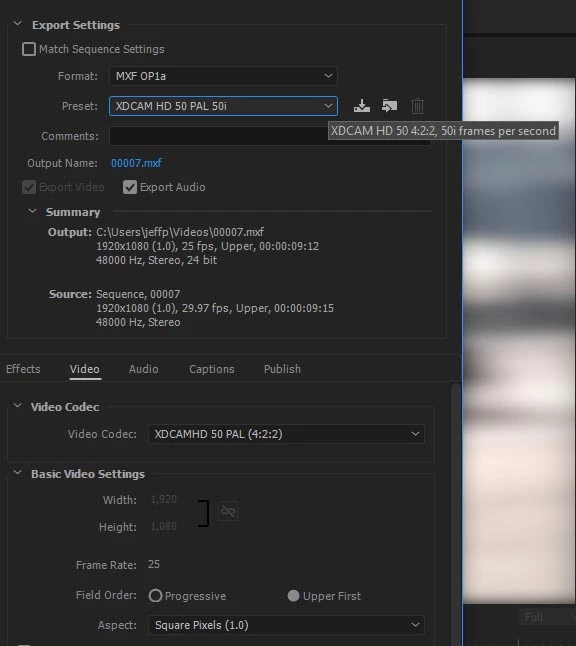
In Export Settings, choose MXF OP1a as the format, then for preset, scroll down through list to XDCAM HD 50 PAL 50i, which will encode at 50mbps to the XDCAM format as Upper Field Interlaced using 4:2:2 color at 25 frame rate. That should pretty much fulfill what they are asking for, except if you need more than 2 audio channels, then under the Audio tab you can change the number of channels there and that's not something I've ever messed with before, always stereo for me. Under Audio tab, it says Uncompressed so to me that is the PCM they are asking for. This should get you in the ballpark.

Thanks

Jeff

3 replies

Inspiring
November 28, 2018

Thanks Jeff that's very helpful indeed!  Though I would love to see Adobe add GOP controls, bit rate, bit depth controls.  Getting to the ballpark is great, but I want to go inside:)

Inspiring
May 18, 2018

XDCAM is MPEG2 (uses MPEG2 compression)

Use the

Format: MXF OP1a

Preset : XDCAM HD 50PAL 50i

then select Render at Maximum Depth & Use Maximum Render Quality (if desired)

John T Smith
Community Expert
Community Expert
May 18, 2018

Have you asked someone at the actual broadcast facility what they want?

jeffp68340199Correct answer
Participating Frequently
May 18, 2018

Hi,

Sony XDCAM is an MPEG-2 codec, and they are requesting it in an .mxf wrapper, versus .mov or .avi for instance.

In Export Settings, choose MXF OP1a as the format, then for preset, scroll down through list to XDCAM HD 50 PAL 50i, which will encode at 50mbps to the XDCAM format as Upper Field Interlaced using 4:2:2 color at 25 frame rate. That should pretty much fulfill what they are asking for, except if you need more than 2 audio channels, then under the Audio tab you can change the number of channels there and that's not something I've ever messed with before, always stereo for me. Under Audio tab, it says Uncompressed so to me that is the PCM they are asking for. This should get you in the ballpark.

Thanks

Jeff

maxn64556031
Participant
May 18, 2018

Hey Jeff,

thanks! That really helped me get it! Doing the export now...

One more question, they also asked for an xml, see specs below - would that be just exporting a finalcutpro xml? Or is there another option for xml in premiere or AME?

XML

The metadata xml file should carry the same name as the mxf file.
I.e. for the material ABC000000 the files would be
named as “ABC000000.xml” and “ABC000000.mxf”

The file must be encoded in UTF-8 without BOM format and contain the information below (example).

<FinalCutServer>
<getMdReply>
<entity entityType="asset" entityId="not defined">
<metadata>
<mdValue fieldName="Audio Ch1" dataType="string">
Audio Original (or lang present)</mdValue> <mdValue fieldName="Audio Ch2" dataType="string">Audio Original (or lang present)</mdValue> <mdValue fieldName="File Name" dataType="string"> ABC000000.mxf</mdValue>
<mdValue fieldName="Duration" dataType="timecode">
hh:mm:ss:ff</mdValue>
<mdValue fieldName="Cart No" dataType="string">
ABC000000</mdValue>
<mdValue fieldName="Material_Id" dataType="string">
ABC000000</mdValue>
<mdValue fieldName="Type" dataType="string">
Commercial/Interstitial/Programme/Videoclip</mdValue>
<mdValue fieldName="Aspect Ratio" dataType="string">
16F16</mdValue>
<mdValue fieldName="Working Title" dataType="string">
Show/Brand, episode, duration

</mdValue>

<mdValue fieldName="Audio Description" dataType="string">false</mdValue> <mdValue fieldName="In-point" dataType="timecode">hh:mm:ss:ff</mdValue> <mdValue fieldName="Compliance Pass" dataType="string">true</mdValue> <mdValue fieldName="Technical QC Pass" dataType="string">true</mdValue> <mdValue fieldName="Definition" dataType="string">HD</mdValue>

<mdValue fieldName="Originator" dataType="string">Correct Contact Team</mdValue> </metadata>
</entity>
</getMdReply>

</FinalCutServer>