
Participant
June 17, 2022
Answered

Broken captions: for some reason the captions type from right to left

  • June 17, 2022
  • 2 replies
  • 323 views

Hi everyone, 

I'm trying to write captions for some work I'm doing and the captions type out from right to left, I've tried to see where the settings for the caption track is but I can't find anything which will fix the problem. Any help is much appreciated! 
This topic has been closed for replies.
Correct answer David Arbor

In Preferences > Graphics > Default Paragraph Direction is your setting "Left to Right" or "Right to Left?"

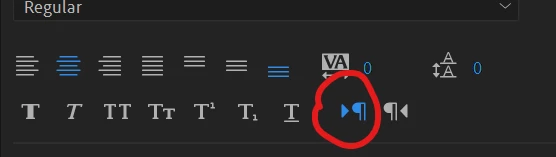
Also, are you using a Track Style for your captions that could have been set to "Right to Left?" Click on one of the captions and go to the Edit tab of the Essential Graphics panel. The circled icon in my first screenshot is for Left to Right typing, is the other icon selected? If so, change the icon and then you can hit the "Up Arrow" icon on the right of the "Track Style" dropdown menu (second screenshot) and push this update to all captions on your track.


2 replies

Stan Jones
Community Expert
Community Expert
June 17, 2022

If David's suggestion does not fix it for you, what version are you using?


Stan

David ArborCorrect answer
Inspiring
June 17, 2022

In Preferences > Graphics > Default Paragraph Direction is your setting "Left to Right" or "Right to Left?"

Also, are you using a Track Style for your captions that could have been set to "Right to Left?" Click on one of the captions and go to the Edit tab of the Essential Graphics panel. The circled icon in my first screenshot is for Left to Right typing, is the other icon selected? If so, change the icon and then you can hit the "Up Arrow" icon on the right of the "Track Style" dropdown menu (second screenshot) and push this update to all captions on your track.


Participant
June 17, 2022

Thank you David! Your solution with the icon worked!
