
Mediaworks
Participant
June 20, 2017
Answered

BRUTAL artifacts created through Media Encoder!

  • June 20, 2017
  • 4 replies
  • 6985 views

I'm exporting a very large number of videos from Prmiere Pro through Media Encoder and it is producing insane artifacts. It seems if I export directly from Premiere the artifacts are not produced. The source footage comes from a DVX200 but I see it in all sorts of footage from cameras to game capture. I have exported H.264, MP4s, ProRes. All produce these artifacts.

I'd simply export files individually but I have over 100 files to export. It's just not realistic. I usually only need to export a single video at a time but this project is massive.

I don't know how it can be a hardware issue if exporting from PP directly results in clean videos and ME messes it up. Really kicking my butt and of course I'm fighting a deadline.

Footage:

Type: MPEG Movie

File Size: 4.21 GB

Image Size: 3840 x 2160

Frame Rate: 29.97

Source Audio Format: 48000 Hz - 16 bit - Stereo

Project Audio Format: 48000 Hz - 32 bit floating point - Stereo

Total Duration: 00;06;15;27

Pixel Aspect Ratio: 1.0

VR Projection: None

System:
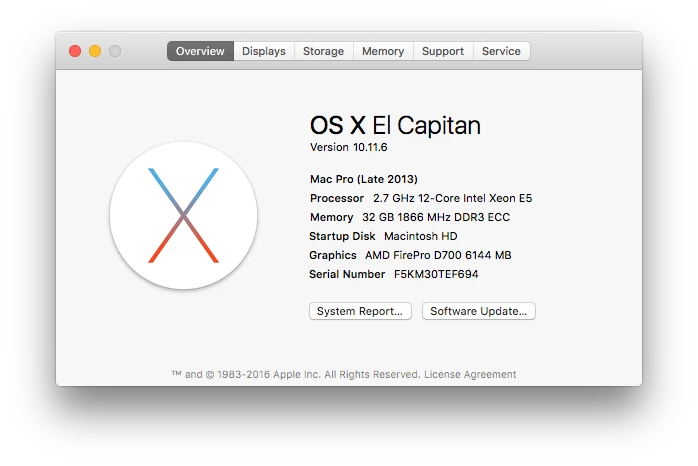
This topic has been closed for replies.
Correct answer Kevin-Monahan

Largely, we do not see this issue much any more. The artifacts are caused by heat-damaged GPUs.

  • Short term fix: Use Software Only GPU acceleration
  • Longer term fix: Have your GPU(s) replaced by Apple and update macOS

Regards,
Kevin

4 replies

Kevin-Monahan
Community Manager
Kevin-MonahanCommunity ManagerCorrect answer
Community Manager
May 31, 2019

Largely, we do not see this issue much any more. The artifacts are caused by heat-damaged GPUs.

  • Short term fix: Use Software Only GPU acceleration
  • Longer term fix: Have your GPU(s) replaced by Apple and update macOS

Regards,
Kevin

Kevin Monahan - Sr. Community and Engagement Strategist – Adobe Pro Video and Audio
Participant
August 20, 2021

Have new imac M1 and have BRUTAL artifacts when rendering, looks fine when rendered same settings on my old macbook pro. What's the chances that there is something wrong with the new imac?


Participant
October 7, 2021

I'm having the same issues on my brand new M1 Mac. Have tried everything from bumping the bitrate up to 100 to clearing the cache and regenerating a new cache. Nothing seems to be working. Getting random artifacts in my exports. They're horizontal lines across the video and they are not showing up in my project monitor in PP. Very frustrating.

Godsanimator
Inspiring
May 31, 2019

From my experience the graphics cards get to hot in the Mac Pro computers. Media encoder and premiere pro both use the gpu to accelerate the export. Try turning media encoder to software only export and see if you are getting the same issue still.

Participant
July 14, 2017

This is an ongoing problem for Mac Pro's.  I get issues like this all the time.  It dates back to March of 2014 and Adobe/Apple couldn't care less to fix it.  RENDER PROBLEM - AME and Premiere Pro CC causing random horizontal lines on H.264 Renders

Participant
April 4, 2018

Hi I'm having the same problem when exporting 4K footage with Lumetri grade on the footage. I've used every conceivable method to remove the lines but they are still here. The same problem happened on the iMac and the MacPro and on all three versions of CC, 15,17,18

Might have to ditch Premiere Pro if they still haven't sorted this issue out. Its costing my time and money and I can't export final product with this sort of issue going on throughout the exported video.

@mediaworks did you get this fixed?

Inspiring
June 20, 2017

Please post a screen shot of your Export Settings Summary from the Export Settings Pane, like this example below:

MtD

Mediaworks
Participant
June 20, 2017

It is inconsistent. It does not happen on every video.