



BSOD on export - Memory issue?
Hi,
I built a new system to be able to work with and handle video editing smoothly. I also reused some parts to save some money.
Hardware spec is as follows:
Intel 6800k
NZXT Kraken X61
ASUS X99-E
32GB Corsair LPX 3200 (8x4)
EVGA Supernova G2 750W
Nvidia GTX 670
500GB Samsung 850 EVO
256GB Samsung 950 PRO m.2
10Gbit NIC to storage server.
This is running on Windows 10 with latest CC 2017.
Video clips is stored on storage server and all project files and scratch files are stored on the 950 Pro SSD. OS on 850 SSD.
I wanted to do some edits on an older CC 2015 project so I converted it to 2017 and did the edits.
The sequence is 30 min long and consist of video clips with different frame rates and resolutions as well as dynamically linked after effects compositions.
When exporting this sequence to a H264 media file I get a BSOD after a couple of hours. Usually with a NO_PAGES_AVAILABLE Bug Check String.
I have tried encoding both directly with Premiere Pro and through Media Encoder with the same result. I have also tried to pre encode the after effects compositions and add these media files to the sequence with the same result.
I checked the system for stability issues by running Prime95 for about 8h with small FFT and another 16h or so in blend mode, no errors.
I then booted memtest86 7.1 and ran a memory check for about 8h, no errors. Windows own memory check didn't show any problems either.
Ran a couple of 3DMark tests with the free version to test GPU, no issue. I'm at a loss to what more to test for system stability. CPU stays cool.
I'm not sure but I think its a memory issue with Adobe during encoding. I have set in the settings that it should leave 10GB of memory to other applications, ie 22GB available to Premiere Pro. Checking in Media Encoder gives the same value. It is also set to memory mode instead of performance.
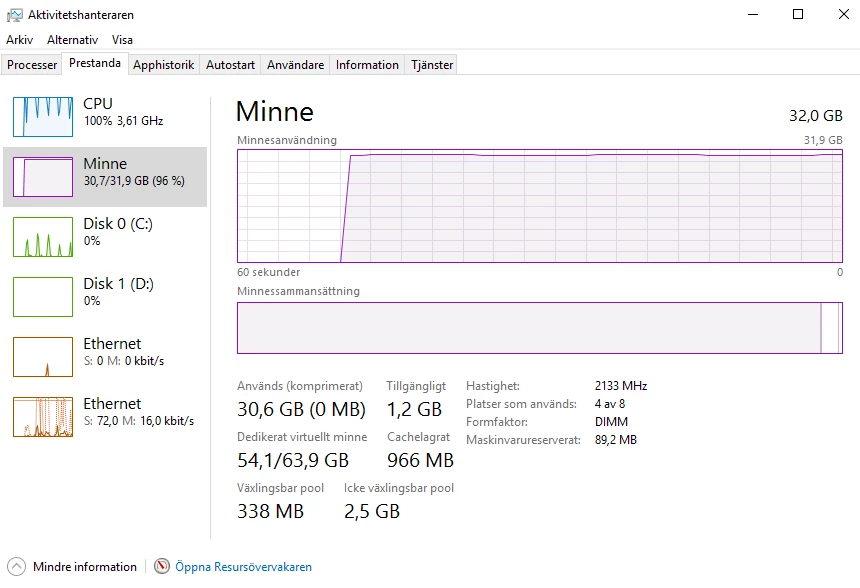
Looking at the Activity Monitor during encoding it looks like Adobe is using way more than its allowed 22GB. Correct me if I'm wrong but I read it as Windows has 64GB of virtual memory, 32GB physical and 32GB system page file. When I took these screenshots before going to bed it seems to me that almost all of the virtual 64GB memory is used, 54.1 of 63.9? And when I got up this morning the computer had crashed and restarted. Checking created mini dump showed the NO_PAGES_AVAILABLE bug check string.
What can I do to sort this out?

 AdChoices