Participant
November 10, 2023
Question

Bug with subtitles and error message : <b>

  • November 10, 2023
  • 1 reply
  • 895 views

Hi everyone,

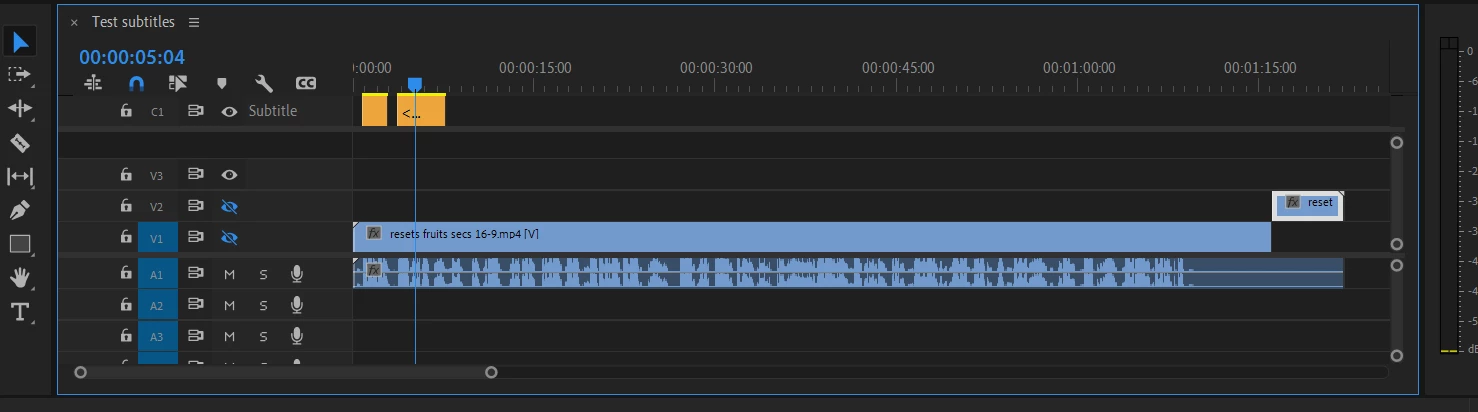
I cannot put anymore a subtitle file on Premiere Pro. When I put the SRT on the timeline, it just shows me the 2 or 3 first blocks instead of the all subtitles.

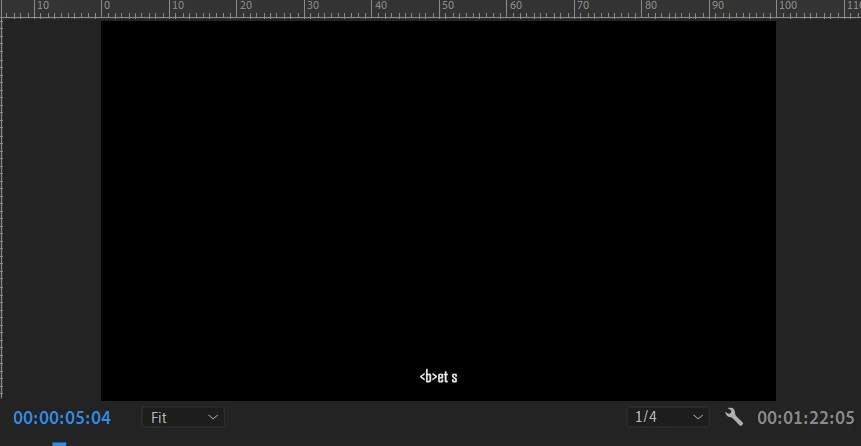
It comes always with a sort of error message within the subtitle appearing on the timeline : <b>

The subtitles files are not the problem. I have tried with many other that worked before and doesn't work anymore. I work on Premiere Pro 2024 version. I have uninstalled it and went back to 2023 version. Problem persists. 

Important to say that I am no begininer with Premiere Pro. I am professional video editor with years of experience on the tool.

Thx a lot in advance for your help
This topic has been closed for replies.

1 reply

Stan Jones
Community Expert
Community Expert
November 10, 2023

@Arnaud33501410u1ko,


It is frustrating when things like this don't work. PR 2024 is working correctly for me on Win 10, and I am not seeing other reports of this general problem.


> The subtitles files are not the problem.

I understand your conclusion, but this type of problem is almost always a problem with one or more lines/characters in the file. The fact that it is affecting multiple files may point to a file format issue more generally.


> a sort of error message within the subtitle appearing on the timeline : <b>

That is not an error message; it is the beginning tag for a bold mark. The code in the SRT has a problem, and PR sees it as text, not a tag.


> When I put the SRT on the timeline

First, make sure you are importing the SRT using the preferred method. Delete the current caption track: Right-click the caption track header (the word "Subtitle" in your screenshot) and pick delete. In the Text panel -> Captions tab, click on Import captions from file, and pick the SRT. I assume this will show the problem, but start there.


The easiest way to troubleshoot this is for us to take a look at one of your subtitle files. I'll send you a private message.


Stan