
Motmed
Participant
November 16, 2019
Answered

Call-out mogrt doesn't work properly

  • November 16, 2019
  • 6 replies
  • 2908 views

Hi Guys, i just downloaded several callout mogrt's and installed them normally into essential graphics.

However, when i drag them on the timeline, it looks like this:
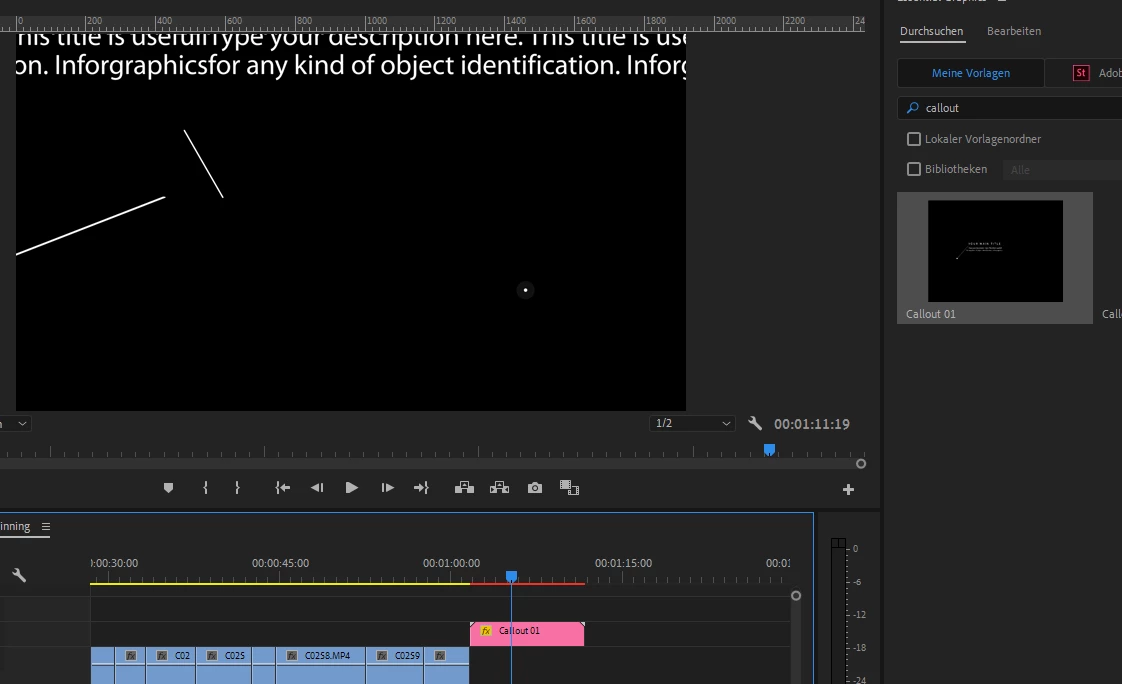
 

As you can see, it doesn't look like what its supposed to look like (preview of the template on the right).


I searched everywhere and couldn't find anyone having the same problem, so here is what i already tried:

-  reinstalled the mogrt into essential graphics

-  updated premiere pro to 2020 version

-  tried another callout-mogrt pack ( i even pay'd 20bucks....)

-  downloaded all the missing fonts

-  opened the project file in AE (same issue)

-  tried to edit the template once dragged into the timeline (didnt work at all)

-  everything else that came into my mind


Unfortunately none of this helped, so i hope someone here can help me 🙂

This topic has been closed for replies.
Correct answer Motmed

I found the solution!

Actually, the support of the third party that sold the mogrt wrote back, and asked me to try it again after switching Premiere Pro to english. I did and it worked!

I dont really know why the language causes this issue, but anyway, im gonna have to get used to the english Premiere Pro 🙂


Moderator Note: Link/text removed. Sorry. Please do not use Console to change the application. It is against our corporate guidelines and is a request from Adobe Premiere Pro engineering.

6 replies

YaroD
Participating Frequently
November 21, 2019

Man!! It was a life saver!! I've been having the same problems with third party mogrt templates while using a German language PP. Danke dir vielmals!!! \o/

R Neil Haugen
Legend
November 21, 2019

This means the creators of those mogrts did NOT do their job correctly. And should be told so!


One of the specified tasks for creating mogrts for sale is to run the Universalizer tool on them as part of the finish prep for shipping. This will take care of the vast majority of language issues.


Neil

Everyone's mileage always varies ...
R Neil Haugen
Legend
November 18, 2019

There was a clear error on the part of that mogrt creator ... they didn't run the Universalizer feature when creating the mogrt. That's there exactly to avoid issues like this ... it 'fixes' the code so that no matter the language, the mogrt should work.


I would email them back and suggest they live up to what they should be doing. Occasionally a mogrt will even make it onto the Adobe Stock system without being universalized ... but they normally test that before allowing a mogrt onto the Stock system.


Some independent suppliers just don't follow the full script.


Neil

Everyone's mileage always varies ...
Motmed
MotmedAuthorCorrect answer
Participant
November 18, 2019

I found the solution!

Actually, the support of the third party that sold the mogrt wrote back, and asked me to try it again after switching Premiere Pro to english. I did and it worked!

I dont really know why the language causes this issue, but anyway, im gonna have to get used to the english Premiere Pro 🙂


Moderator Note: Link/text removed. Sorry. Please do not use Console to change the application. It is against our corporate guidelines and is a request from Adobe Premiere Pro engineering.

Participating Frequently
May 5, 2021

Hi motmed,


I have the same problem for a while now, I will try out this solution, thanks.

Also, my solution before this, what you also can try out without changing the language but which is more complicated: When opening up the mogrt in After Effects, you can go to each color included in the mogrt-file and set a new color-path for Essential Graphics for every single color.  

This worked for me as well, the problem is that my AE Testversion has run out so I was looking for another solution. 


Best regards

Motmed
MotmedAuthor
Participant
November 17, 2019

It is a third party mogrt, but i tried callout mogrt from 3 different third-partys and i had the same problem with all of them. I tried to contact the seller of the pack which i payed 20 bucks for, but still got no response so far...

Ann Bens
Community Expert
Community Expert
November 17, 2019

Are these Adobe morgt or third party.

If Adobe post here: https://community.adobe.com/t5/stock/bd-p/stock

If latter contact vendor.

R Neil Haugen
Legend
November 16, 2019

What is the framesize of your sequence?


In the preferences do you have scaling set to Set to Frame-size? If not, set that. I don't remember which tab of the preferences it's in.


Neil

Everyone's mileage always varies ...
Motmed
MotmedAuthor
Participant
November 17, 2019

Thanks for the fast answer.

My sequence is set to 1080p standart, and i found the "scaling to frame-size" in the preferences for the media, so im not sure it is the right thing. Unfortunately it didn't help...


Im kinda confused, because it seems like im the only one having this issue, and i didn't really change alot in the preferences.

Could it be that the mogrt has been created with the imperial system (inches) , and as my program is working with the metric system (centimeters) it just messes everything up? But then again, the positioning of graphics is per pixel as far as i know, so it should be the same all around the world right?