

markkoskg15941118
Inspiring
October 3, 2020
Answered

Can I have more than one timeline in a single project?

  • October 3, 2020
  • 4 replies
  • 611 views

When I open a project in Davinci Resolve, I sometimes have 4 or 5 timelines in a single project. Can I do the same in Premiere? That is, have 4 or 5 timelines with different videos and sounds?
For example: in a timeline have an edited music video. In another timeline a video of a recording of a game, etc.
This topic has been closed for replies.
Correct answer Richard M Knight

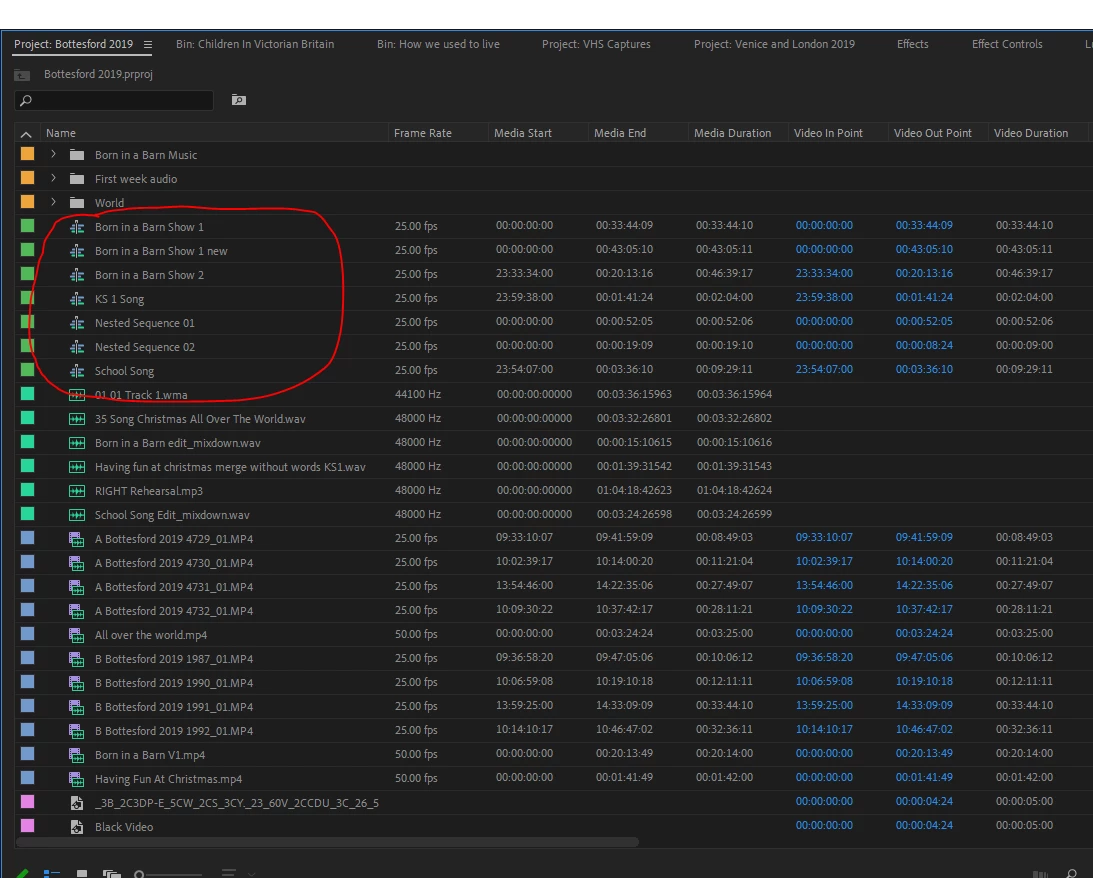
The sequences are listed in the project panel, double click to open.

4 replies

Legend
October 3, 2020

and when I start work each day (if I've had enough coffee and am not too hung over - just kidding) I duplicate my sequence so I can easily refer to the previous days work if I screw something up in the latest sequence (it happens, even to me).  I sometimes have 30 or 40 copies by the time I'm done...  

R Neil Haugen
Legend
October 3, 2020

You simply create sequences as you choose. As noted, they are then (as with any other asset of the project) shown in the project panel, where you organize things into bins according to your wishes.


Neil

Everyone's mileage always varies ...
Richard M KnightCommunity ExpertCorrect answer
Community Expert
October 3, 2020

The sequences are listed in the project panel, double click to open.

R Neil Haugen
Legend
October 3, 2020

Naturally. Most pro projects have several to quite a few sequences.


Neil

Everyone's mileage always varies ...
markkoskg15941118
Inspiring
October 3, 2020

And how do I get to have several timelines at the same time? At Davinci it is very easy to find. Where is that option in premiere?