
Participant
July 14, 2023
Answered

Can't access ok button for sequence settings in premiere pro

  • July 14, 2023
  • 1 reply
  • 2348 views

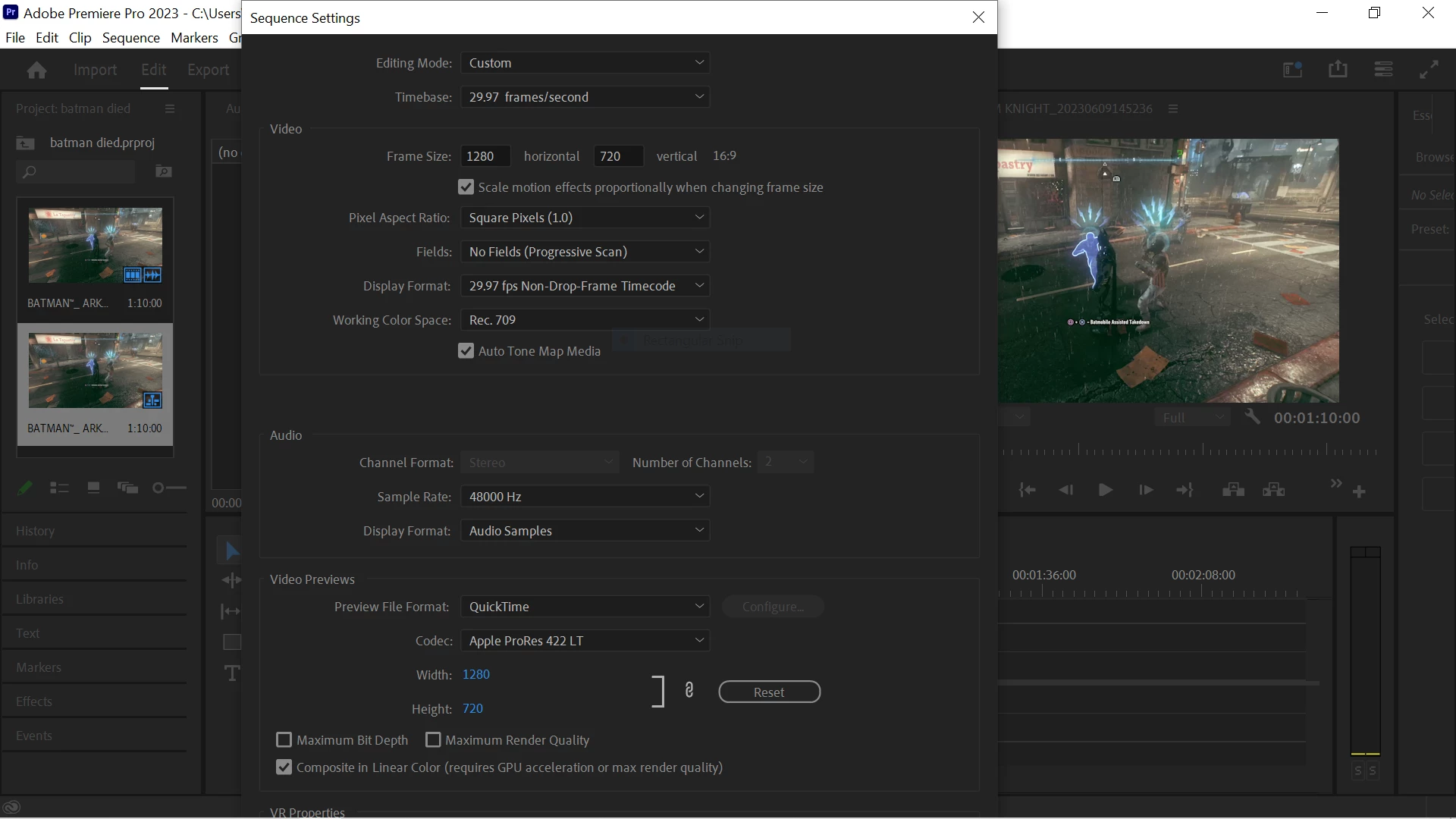
Hey guys I am a windows 10 user and I have the problem that whenever I go into sequence settings to change something, the panel is too big and I can't adjust it so that I can gain access to the "ok" and "apply" button beneath. Is there any way of resizing these pop out panels manually or am I screwed?
 

This topic has been closed for replies.
Correct answer Stan Jones

@doctor mike,


Thanks for the resolution info. I moved my PR window to my second monitor (HD like yours). With the Scale and Layout -> "change the size of font" etc set to 100% (recommended) I see the full settings window. If I set it to 150%, I see what you see.


So while 1920x1080 is the minimum requirement, it looks like there are some issues if you scale up.


I checked two versions, PR 22.6.4 and 23.5.0. Note that somewhere between those two, the Sequence Settings window changed, to split VR properties into its own tab. But this did not effect it appearing on display correctly.


Stan


1 reply

Kevin-Monahan
Community Manager
Community Manager
July 15, 2023

Hi @doctor mike,

What is the resolution of your computer display? Does it meet system requirements? Let us know.


Thanks,
Kevin 

Kevin Monahan - Sr. Community and Engagement Strategist – Adobe Pro Video and Audio
Participant
July 16, 2023

Hi Kevin, thanks for the reply. My Laptop is a lenovo thinkpad l13 yoga with a screen dimension of 13.3" and 1920x1080 resolution

Stan Jones
Community Expert
Stan JonesCommunity ExpertCorrect answer
Community Expert
July 16, 2023

@doctor mike,


Thanks for the resolution info. I moved my PR window to my second monitor (HD like yours). With the Scale and Layout -> "change the size of font" etc set to 100% (recommended) I see the full settings window. If I set it to 150%, I see what you see.


So while 1920x1080 is the minimum requirement, it looks like there are some issues if you scale up.


I checked two versions, PR 22.6.4 and 23.5.0. Note that somewhere between those two, the Sequence Settings window changed, to split VR properties into its own tab. But this did not effect it appearing on display correctly.


Stan