
salarh98533084
Participant
May 11, 2020
Question

Can't click adobe stock in essential graphics Premiere pro

  • May 11, 2020
  • 4 replies
  • 2092 views

Hi, please help me with this, I can't open adobe stock in essential graphics. Thanks 
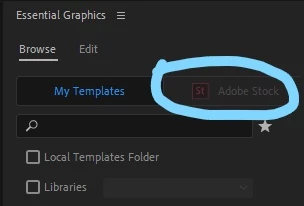
This topic has been closed for replies.

4 replies

Participant
June 7, 2023

so nobody got an answer to this still?

Kevin-Monahan
Community Manager
Community Manager
June 8, 2023

Hi @Jon24387068qc47,

I read about your issue. It sounds odd. It seems like not everyone experiences this problem, only some do. Those that have the problem have solved this issue. I wonder if it has to do with the licensing you have.


Do you have a full subscription to Creative Cloud, or just Premiere Pro? Is this an educational or enterprise version? For example, are you studying at a university? Let us know. I hope we can help. Sorry for the frustration.


Thanks,
Kevin

Kevin Monahan - Sr. Community and Engagement Strategist – Adobe Pro Video and Audio
Participant
November 20, 2020

Nice one. But not in my case. I´ve been subscribed for a couple of years. I have the receits that prove it. Lol. And I have had the asobe stock enabled and it went away all of a sudden. All the apps are up to date.

Participant
November 20, 2020

Same here.

Participant
November 18, 2020

I´m having the same problem! It happens also with the sound library.

nishu_kush
Community Manager
Community Manager
May 13, 2020

Hi Sali,


Thanks for reaching out.

Please check that the Creative Cloud desktop app is working fine and there are no updates available for it.

Let us know how it goes.


Thanks,

Nishu

Participant
November 17, 2020

I'm having the same problem and I can't see any issues or updates in my Creative Cloud desktop app... suggestions?
