
Participant
March 29, 2020
Answered

Can't drag and drop any effects into timeline

  • March 29, 2020
  • 2 replies
  • 7267 views

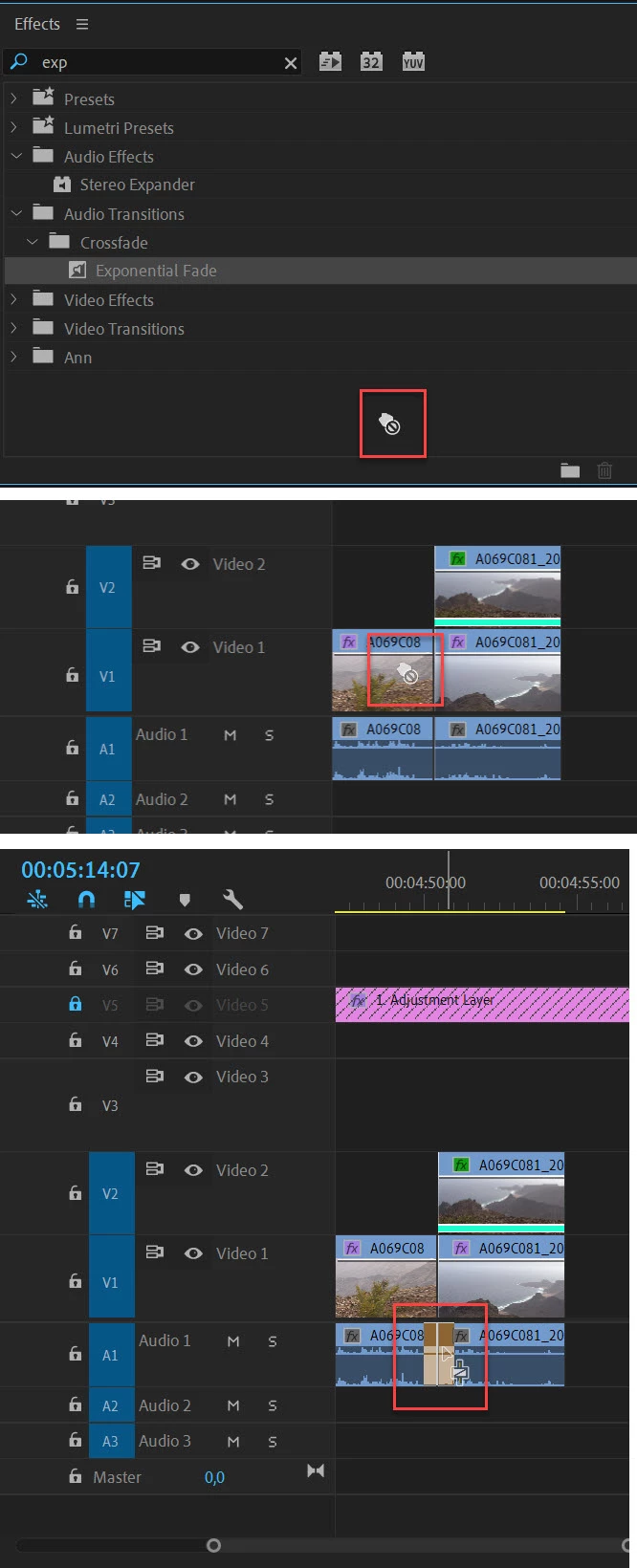
Hi, I've been working on a project for two days and suddenly Pr stopped allowing me to drag effects into my timeline. I can drag anything else I want, and through keyboard shortcuts, I can apply default transitions to my clips. However, I cannot open the editing window, select an effect, and simply drag it in. When I try, my cursor becomes a grabbing hand with a little crossed circle beside it informing me that I cannot drag the effect.


I have tried resetting the project, resetting all my preferences and caches, resetting to adobe's saved layout for workspaces,read other community posts about similar issues and have tried all the methods that were brought up in those threads, and nothing seems to work.


My only option now it seems, is to reinstall Pr, and start the project from scratch if I want to drag effects into my timeline. That's my last resort if anything, but I hope a community member has a simple answer for me that I'm too dumb to see lol. Thank you!
Correct answer Ann Bens

Drag transition all the way to the cut.

2 replies

Participant
July 10, 2025

This happened to me when i was working on a project. The simple fix that i found out is to copy the entire sequence and create a new one and paste the entire sequence on it. Everything gets fixed. Give it a try, it worked for me.


Participant
March 29, 2020
Ann Bens
Community Expert
Ann BensCommunity ExpertCorrect answer
Community Expert
March 29, 2020

Drag transition all the way to the cut.

CorySouthpaw
Participating Frequently
January 13, 2021

I am dumb, and I can't believe I made the rookiest mistake after using Pr for over 6 months now. Thank you!


So what was the solution?   I wouldn't say you're dumb because I've had this same issue on & off for years!  Always on Window machines but totally different models, different version of Premiere.   Happened to me just now, drag a "dip to black" effect and beginning of timeline was fine.  Go to end of timeline, drag the effect and NOTHING.   Tried like 10 more times to either of 2 clips.  Also tried using the source effect instead of the one in my favorites.  Dragging on top of the clip the highlight never even happens.