
mikeb73118722
Participant
June 14, 2017
Answered

Can't drag audio clips left or right or to different channels!?

  • June 14, 2017
  • 6 replies
  • 40009 views

Hello, I'm relatively new to Premiere, but I'm having trouble editing the audio in the timeline. Why can't audio clips be moved independently from the video tracks?

If I place a linked audio/video track into the timeline and unlink the selection, the video track seems to be the only track that you can move. The audio track stays put. Am I missing something?

Similarly, if I delete the video component of a clip and leave the audio, I'm not able to edit the remaining audio clip or move it on the timeline.

Any help is greatly appreciated.
    Correct answer Ann Bens

    Hey Jim,

    I have turned off and removed all keyframes. I have deselected show audio keyframes. I still cannot move my audio clips.

    Thanks.


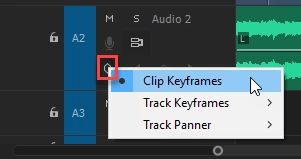
    If you want to move audio clips around make sure it is set to Clip Keyframes and not Track Keyframes as shown in previous screenshot

    6 replies

    Participant
    February 5, 2025

    turns out i couldn't move or add tracks because my premiere pro window was open on the wrong monitor (i have 3 monitors) it seems like blender is working fine, blender also has a video editing feature, it seems like it's better to use blender (a free software) than any adobe software which you pay for, yet doesn't work

    Participant
    February 5, 2025

    blender doesn't have this issue

    John_Allred
    Inspiring
    January 17, 2021

    I set my keyframes to Track and couldn't move a clip after that. Thanks so much for the clarification!

    Known Participant
    May 26, 2020

    I am having the same problem in PP CC2020. 

    Participating Frequently
    July 23, 2017

    Thank you Ann! Yeah the timeline was being weird and was difficult to expand. Seeing the little keyframe circle in the expanded audio details in the screenshot made all difference. Thank you! Thank you!

    R Neil Haugen
    Legend
    June 14, 2017

    It sounds like your audio tracks are "locked" in the header controls on the left side of the sequence.

    Neil

    Everyone's mileage always varies ...
    Participating Frequently
    July 22, 2017

    I am having the same issue above as Mike B.

    No, the audio tracks are not locked. Yes, V1 and A1 are highlighted.

    Every time I try to drag the audio clip, it highlights the clip and the cursor turns into a cross figure. It won't allow me to drag or move the audio clip in any direction.

    If anyone has figured this one out, please let me know.

    Thanks!

    Legend
    July 22, 2017

    Make sure Track Keyframes aren't being shown.