
Participant
August 21, 2017
Answered

Can't drag footage into timeline; Uncontrollable scrolling

  • August 21, 2017
  • 1 reply
  • 1052 views

Hi All

I'm having a very Strange issue with Premiere Pro. Since opening the app a few days ago, I cannot drag files from the bin to the timeline, every time I try, I get a hand symbol with the circle with a line through it on the bottom right corner. Also, any time I try to extend the length of a clip in the timeline, the timeline scrolls forward uncontrollably. I can't find anybody else online asking about this problem, so if you know any way to help, I'd really appreciate it. Thank you.
    This topic has been closed for replies.
    Correct answer kulpreet singh

    Hi Jepburn,

    I am sorry about this annoying issue.

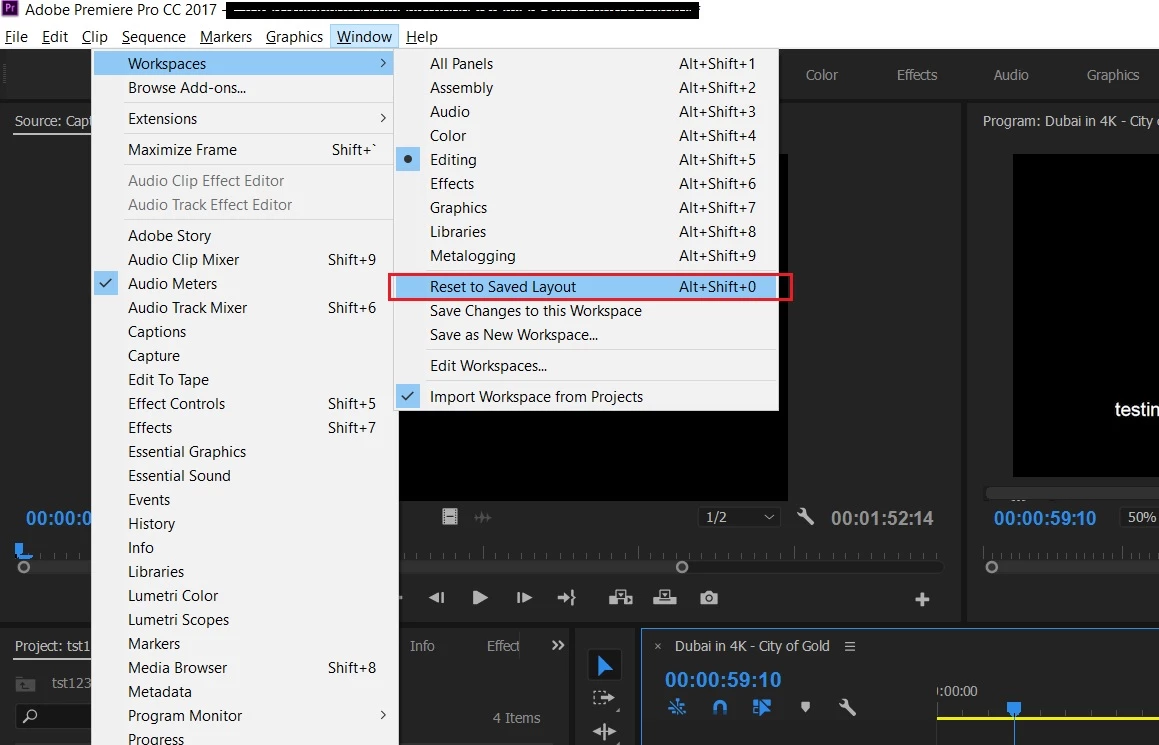
    Have you tried resetting the workspace or try in a new sequence/project?

    Thanks,

    Kulpreet Singh

    1 reply

    kulpreet singh
    kulpreet singhCorrect answer
    Inspiring
    August 21, 2017

    Hi Jepburn,

    I am sorry about this annoying issue.

    Have you tried resetting the workspace or try in a new sequence/project?

    Thanks,

    Kulpreet Singh

    jepburnAuthor
    Participant
    August 21, 2017

    That seemed to do it, thank you!

    kulpreet singh
    Inspiring
    August 21, 2017

    Thanks for confirming.