
Participant
April 27, 2017
Answered

Can´t drag transitions to my clips

  • April 27, 2017
  • 2 replies
  • 41090 views

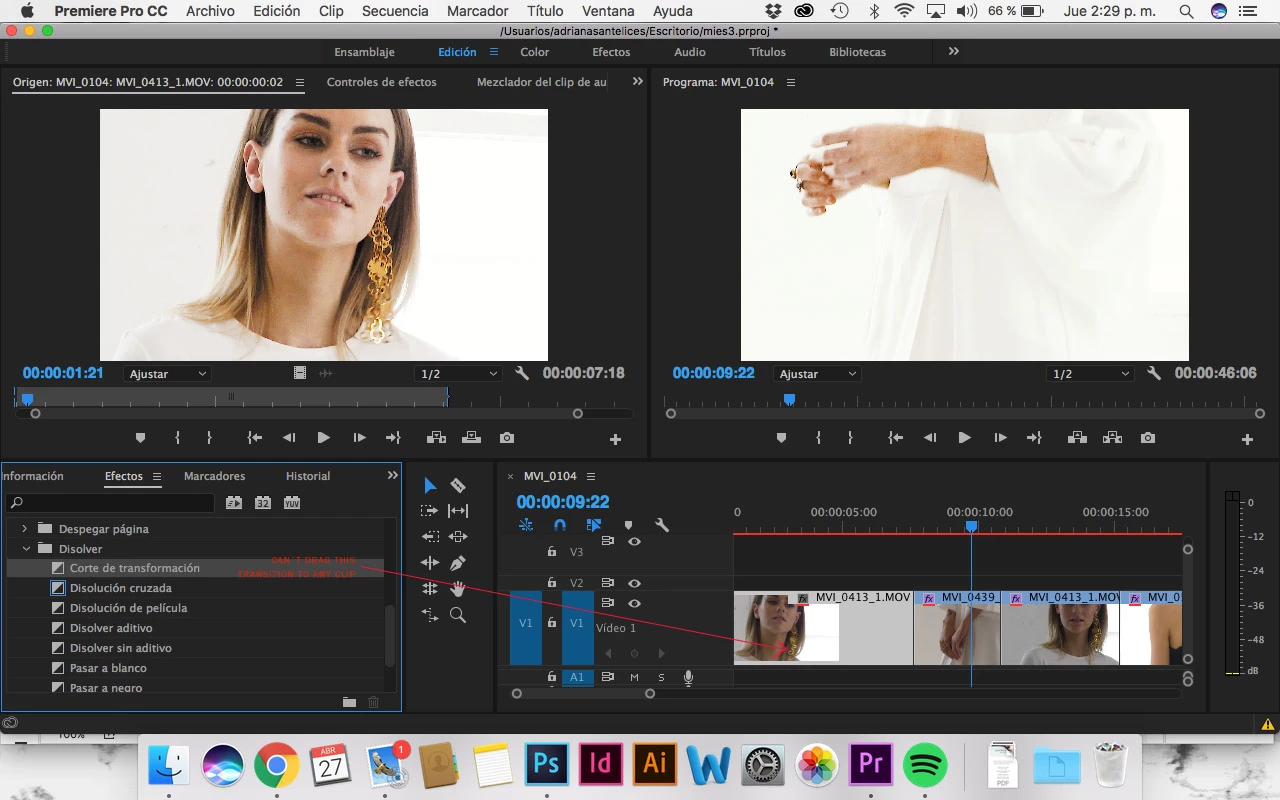
Hi everyone. I have looked everywhere for an answer and can´t find it anywhere. I´m having this specific problem that I can´t drag a transition to my clip. When I clic on top of the transition, before start dragging, the mousse shows me a hand with a cross on top. Any ideas why? I am really new at this so it might be something simple I am missing. Help!
Correct answer CarolynUX

Was experiencing this issue too, but all I had to do was Zoom in (enlarge) the panel to see that I was adding it to the first video!


2 replies

Roei Tzoref
Legend
April 27, 2017
When I clic on top of the transition, before start dragging, the mousse shows me a hand with a cross on top. Any ideas why?

when you drag it, it shows you you can't drop it in the effect's panel itself. this is normal

the question is, does the "no entry" sign appear once you are above a clip? or can you do this?

more about transitions here:

Apply transition effects to video and audio |

Participant
September 19, 2023

I'm having the exact same problem right now. Whenever I try to drag a "dip to white" effect I always get the "no entry" sign. My clips are not at the beginning or end. I can't even drag it to one clip, much less the two clips I want the effect to be added. Any help would be appreciated. 


Ann Bens
Community Expert
Community Expert
September 19, 2023

Screenshot shows effect but same goes for transitions.

stefan_gru
Inspiring
April 27, 2017

If I understand Spanish sufficiently, it looks like you're trying to drag the Cross Dissolve effect to a clip. Apologies if you already know this — but the Cross Dissolve effect works on the ends of clips, so you have to drop the effect where two clips are joined.

Before dropping the effect:

After dropping the effect: