Hi,
You're here because you can't drag either audio or video to the Timeline. Sorry for the frustration!
SOLUTION: Make sure Source Patching is set up correctly in the Timeline. The video below explains it visually.
Video tutorial
HOW TO:
- SELECT: Select the Clip in the Project panel. Blue Boxes should "light up" in the far left of the timeline. If they don't, go to Step 2.
- PATCH: Click the V1 & A1 "blue boxes" to enable them in the far left of the Timeline. (see the image).
- EDIT: Drag the clip to the Timeline (or click a button or use a keyboard shortcut for an Insert or Overwrite edit in the Source Monitor).
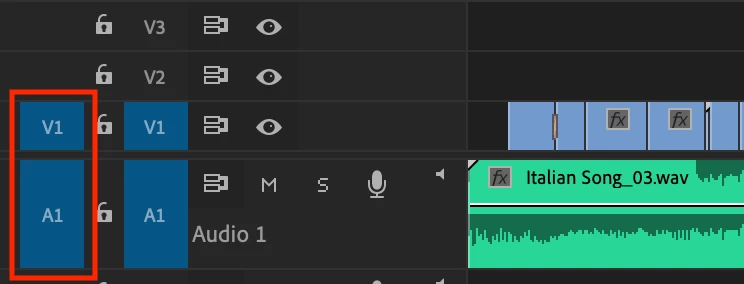
Notes:
1. Source patching is where most errors are made when you cannot drag an A/V clip into the timeline.
- If one Source Patcher and the other is not enabled, when you drag your clip in, your edit will only include audio or video.
- If no Source Patchers are selected, when you drag a clip, no clip can be edited to the timeline.
2. Source Patching should be automatic:
- Once a clip is selected in the Project panel.
- Once a clip is double-clicked in the Project panel and loaded into the Source Monitor.
3. If Source Patching is not working automatically when selecting a clip or when loading into the Source Monitor:
- Try clicking the buttons in the timeline manually.
- If a clip is not supported for automatic patching, you may not be able to click either A1 or V1 (or both). In that case, you may need to transcode the file in non-Adobe product, such as, Handbrake.
4. Track Targeting: The other two blue boxes that say V1 and A1 are for track targeting, which come into play after you edit clips into the timeline. Don't let those confuse you. You don't need to be concerned with them when simply dragging clips to the timeline. The ones on the far left are the important ones in solving this problem. The boxes to the right do not come into play until you start editing for things like copy and pasting to another track, etc.
5. Source Patching issues happen most frequently with screen captured video that has variable frame rates, which is a very popular format editors use these days. That is why it is more important than ever to be focused on source patching when editing such footage. The issue doesn't commonly happen with footage coming from camcorders, etc.
This is a very common, yet crucial, bit of info that gets by a lot of editors when they are starting out, so you wouldn't be alone.
Let me know if you have any questions.
Thanks,
Kevin
Kevin Monahan - Sr. Community and Engagement Strategist – Adobe Pro Video and Audio




 AdChoices