
Fearless Mind
Participating Frequently
September 21, 2018
Answered

Can't edit caption style (Premiere Pro 14.9 and earlier)

  • September 21, 2018
  • 1 reply
  • 1430 views

I am having some trouble with open captions.
I got a dashcam that produces a .srt file that tells the current speed of the car along with its video file.


But but when I try to change the style of the text, like the color, size etc it dosent change on the playback.
same if i try to edit the actual text, none of the changes i do in the captions panel shows up on the playback.
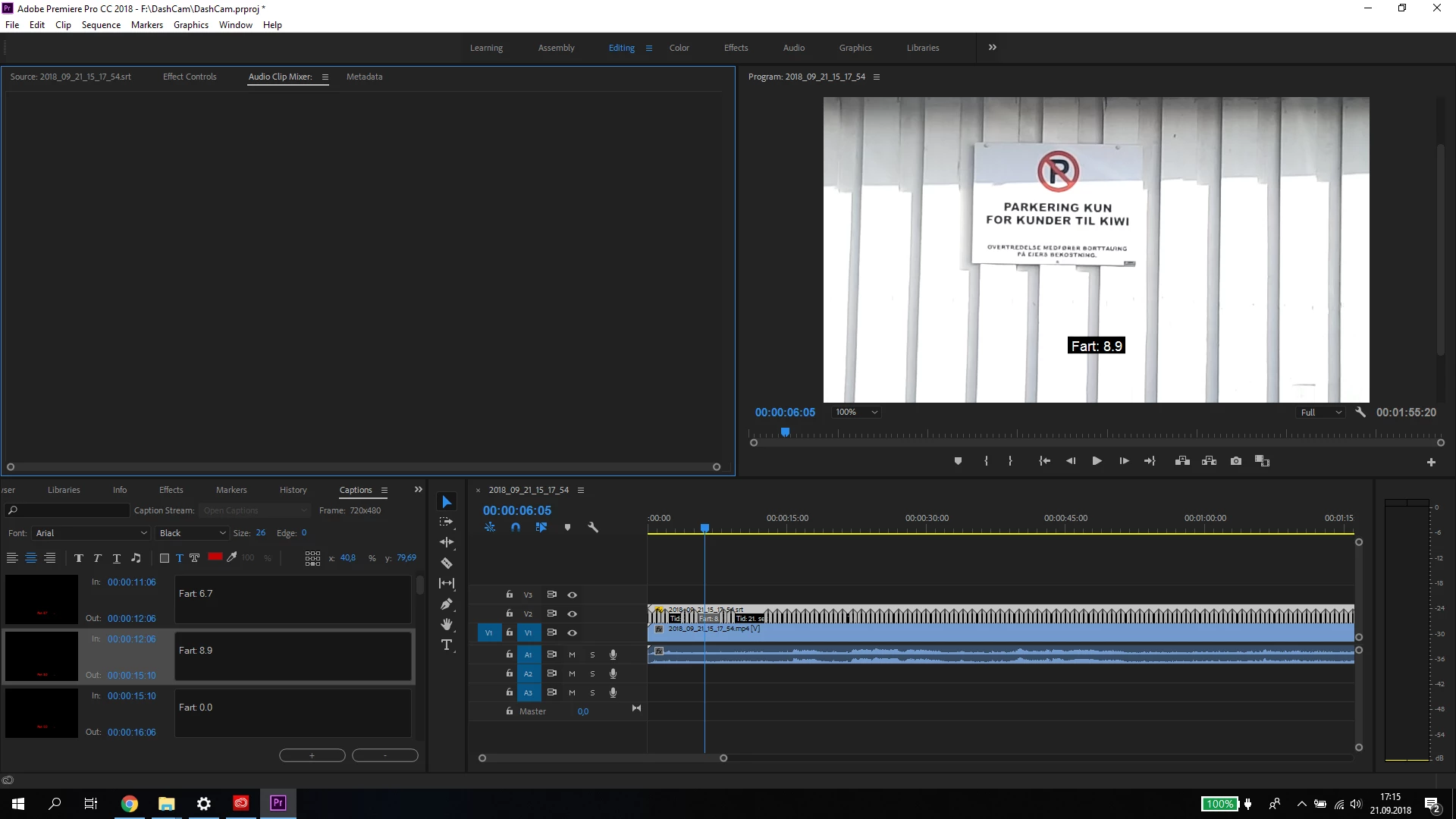
 

But you can see the changes in the thumbnail of the captions panel.


Anyone know how to fix this?

This topic has been closed for replies.
Correct answer Stan Jones

I have not been able to discover a pattern as to when these display correctly and when they don't. The more complex the project or use of multiple caption streams are, the more likely to get things out of sync.


Sometimes saving, closing the project, and reopening works.

Other times simply changing focus from different panels may work.

Once, cleaning the media cache resulted in the correct display.

Resetting workspace is worth a try, but it did not help the only time I tried it.

Do you want all the fonts the same? I would try selecting all captions in the caption panel, then change there.

What specific dot version of PR are you running?

1 reply

Stan Jones
Community Expert
Stan JonesCommunity ExpertCorrect answer
Community Expert
September 21, 2018

I have not been able to discover a pattern as to when these display correctly and when they don't. The more complex the project or use of multiple caption streams are, the more likely to get things out of sync.


Sometimes saving, closing the project, and reopening works.

Other times simply changing focus from different panels may work.

Once, cleaning the media cache resulted in the correct display.

Resetting workspace is worth a try, but it did not help the only time I tried it.

Do you want all the fonts the same? I would try selecting all captions in the caption panel, then change there.

What specific dot version of PR are you running?

Fearless Mind
Participating Frequently
September 21, 2018

Thanks for the response, I did try some of these out, like resetting the workspace.
And i am editing all the captions at the same time, but I also tried editing them individually.

I'll try some of the other tips you've given as well.

I'm running the newest version of premiere, 12.1.2 freshly installed today.

Stan Jones
Community Expert
Community Expert
September 21, 2018

Thanks; let us know...