Participating Frequently
December 6, 2020
Question

Can't edit subtitles on timeline

  • December 6, 2020
  • 3 replies
  • 272 views

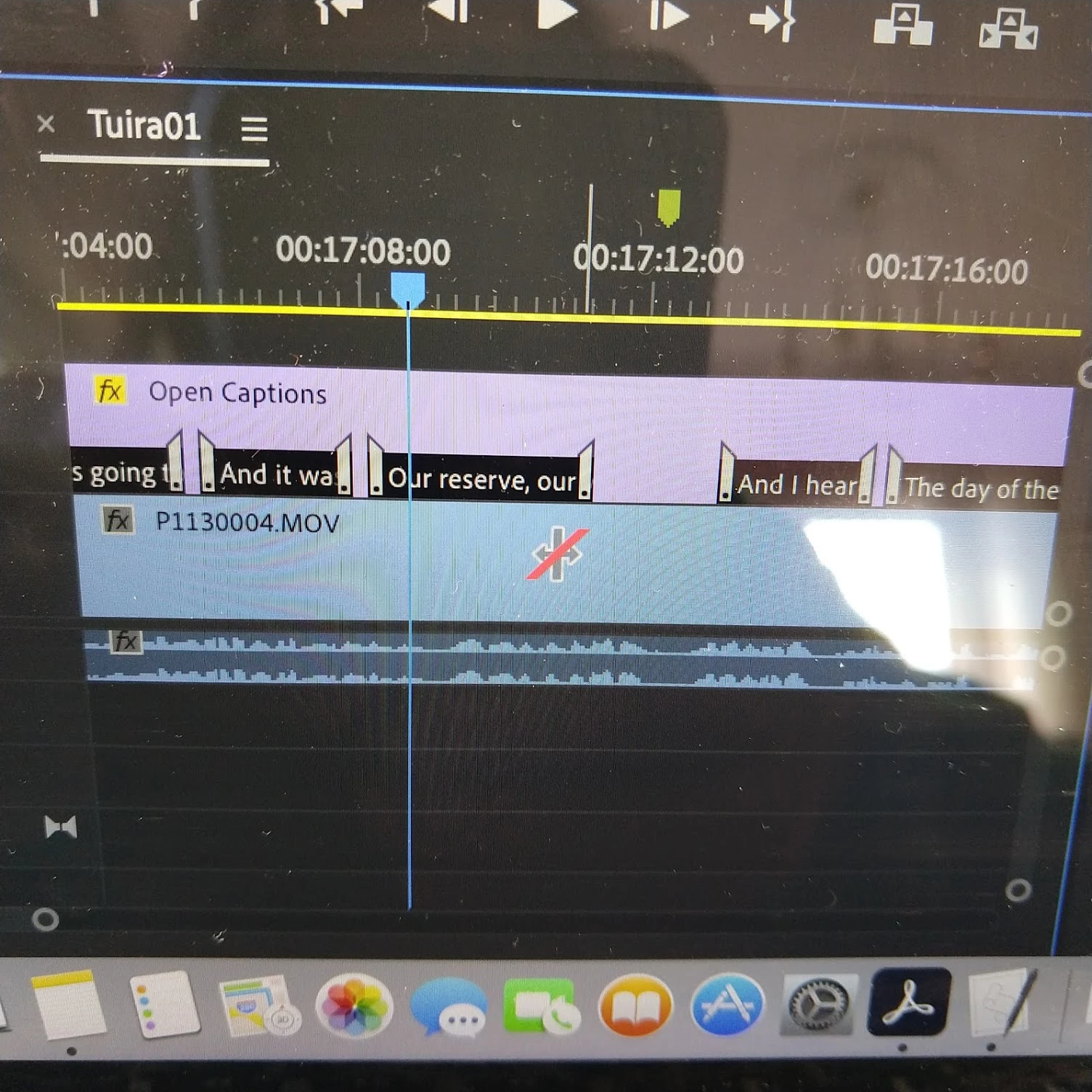
When i try to edit on the timeline, it doesn't allow me to drag the subtitles and i get a red dash on the icon. I am using Pro CC 2019  with MBP 15" 2014 running Mac Os Sierra
This topic has been closed for replies.

3 replies

Stan Jones
Community Expert
Community Expert
December 6, 2020

You're welcome!


Stan

Stan Jones
Community Expert
Community Expert
December 6, 2020

You appear to be using the "Ripple Edit" tool. Use the regular selection tool (plain arrow). Select the caption stream first, then either drag the whole caption or position the tool over the end or beginning and drag left or right.


Stan

Participating Frequently
December 6, 2020

Yes, i am tryig to adjust the captions on the timeline and it is the ripple tool. I used to be able to hover over the captions on the timeline and drag them in or out, now i have this red slash over it.

Participating Frequently
December 6, 2020

Just tried the plain arrow and it worked. I confused it with the "track sleect forward tool"! Thank you!

Ann Bens
Community Expert
Community Expert
December 6, 2020

Dont know what you are trying to achieve but use caption window.
