
zotosv1705518
Participating Frequently
February 6, 2019
Answered

Can't import .avi anyway

  • February 6, 2019
  • 4 replies
  • 32995 views

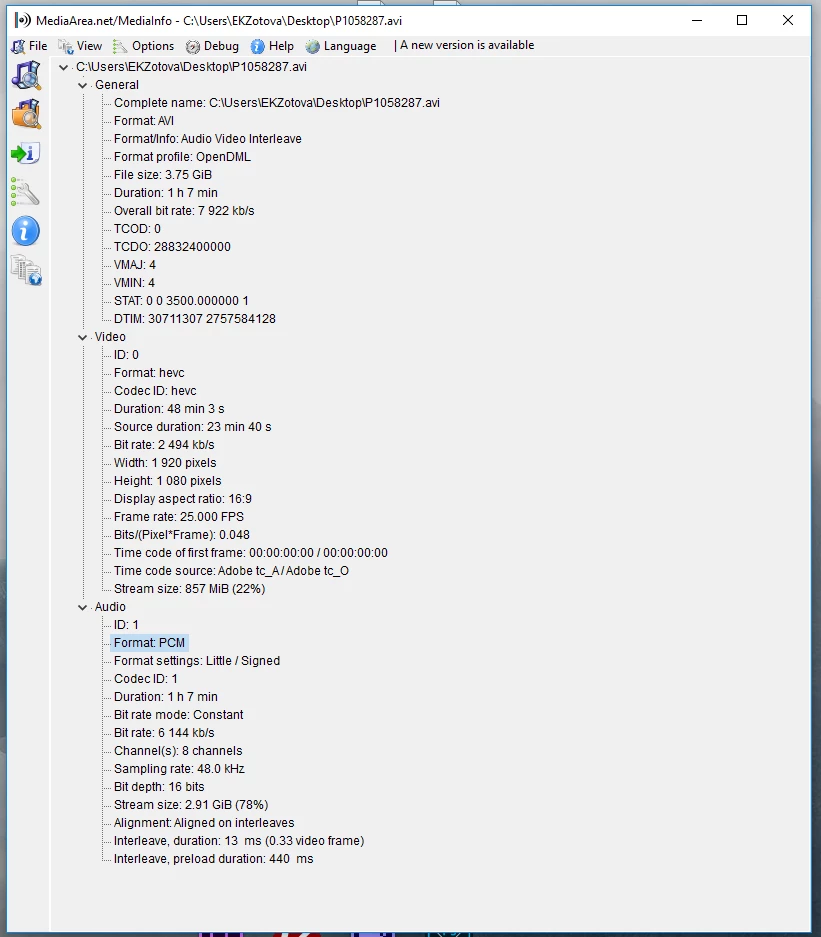
Please help me to import videofile with such parameters. The codec pack K-light is installed, but it still does not work. I do not understand why the file is not imported, files with h265 and pcm codecs can be imported singly.
    This topic has been closed for replies.
    Correct answer Ann Bens

    Never install a codec pack, can mess up your system codecs.

    Premiere does not support avi with 264, so guessing 265 is also not supported.

    Need to convert before bringing it into Pr.

    4 replies

    Inspiring
    May 2, 2021

    Hello everybody.

    zotosv--, I hear ya there... It would be great if they never removed a functionality.  However, that's not exactly a feasible solution for an ever evolving software package, especially one that's recently recoded the engine-packaging handling the work behind the scenes to make use of advanced binary RISC processing built for video (and of course, they did it just as this RISC set came onto the market, to offer more functionality).

    Hope is not lost.  In an effort to provide some backward compatibility, they have made it possible to use CS6 in conjunction with the latest CC.  This was originally meant as a stopgap measure to provide users with Encore Disc Authoring, and for those who worked often enough with it, Dolby DTS or Pro Logic sound (which was still in license at the time; as outlined by a recent civil case).  However, by including this capability, they also enabled the use of codecs dating back to CS3.  If it was availiable in CS3, it *should* work with CS6, and you can *possibly* make your initial recodes with AME CS6.  The problem is where to download a copy, and where to get a key to install it.  This function has become sought after and any retail copies left are being sold off at high prices.  Shop around.

    You *might* get away with a trial install, and a linking to the adobe CC webcloud.  If you have a retail key, find a download somewhere, and install the software.  It will be mostly 32bit, and a little slow on your new machine (the binary instruction sets have to be translated rather than simply run).  You will also want to make sure you are running all the EXE files in the folders as Administrator.  I've had this come up several times as the issue with Adobe software.  Also, some antivirus are now stopping some of these from running unless you explicitly "trust" them in the Antivirus.  My installed software has this issue lately.

    I can also confirm that AVI was a codec provided by DIVX, not by apple.  Apple was able to encode AVI using the basic encoder they purchased from DIVX, but they only bought the basic wrapper, not the inner working.  Older versions of this are not fault tolerant.  If there is any sync issue at all or any variance in frames, your sound will be off sync, among other issues.  However, I can confirm that newer copies of the divx encoder, which make use of the matroska wrapper, fix this variance, and do so capably.  They also have a very fast algorithm for slight enhancement to older video, which I found from an old TMNT VHS rip.  Ahh the 80's synthoid rock and roll theme songs...  That was quality.

    I hope this helps.

    Participant
    October 6, 2020

    I used VLC Media Player to convert the .avi file to .mp4

    Download, install, and open VLC Media Player app

    Click File > Convert > New Window will appear

    1. Add file

    2. Choose profile

    3. Choose Destination

    4. Save

    All done!

    Participant
    April 17, 2022

    This is the easiest and most correct answer on here. It took me less than 2 minutesw to download, install, and then convert. DO NOT try to use handbrake as one user suggested. It did not work and actually messed with my system. It is designed for windows 8 so if you have any version of windows that is newer the handbrake option does not work - but it does now try to load EVERY time I start my computer. 

    Ann Bens
    Community Expert
    Ann BensCommunity ExpertCorrect answer
    Community Expert
    February 6, 2019

    Never install a codec pack, can mess up your system codecs.

    Premiere does not support avi with 264, so guessing 265 is also not supported.

    Need to convert before bringing it into Pr.

    zotosv1705518
    Participating Frequently
    February 6, 2019

    Thank you for the answer.

    I installed a codec pack just because of despair.

    It's a pity that I can do nothing with Premiere pro

    Ann Bens
    Community Expert
    Community Expert
    February 6, 2019

    You can use Premiere if you convert the file first say with HandBrake.

    Community Expert
    February 6, 2019

    Can you play the AVI outside of Premiere? Where did the AVI come from (what created it)?

    Videos may not import and display properly in Premiere if they have employ a particular CODEC (compression) that is not available in Premiere so it is unable to interpret the video.

    zotosv1705518
    Participating Frequently
    February 6, 2019

    Thanx for your answer

    Yes, this video can be played in VLC media player. I recieved this video from business partner.