Participating Frequently
April 6, 2021
Answered

Can't import video twice

  • April 6, 2021
  • 4 replies
  • 1118 views

Hello. I have a very serious problem. From this morning, I can't import video. I import one video, it appear on the timeline, then I can't import others videos. What can I do? I try all import mode. 

This topic has been closed for replies.
Correct answer Ann Bens

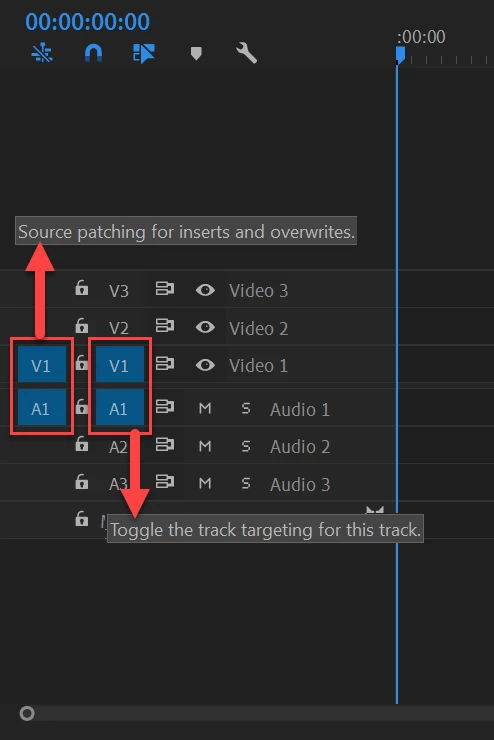
That is what I said: source patching.

4 replies

Participating Frequently
April 6, 2021

SOLVED! V1 button was disabled -_- 

Ann Bens
Community Expert
Ann BensCommunity ExpertCorrect answer
Community Expert
April 6, 2021

That is what I said: source patching.

Participating Frequently
April 6, 2021

oh, sorry, I don't know it was named in this way but honestly i was literaly in panic. Anyway, thank you!!!


Participating Frequently
April 6, 2021

I've try to open old projects: they don't work anymore (I can't import in timeline) 

Participating Frequently
April 6, 2021

i really don't understand what's is going on. Now, I can't import multiple files: Premiere import only on file, and after this, I can't import nothing in timeline. I've updated Premiere with no results. 

Ann Bens
Community Expert
Community Expert
April 6, 2021

Most common user error is not source patching the track.
Solved by first opening clip in Source Monitor, set in and out point. Then drag/insert into timeline.

Participating Frequently
April 6, 2021

I've tried this with no results. My premiere import one file, then, it doens't import anymore. This is happening with all my files, also files that I have successfully edited in the past few weeks.