
Known Participant
August 8, 2017
Question

Can't log into Vimeo/ upload directly to Vimeo from Premiere CC

  • August 8, 2017
  • 19 replies
  • 13376 views

Hello,

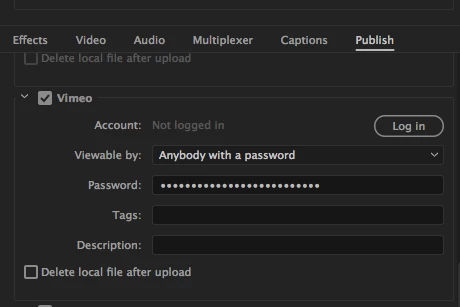
When I try exporting from Premier and attempt log in to Vimeo, as I have for many months now, when I enter my password, it still does not connect, even though I am logged in already to Vimeo. Also, I do not see premiere listed in the connected apps section of Vimeo's preferences either.  any one know why this just started happening?
This topic has been closed for replies.

19 replies

Stan Jones
Community Expert
Community Expert
September 29, 2020

It looks like 3 years, but it is not. This was an old thread regarding a problem that occurred in 2017 and was fixed that year.


The "new" vimeo log in issue appears to have started in April 2020. I know from my own tracking that it changed at some point (summer?), so the "symptom" we were seeing changed. I believe (but don't know for a fact) that part of this was on Vimeo's end. In any event, this was fixed in about 5 months.


Stan

KevSoleil
Participant
February 4, 2021

Just came across this issue today (Feb 2020), most infuriating...

Stan Jones
Community Expert
Community Expert
February 4, 2021

Lol, you mean Feb 2021... The first check I wrote this year was wrong!


This problem happened twice. This thead was from 2017, problem fixed. Then 2020, fixed in version 14.4. See this post here: https://community.adobe.com/t5/premiere-pro/can-t-log-into-vimeo-upload-directly-to-vimeo-from-premiere-cc/m-p/11467911#M301269


If you have version 14.4 or later, then perhaps we have a new version of the problem....


Stan

Participating Frequently
September 29, 2020

Yes - also working for me. What was that - three years to resolve? Unbelievable. Will be intersting to see how long ot lasts...

Community Manager
September 28, 2020
Stan Jones
Community Expert
Community Expert
September 28, 2020

Thanks for reporting this! Yes it is!


Stan

Participant
September 9, 2020

Contact Vimeo. Especially if you're paying for the service - see their response tp my support enquiry below.


My experience is: 


When I log in to vimeo in the export dialogue window I just get the following error:

"Unauthorized
Oops! This action could not be completed because your form session expired. Please make sure your cookies are enabled, then return to the previous page and try again."


Here's the response I've had from Vimeo in relation to this issue:

-----------------
Thank you for bringing this to our attention. We are currently aware of issues that affect the functionality of our upload integration with Adobe Premiere.


All issues on site are prioritized based on severity (functionality vs. appearance) and how many users are affected. Unfortunately, I regret to inform you that these Adobe Premiere issues will not being prioritized by our development team at this time.


Our Support and Product teams will continue to monitor and consider it for future improvement plans. When the development team is able to take the required steps to resolve this issue, we will update you here.


For now, I would recommend that you upload videos to Vimeo via the Upload Page, or the Upload button on the Video Manager
----------------

I'd encourage anyone with the issue to contact Vimeo to push it up the to-do list.

Legend
September 9, 2020

a workaround I mentioned quite a while ago, but in case you haven't waded thru this endless thread:  If you have a dropbox account with sufficient storage, and you have a local folder that automatically mirrors any files you put in this folder (or subfolder), if you export to this folder, when the upload is finished to dropbox (and the mirroring is finished) you can instaneously (well in just a few seconds) transfer to vimeo.  This has been very useful to me when I have an export that's gonna take a few hours or more but don't want to sit twiddling my thumbs at the office.  When I get home, I can log in to vimeo and transfer from dropbox.  It's an option that's not obvious on the vimeo upload page (like much of vimeo's poorly designed interfacwe).

I know this is not ideal and I think adobe's response to this issue is also substandard.  Obviously if it works in earlier versions of the software, there's been some sort of change in the code.  However, this is a very small part of an extremely complex program where other issues probably and should take precedence.  For vimeo, not so much and I suggest anyone who's having this problem, let them know.  FWIW, everytime there's been a failure of support at vimeo and I've called them on it, they've extended the subscription by a month without charge.  We're up to 3 months at this point.  Unfortunately this extension has been to my client's account (not mine).   My client has a premium account since we've been doing video on demand and live streaming accounts so thie 3 months of free service is of a great financial benefit.  There are features to Vimeo that I haven't been able to find elsewhere so we're kind of stuck there (at least until we use up the extension of the subscription).  

Legend
September 9, 2020

also, there is an additional advantage to the dropbox-vimeo workflow.  If you've got a large file and you want to use it in several places in vimeo, for example as a video on demand and as a private password protected link, it's a simple process to "reupload" as there doesn't seem to be anyway to duplicate a file once it's up on vimeo...  no more hours long repeat uploads...  again part of a poorly designed UI...   I understand that these are extraordinary times, but these issues predate the covid issues by many months if not years...   

Stan Jones
Community Expert
Community Expert
September 8, 2020

Barracuda, I suspect this is not really version specific. The first time I tested in, I thought it was working ok, but that was because I was already logged in and had been for a long time. 


I just opened 2018, worked fine (because I had used the beta workaround to get logged in), but when I logged out, I get the "unauthorized" when I try to log in.


Stan

Participant
September 8, 2020

Same problem here.  Was working fine with CC 2017.  Upgraded to CC 2020 now I can't publish directly to Vimeo.   Publishes to YouTube just fine.  But not Vimeo.  I get "Unauthorized Oops! This action could not be completed because your form session expired. Please make sure your cookies are enabled, then return to the previous page and try again."  I did all that .  Still no luck

Stan Jones
Community Expert
Community Expert
September 6, 2020

I am not recommending this, however....


I just discovered that I could log in (i.e "connect") to Vimeo with the public beta (14.4.0.25). Once the log in was complete, PR crashed. I did not see any problems due to the crash, but that's why I say I don't recommend this. But when I reopened regular PR (I'm on 14.3.2) or the beta, I was connected to Vimeo and could publish.


Since this problem with Vimeo only occurs once you are logged out/disconnected, this may be a workaround to get reconnected until it is fixed.


It also suggests to me that this problem may (now) be on the Adobe side. I say "now" because the problem behavior changed some time ago on the Vimeo end.


Stan

Participant
July 29, 2020

Same problem here, really hoping for a fix, haven't been able to 'render to Vimeo' for quite some time now.

JJHART
Participant
August 22, 2020

Still no fix?

Participating Frequently
September 3, 2020

September 3, still no fix.

epassanesi
Participant
July 27, 2020

Any update on this? As of July 2020 on the most up to date version of Premiere, when I try to login through the "Publish" tab to my Vimeo account I keep getting "Unauthorized because the browser does not allow cookies". The "browser" window that pops up to login is not even my browser, it's Adobe's popup login browser. The only workaround I could think of would be to use the Vimeo panel, but then I can't use the newly optimized hardware encoding settings for H.264 and H.265. Please help, this function used to work seamlessly, and now is broken.

Participating Frequently
July 27, 2020

Same issue on my side also. No solution from Vimeo either.

patrickc22018738
Participant
July 21, 2020

Hello, 

Any updates on this, it breaks my workflow a lot and it's an open issue for over 3 years now. If there's a workaround beside moving all my workflow to DaVinci that would be great. 

Participating Frequently
July 22, 2020

Nope. Still not solved even after contacting Vimeo.