

dparsons85
Legend
January 31, 2018
Answered

Can't move any items to bins

  • January 31, 2018
  • 7 replies
  • 9413 views

When I try to move an item into a different bin I get a popup essentially telling me I can't do that (see image below - red circle with slash). There is no indication as to when this is going to happen or how to stop it.
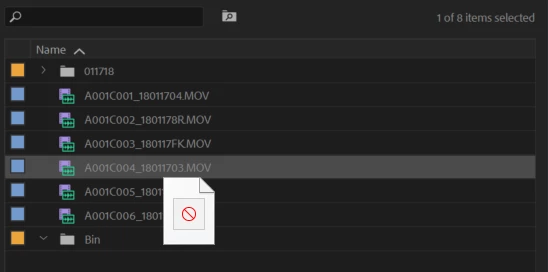

This has also happened to me in After Effects, see this thread: Can't move anything to different folders

On occasion I have been able to fix it by closing the project, clearing the caches, rebooting, and reopening the project. This doesn't work every time and I can't figure out why. Importing the project into a new project doesn't help either and I've even gone as far as to just open a new project, create a bin and blank video to see if I can move the blank video into the bin and it won't let me so this isn't project specific.

The project I'm currently working on was started in CC 2017 but when I ran into this issue I imported the project into CC 2018 thinking maybe that would fix it but no, it also happened in PPro CC 2018.

Any and all help is appreciated. Thanks!

    This topic has been closed for replies.
    Correct answer dparsons85

    Thanks Jim! You're right, after looking around it seems to be a problem with my dual monitor setup. If I have the project panel on my second monitor there's a large portion of the bins I can't drag to, BUT if I drag the file to the right most part of the bin window it works.

    What's weird is I can't get that circle with slash to appear at all if I have my project panel in my main monitor, probably why I never saw it before.

    7 replies

    Participating Frequently
    January 28, 2021

    I ran into this recently - couldn't move a sequence into another bin.  When I removed linked ae comps from the sequence I was able to move sequences into other bins again.   So, I'm gonna say that this issue is not a 2-monitor issue for me, but rather a piece of corrupt media or a software glitch with Premiere. 

    Up to now, I have avoided the linked comps path, instead choosing to render and import the old fashioned way.   I was collaborating with a team that made it sound like it was worth trying again, but nope, thumbs down from me on linked ae comps for this other reasons. 


    Participant
    November 19, 2020

    I just fixed this by starting Premiere on my primary screen which is a laptop, then switchnig to the dual screen setup that I notmally use. I've experienced a few different issues with Premiere over the years apparently related to using a laptop with an external montotor. Similar to the dual screen situation possibly. But this has fixed them. I even start with the external monitor unplugged to be sure, but it may not be necessary. I'll open a project and click on something to get started. Then I can move it to the main screen, and the problem is gone. I'd expect to do with restart though, until the bug is fixed. 

    Participant
    November 25, 2020

    I am having this same problem. It is driving me nuts, bins give me the ban sign when I try to move clips or shift from one bin to the next when I am working with 2 monitors, but on one monitor it's fine. I have so many clips and work at a quick pace I can't do it on one monitor. Restart does not help. Would be great if Adobe could fix this.

    Kevin-Monahan
    Community Manager
    Community Manager
    December 10, 2020

    It should be fixed in 14.6. Have you updated yet, Nate?

    Thanks,
    Kevin

    Kevin Monahan - Sr. Community and Engagement Strategist – Adobe Pro Video and Audio
    Participant
    November 10, 2020

    Yes I am having the same problem. MacBook Pro (16-inch, 2019) with Apple Thunderbolt Display 27 inch.

    Adobe please fix this bug. Thanks!

    Mohamed Ali Ben Thaier
    Inspiring
    November 9, 2020
    Erik Hutch
    Inspiring
    November 9, 2020

    Thank you Mohammed.  Yes, I've tried this method and sometimes it works, other times it doesn't.


    Participating Frequently
    April 9, 2020

    Running several monitors next to a 2019 iMac, and this same issue on a vertical LG monitor on Premiere Pro 2020.


    Wouldn't let me drop files in certain folders.


    This post helped me. In my case, there was a circle and slash over the the little hand. But when I moved the bin slightly from the edge of the screen, everything back to normal. Almost like the edge of the bin was reading to be slightly off the screen? 


    Still doesn't totally make sense to me, but I glad there is something to be done.

    vagabond52
    Participant
    October 31, 2020

    Just reporting that as of Oct 31, 2020 this is still an issue.

    paulf2020
    Participant
    November 1, 2020
     

    This issue is driving me nuts.  Have searched everywhere and no luck.

     
    Legend
    January 31, 2018

    I get a similar circle with slash...until I actually move the mouse over a bin.

    dparsons85
    dparsons85AuthorCorrect answer
    Legend
    January 31, 2018

    Thanks Jim! You're right, after looking around it seems to be a problem with my dual monitor setup. If I have the project panel on my second monitor there's a large portion of the bins I can't drag to, BUT if I drag the file to the right most part of the bin window it works.

    What's weird is I can't get that circle with slash to appear at all if I have my project panel in my main monitor, probably why I never saw it before.

    dparsons85
    Legend
    January 31, 2018

    Forgot to mention I'm on Windows 10, not sure if that matters.