


Can't Open Project Files After 2017 Update
After updating to the 2017 version of Premiere Pro, my older project files (created in the 2015.3 version) have lost the file association with Premiere Pro CC in Windows 7 x64. I tried to recreate the association by right-clicking on the file and selecting "Open with." Premiere Pro CC 2017 is not listed in the Recommended Programs section, or in the Other Programs section. So I click the Browse button, navigate to the "Adobe Premiere Pro.exe" in my Program Files folder, and select it as the default program. The problem is, it doesn't update. When I click Ok, it just selects Adobe Acrobat Reader DC instead.
The screenshot below shows that the recommended programs list does not include Premiere Pro.
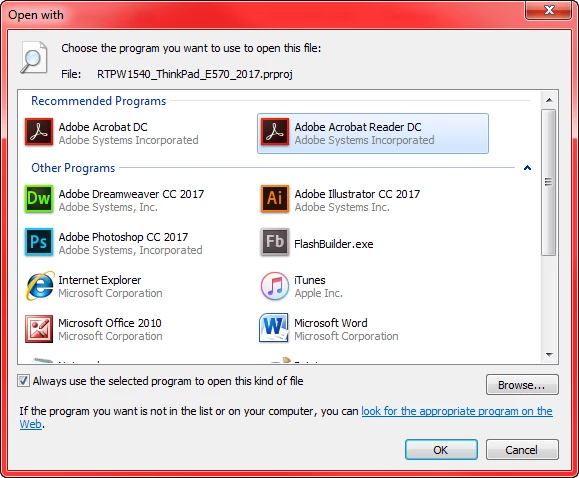
I have restarted and tried to recreate the association multiple times, but I have had no luck.
On a positive note, I can open Premiere Pro, select "Open Project" and navigate to the project file to get it to open that way. The problem is, I have to do it that way every time, even after I convert it to a 2017 version and save it.
Any suggestions?
 AdChoices