Participant
January 6, 2025
Answered

Cannot export selector 9 error code 6

  • January 6, 2025
  • 4 replies
  • 1560 views

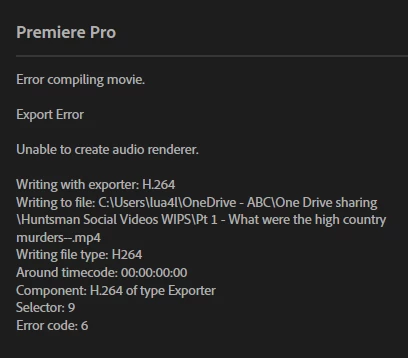
Cannot export a project. I keep getting the error below. Can anyone help? 
Correct answer Kevin-Monahan

Hello @Angelique_4302,

Thanks for the note. Error code 6 is an unknown error, however, chossing File > Save As, then renaming the project file can work, as it has for others troubleshooting the error. If it does not, try the same to a secondary drive. Please also avoid any interaction with "One Drive." I would avoid One Drive for the File > Save As for your first step. Let us know if it works.


Cheers,
Kevin


4 replies

Participant
April 8, 2025

Hi, I just had this and tried all the suggested workarounds but nothing seemed to work. I was trying to export a 40 minute multicam sequence that had been sent over from someone else (who was also having this problem). What seemed to work for me was copying everything in the sequence, opening up a different project, creating a new sequence, and pasting it all in there. It exported fine after that. 

Kevin-Monahan
Community Manager
Kevin-MonahanCommunity ManagerCorrect answer
Community Manager
January 7, 2025

Hello @Angelique_4302,

Thanks for the note. Error code 6 is an unknown error, however, chossing File > Save As, then renaming the project file can work, as it has for others troubleshooting the error. If it does not, try the same to a secondary drive. Please also avoid any interaction with "One Drive." I would avoid One Drive for the File > Save As for your first step. Let us know if it works.


Cheers,
Kevin


Kevin Monahan - Sr. Community & Engagement Strategist – Pro Video and Audio
Participant
January 7, 2025

Hi Kevin, 


Thank you so much! This was the fix! Not exporting to One Drive and clicking "save as" and renaming the project did the trick. Thank you! It's very much appreciated! 

Kevin-Monahan
Community Manager
Community Manager
January 7, 2025

It makes me happy to have helped you. If you ever have a need to troubleshoot error codes again, this thread may help. FAQ: Fix Error Compiling Movie errors in Premiere Pro.


Cheers,

Kevin


Kevin Monahan - Sr. Community & Engagement Strategist – Pro Video and Audio
Peru Bob
Community Expert
Community Expert
January 6, 2025

You can try turning off Hardware encoding in the export settings.

Even if that works, I would take the advice of Ann Bens .

Participant
January 6, 2025

Thanks so much for replying. I have changed Hardware Encoding to Software Encoding and changed the export location to an external drive but still no luck

Ann Bens
Community Expert
Community Expert
January 6, 2025

One drive is grand for backup but not for editing.

Use a local or external drive.

If your audio is mp3, convert to wave or Render and Replace.
