Participating Frequently
November 24, 2020
Question

Cannot Sign in to YouTube

  • November 24, 2020
  • 6 replies
  • 8618 views

Hey,

I cannot Sign In to my YouTube account via premiere Pro on PC.

I could sign in with my other channel, but with the other one it doesent work...

Always this error appears:
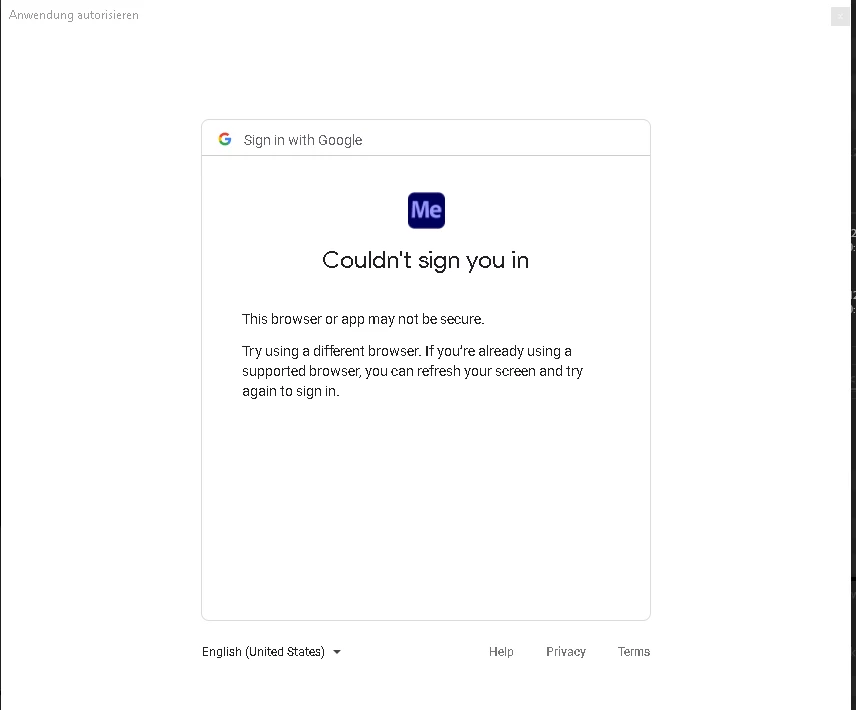
 

What can i do?


Thanks in advance!

This topic has been closed for replies.

6 replies

Participant
April 19, 2022

For anyone still having the issue. I just had it, i kept clicking sign-in for youtube in PP export settings, it would take me to the google page, i did the already signed in account a few times as well as just manually logged in. Accepted the privacy warning and then it goes to the "successfully logged in return to premier" page. And would not do anything. I kept getting an annoying pop up in premier saying to sign in using my browser and only after the 4th time, did it actually take me back to premier and the pop up went away... BUT NO SIGN OF LOG IN UNDER THE PUNLISH TAB. I TRIED VIA MEDIA ENCODER OR WHATEVER IT IS AND SAME THING. I TRIED CHANGING MY DEFAULT BROWSER TO SAFARI, SEARCHED THROUGH YOUTUBE & GOOGLE SETTINGS. GAVE UP AND JUST RESTARTED MY COMPUTER. OPENED PREMIERE , SET THE EXPORT SETTINGS.


>>>>>>>>>>>> AND THEEENNN I DECIDED TO REMOVE THE 2-STEP AUTHORIZATION FROM MY YOUTUBE VIA GOOGLE.  <<<<<<<<<<


Attempted to sign in again via premiere, and im not sure if i clicked the already signed in account, or manually logged in, but it worked, brought me back to premiere and it was now confirmed i was logged in. Exporting a 4k 2 hour podcast episode that has been scheduled to be available today and was not going to export and upload seperately lol. 


P.s : after restarting my computer, my Creative Cloud was running coincidentally the only time i was able to log in to youtube via premiere successfully. I usually have it completely off, not in the background. But it default opens at start up for me. Just another potential troubleshoot option. Not sure which one was the trigger but it was either:


1. restart computer after a few successful yet failed attempts.

2. turn off 2-FA Verification Via Google Account Privacy/Protection settings.

3. If your Adobe Creative Cloud is not Open when your attempts failed, maybe try opening it, give it a second to catch up, and try again. (Granted, i dont think this had something to do with it, but the thought of the cloud and active internet connection via your adobe account to recieve the confirmation of permission from google could be a theory in my head right now at 7:30 am after a long night. 

good luck! 

Participant
July 15, 2021

I need some healp to i cant login in Adobe Premier Pro whit my YouTube channel bcs he say that the browser or the Aplication si not secure pls i need help 


anissa_thompson
Community Expert
Community Expert
February 4, 2021

Here's my work-around, and yes I know, it's for Rush, but it should have the same result for Premiere Pro - you'll need to head over to MEDIA ENCODER to get it to work:

(* #madewithrush + used my own solution to upload this video to YouTube 👍) Hope this helps!


https://www.youtube.com/watch?v=6oGlaa5gA04&feature=emb_logo


Hope this helps! Make sure to press "✔ Correct Answer" on this post if this answers your question. Happy Creating!Anissa • @anissat
Kevin-Monahan
Community Manager
Community Manager
March 2, 2021

Excellent job, Anissa!

Kevin

Kevin Monahan - Sr. Community and Engagement Strategist – Adobe Pro Video and Audio
Stan Jones
Community Expert
Community Expert
January 7, 2021

For a problem some time back (that affected both Youtube and Vimeo), I never did find any cached settings, but I believe they are there somewhere!


You can try resetting preferences.


I have one account and two channels. 


I just noticed that you can click on the plus sign to the right of the "channel" indication and it prompts you to authenticate one channel or the other. I did not sign out before doing that. I add the image below.


Here are two other threads that may give you some ideas on what problems  have occurred and how users have tried to fix them. As noted, both of those problems (2019 and 2020) appear to be fixed.

https://community.adobe.com/t5/adobe-media-encoder/ame-and-premiere-cannot-log-out-of-vimeo/m-p/11495741?page=1#M10710

https://community.adobe.com/t5/premiere-pro/can-t-log-into-vimeo-upload-directly-to-vimeo-from-premiere-cc/m-p/11467911?page=4#M301269


Stan


Inspiring
January 7, 2021

Hello,

Many thanks. I tried a lot of thinks, resets, etc... on premiere and Media encoder, nothing helps.

I finaly try with a complete NEW google/Youtube account, created with all default setings AND IT WORKS

without any problem

So some thing is going wrong in my youtube account, I did not fing any seting to allow media encoder to connect.

As every thing is the same on my PC side, the youtube account must have some thing wrong.

I will compare window by window both accounts and try to find out

Any idea ?

Thanks for your help

Jean


Inspiring
January 15, 2021

I have this problem as well, but creating a new account is not an option, as it is a client channel with a signficant amount of content.  Has anyone solved this issue? 


Stan Jones
Community Expert
Community Expert
January 6, 2021

I just tested by opening Export Settings dialogue, logging out and then logging in. I did not have a problem, and I was also given the choice of which channel to use.


For my Google/Youtube account, I have 2 step authentication, so it prompts me on my phone to allow the log in. It you don't do that a) it is a good idea and b) that might be the security issue they are indicating.


Stan


Inspiring
January 6, 2021

Hello, many thanksfor tis advice. I added the 2 steps authentification on my youtube account. It seems OK.

But I still got the same message in Premiere when I try to connect to Youtube for export.

Is your account the primary account or an other account with Youtube update authorisation?

Is it necessary to clear some cached parameters in ME ?

Thanks for your help


Stan Jones
Community Expert
Community Expert
November 24, 2020

What specific dot version of PR are you running? There was a problem in the past, but I thought it was solved.


I wonder if you are seeing an issue similar to one I discovered a few days ago... Youtube acts as if I have two "accounts" and channels (one branded; one not). However, I have discovered that they are actually one account in Google's eyes. So I get some odd results.


BUT, when I just tested this, when I login to Youtube in the PR Sign in, it says "Choose your account or a brand account," and I can pick one of two. And both work okay. The password seems baked in once used. 


Stan


DJ-TAuthor
Participating Frequently
November 24, 2020

@Stan JonesI run Adobe Premiere Pro 2020 Version 14.0. And yes your Channel (if it is a  Brand account) and your account are two different things with one E-mail and password. The thig is, with my other account/channel it worked just fine and I could choose my Brand Account...


DJ-TAuthor
Participating Frequently
November 24, 2020

@Stan JonesOne question (idk if you know that tho): hwo can I remove my one google accpunt out of premiere? It doesent appear in the Channel selection Drop down anymore, but it still appears in the login window...