Canon 5D Mark IV 4K Video only shows audio in Premiere Pro CS6
DESCRIPTION OF PROBLEM
I just purchased a Canon 5D Mark IV. I am having trouble with 4K video in Premiere Pro CS6.
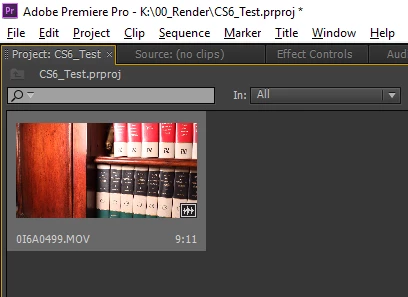
Main problem: When I import the file, Premiere only shows the audio, but not video for my 4k video files.
I do not have this problem with 1080 video, only 4k. I am recording 4k at 23.98 in MJPG.
The file will play in VLC media player. I can also run it through Handbrake and output it with "production standard" settings (converting it from MOV to M4P file type), then open it with Premiere CS6. From there I am able to work with the file (both audio and video show as expected) and export it at 1080 with other 1080 files from another camera - I only intend to output at 1080 in foreseeable future.
Is there a way to open 4K video from the 5D Mark IV directly in Premiere CS6?
Is Premiere CS6 missing an important codec that VLC has?
COMPUTER INFO
- OS: Windows 10 Pro
- Processor: Intel Core i7-6700 CPU @ 3.40GHz
- Installed memory: 32.0 GB
- System type: 64-bit Operating System, x64-based processor
- Graphics Card: NVIDIA® GeForce® GTX 750Ti with 2GB GDDR5 Graphics Memory
- Premiere Version: Premiere Pro CS6 Version 6.0.5
FAILED FIX ATTEMPTS
- Load all Canon software in hopes of loading proper codec
- Attempted to update Premiere Pro CS6 - already up to date
- Restart Premiere Pro CS6 after Canon software install
- Restart computer after installs
[Here is the list of all Adobe forums... https://forums.adobe.com/welcome]
[Moved from Premiere Pro NEW to Premiere Pro OLD... Mod]

 AdChoices