
Participant
June 26, 2018
Answered

Caption Edits Not Showing

  • June 26, 2018
  • 2 replies
  • 3377 views

Hello, I just want to start out that I have next to no knowledge on using Priemere, besides some basic cutting together of videos. I have much more experience in other Adobe products, so I'm familiar with some of their logic.

This may very well be something stupid on the user end, but I haven't figured it out yet.

We received an mp4 from a client and created captions and time coding, which was exported in an SRT file. We then imported both the mp4 and srt into Premiere to burn the captions into the video. I dragged the video and caption files on the timeline, and the captions show, but when I try to edit the text formatting (size, position, color etc.) it shows in the preview in the caption window and not the video preview (or whatever the window is in the top right of the default layout).

Do I need to refresh the video preview somewhere? Is there a save, or an apply button I'm missing? Here is a screenshot of the whole Premiere window. I changed the text formatting pretty extremely to show my point.
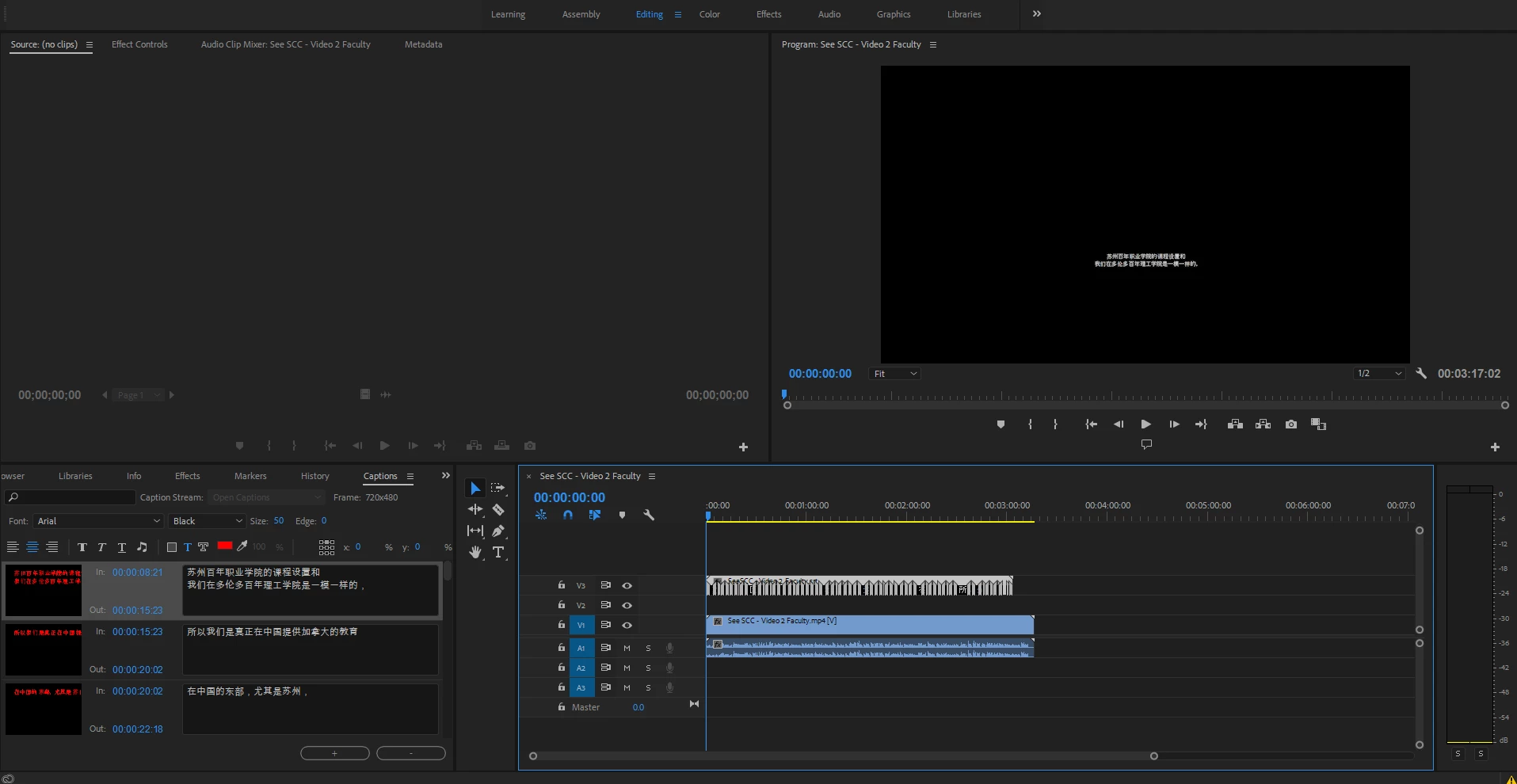
What am I missing??

This topic has been closed for replies.
Correct answer Stan Jones

There are other threads on this problem. It appears intermittent, so hard to replicate reliably. Yes, it appears that the changes in the captions panel get unsynced from the display. My tests confirm that the captions panel is the more reliable guide to what will actually end up saved in the project file.

I have not confirmed a reliable workaround, but saving the project, closing, then reopening has the best shot.

Since the problem is intermittent, I have not yet tested it on the new release, 2018.1.2.

I have not found a problem in 2018.1.1 with editing colors, etc, as long as the edit results are appearing!

2 replies

Ann Bens
Community Expert
Community Expert
July 19, 2018

What are your sequence settings?

Are the captions the same size as the sequence?

Stan Jones
Community Expert
Community Expert
July 19, 2018

Ann's point is a good one. If there is a mismatch in the caption stream size and the sequence size, the captions will not show in the program monitor. There is a different problem where captions that showed at one point no longer show under some conditions that I have not been able to replicate reliably.

jonathansqvc
Participant
July 19, 2018

I have the same issue.

  • Running Adobe Premiere CC2018 Premiere V12.1.1
  • Import a .srt file
  • Add the .srt file over the top of my video
  • Try to alter the captions size
  • Size change only takes place to the caption in the small preview window next to the text in the caption tab not to the display in the program monitor.
  • Its as if the captions are not actually editable even though all the edit parameters are active!

Its worth noting Open Captions created in Premiere V12.1.1 do allow for the amending of their size, colour etc.

Stan Jones
Community Expert
Stan JonesCommunity ExpertCorrect answer
Community Expert
July 19, 2018

There are other threads on this problem. It appears intermittent, so hard to replicate reliably. Yes, it appears that the changes in the captions panel get unsynced from the display. My tests confirm that the captions panel is the more reliable guide to what will actually end up saved in the project file.

I have not confirmed a reliable workaround, but saving the project, closing, then reopening has the best shot.

Since the problem is intermittent, I have not yet tested it on the new release, 2018.1.2.

I have not found a problem in 2018.1.1 with editing colors, etc, as long as the edit results are appearing!

jonathansqvc
Participant
July 19, 2018

Yes it would seem that the changes that I applied to the captions, which could just about be seen in the small preview window, do get applied once I saved and quit Premiere.  On reopening the project subsequent changes to font, colour etc. instantly get updated in the program monitor.