
Participant
January 4, 2017
Answered

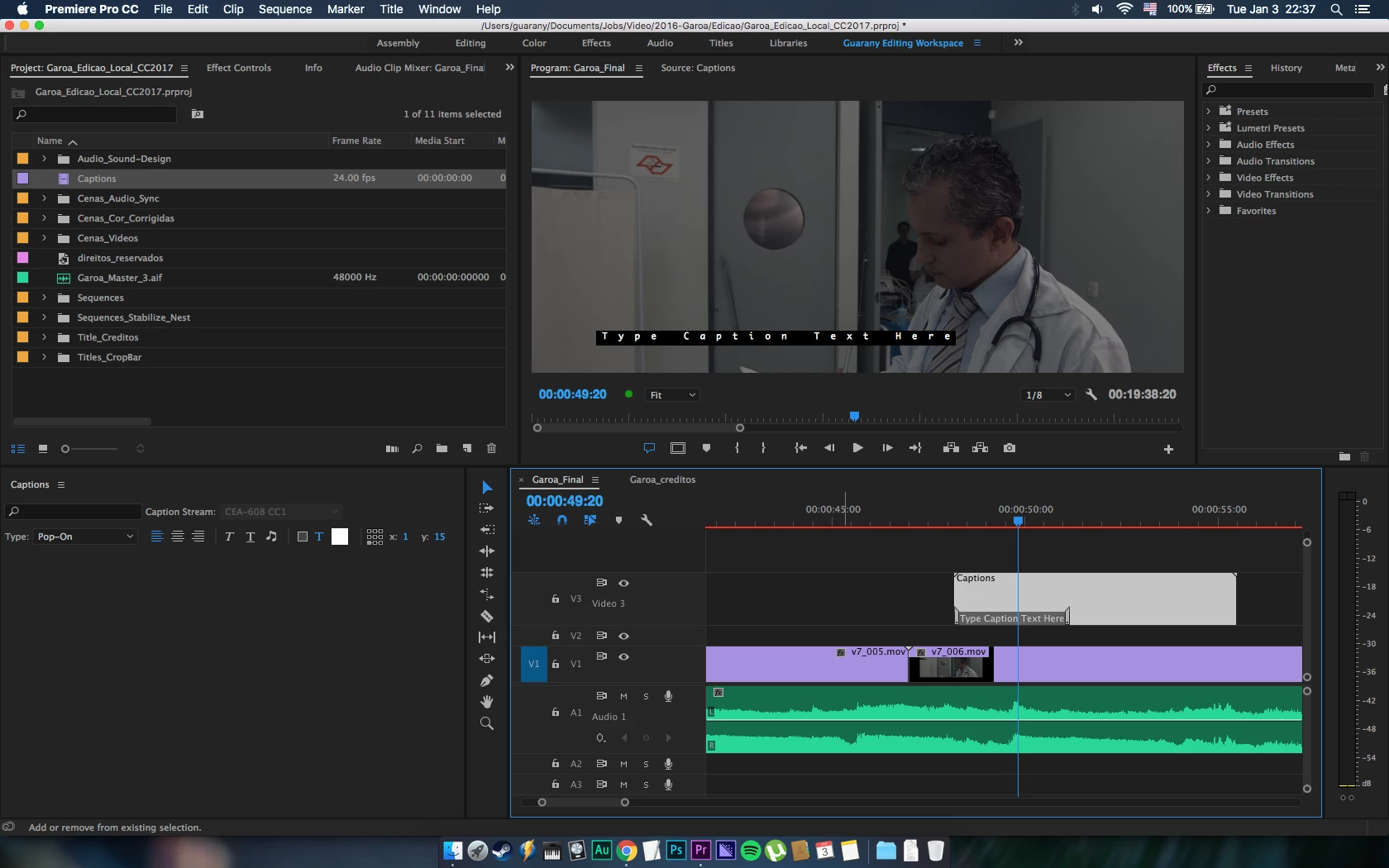
Caption window doesn't have editor options

  • January 4, 2017
  • 2 replies
  • 2076 views

Hi,

This is the first time I'm trying to simplify my work, using the captions tools, so I can use to make a CC, OC and a SRT.
Tee point is, that my caption window doesn't show up any editor tool, see screenshot to clarify.

Thanks in advance...
Correct answer GabrielGuarany

Hi,

Thanks, the solution it was almost like your options.

I opened a new project and the caption window was Ok, so when I got back all was fine. I have no idea what could be, but now it's fine.

2 replies

Ann Bens
Community Expert
Community Expert
January 4, 2017

Pick one of the standard workspaces and Reset to Saved Layout.

Try again.

Participant
January 4, 2017

I did that before. I think it was something with initialization, I don't know. But now it's working fine.

Thanks a lot

Vidya Sagar
Adobe Employee
Adobe Employee
January 4, 2017

Hi Gabrielguarany,

Just for test, create a new caption file & check the captions panel to edit.

If issue persists, change the workspace to Editing & check.

If issue persists,

Go to the following location in the machine

    In Mac, Documents > Adobe > Premiere Pro > 11.0

     Rename the 11.0 folder to Old_11.0

     Launch Premiere Pro, Create a new project(do not open Old projects)

     In Menu bar, Window > Workspace > Uncheck Import Workspace from Projects.

     Open the old project & check the issue.

Please let us know the status of the issue.

Thanks,

Vidya Sagar.

GabrielGuaranyAuthorCorrect answer
Participant
January 4, 2017

Hi,

Thanks, the solution it was almost like your options.

I opened a new project and the caption window was Ok, so when I got back all was fine. I have no idea what could be, but now it's fine.

Participant
January 17, 2025

Yeah, this doesn't work.