Participant
March 5, 2021
Answered

Captions not visible in timeline (Premiere Pro 14.9 and earlier)

  • March 5, 2021
  • 2 replies
  • 548 views

I can create captions but only the first one appers in the timeline and the program monitor. The other ones, although in the captions pane, aren't visible anywhere else.

I'm creating the captions manually, not importing a file.

The other issue is even though I position the curser in the right place on the timeline, the timecode of each new caption starts the frame after the previous one.  I have to manually enter the start and end caption timecode. But the new captions aren't visible anyway.

I've quit and restarted a couple of time but it doesn't make any difference. I'm using PP14.8

Any clues how to fix would be most welcome?
This topic has been closed for replies.
Correct answer Stan Jones

You have to drag out the caption stream in the timeline.


Stan


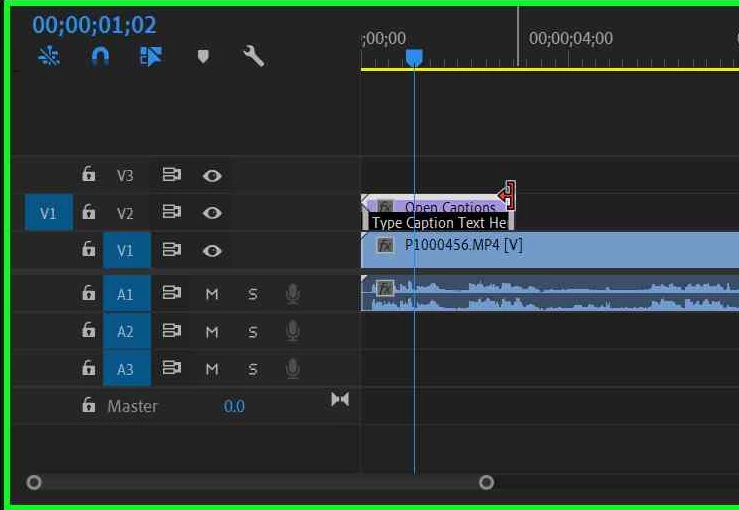
Select the caption stream in the timeline and get the drag indicator:


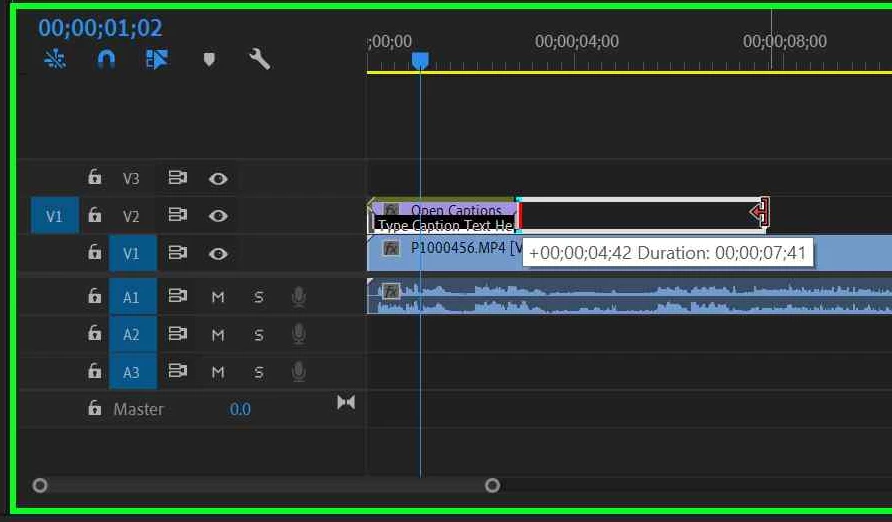
Left click and drag it out:


2 replies

Participant
March 13, 2021

Thanks Stan that worked for me.  It also helped when I imported some stills and struggled to make them longer than 1f in the timeline.  Dragging them out sorted me! I've spent too much time in PP and am only just starting AE - now I know!! Thanks.

Stan Jones
Community Expert
Stan JonesCommunity ExpertCorrect answer
Community Expert
March 5, 2021

You have to drag out the caption stream in the timeline.


Stan


Select the caption stream in the timeline and get the drag indicator:


Left click and drag it out: