

Exit
  • Global community
    • Language:
      • Deutsch
      • English
      • Español
      • Français
      • Português
  • 日本語コミュニティ
  • 한국 커뮤니티
0

Capture DV impossible, only HDV available ?

Community Beginner ,
May 03, 2021 May 03, 2021

Hello,

I've got a lot of MiniDV tapes but after uploaded PP on the lastest MacBook Air M1, impossible to choose DV in capture format, only HDV but it doesn't work ... Is it a problem with M1 ? 
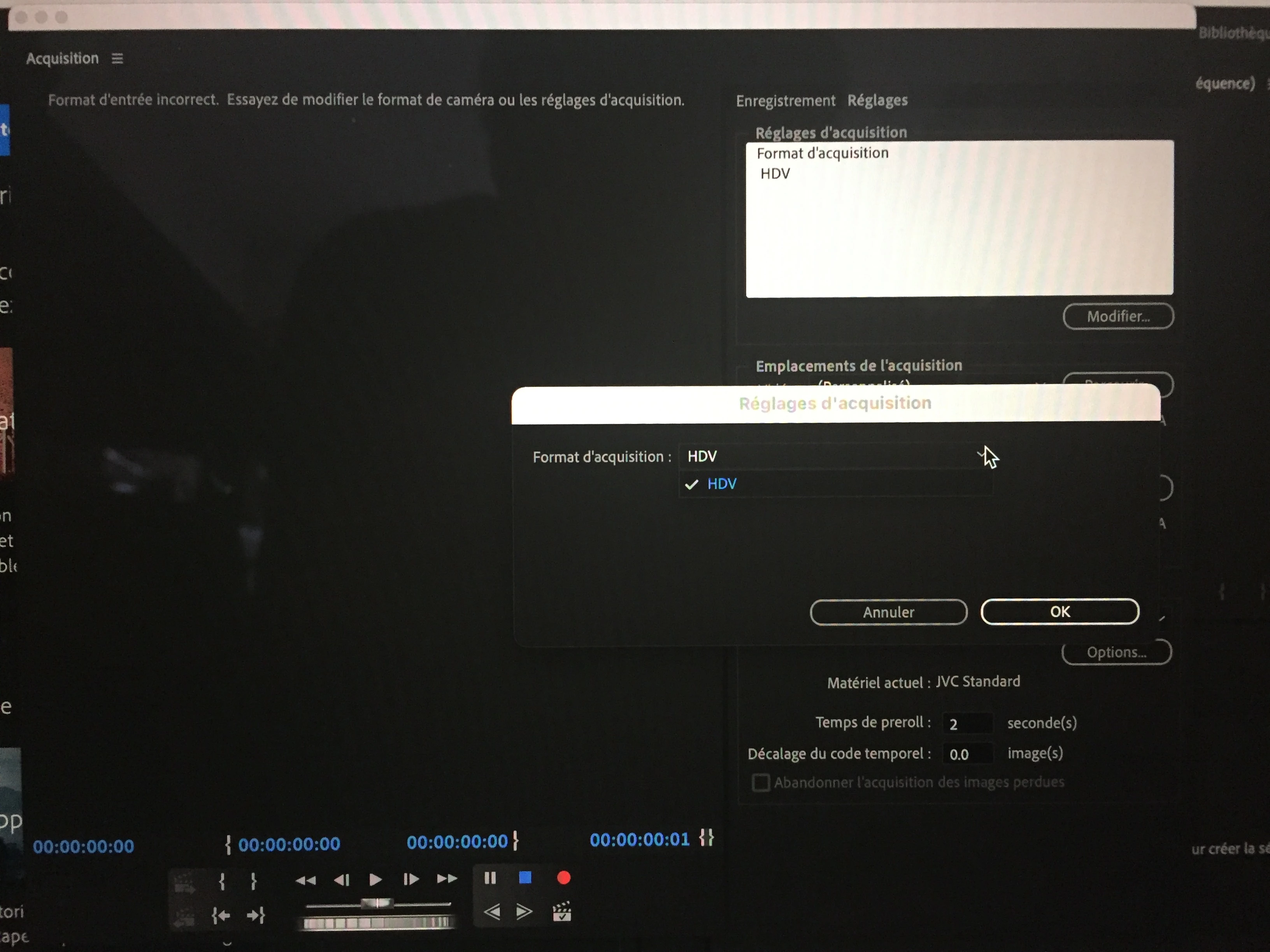
 

IMG_4302.jpg

TOPICS
Formats , Import
2.5K
Translate
Report
Community guidelines
Be kind and respectful, give credit to the original source of content, and search for duplicates before posting. Learn more
community guidelines

correct answers 1 Correct answer

LEGEND , May 03, 2021 May 03, 2021

I am sorry to tell you this, but beginning with OSX 10.15 Catalina, DV is no longer supported anymore. It had been depreciated since OSX 10.13 High Sierra.


And yes, DV is now EOL even for Intel-powered Macs.


And if your Mac originally came with Catalina or newer, then you're out of luck since you cannot downgrade the OS to a version that's older than what that particular model was originally released with.

Translate
LEGEND ,
May 03, 2021 May 03, 2021

I am sorry to tell you this, but beginning with OSX 10.15 Catalina, DV is no longer supported anymore. It had been depreciated since OSX 10.13 High Sierra.


And yes, DV is now EOL even for Intel-powered Macs.


And if your Mac originally came with Catalina or newer, then you're out of luck since you cannot downgrade the OS to a version that's older than what that particular model was originally released with.

Translate
Report
Community guidelines
Be kind and respectful, give credit to the original source of content, and search for duplicates before posting. Learn more
community guidelines
Community Beginner ,
May 03, 2021 May 03, 2021

Thank you.

I've got an older MacBook Pro with OS Sierra 10.12, do you think DV could be selected with the latest version of PP ?

Translate
Report
Community guidelines
Be kind and respectful, give credit to the original source of content, and search for duplicates before posting. Learn more
community guidelines
LEGEND ,
May 03, 2021 May 03, 2021

No. The newest version of Premiere Pro now requires OSX 10.14 or higher just to even install at all.

Translate
Report
Community guidelines
Be kind and respectful, give credit to the original source of content, and search for duplicates before posting. Learn more
community guidelines
Community Beginner ,
May 03, 2021 May 03, 2021

Outch ... And do you think possible to get an older version of PP with Adobe ?

Translate
Report
Community guidelines
Be kind and respectful, give credit to the original source of content, and search for duplicates before posting. Learn more
community guidelines
Community Expert ,
May 03, 2021 May 03, 2021

No.  Only the current and one previous version of Premiere Pro CC are available from Adobe.


You might find older downloads here:

https://prodesigntools.com/adobe-cc-updates-direct-links-mac.html

Translate
Report
Community guidelines
Be kind and respectful, give credit to the original source of content, and search for duplicates before posting. Learn more
community guidelines
LEGEND ,
May 03, 2021 May 03, 2021

Capture of DV footage is far from "EOL" unless you are strictly talking about Premiere Pro.

I am capturing all of my old DV tapes right now on a 2019 MacBook Pro running Big Sur 11.2.3.

I use several tools, some free with macOS and some not.

I can use 2 different connections to the MBP.

Free tools:

  • QuickTime Player
  • iMovie

Not free tools:

  • Final Cut Pro X
  • LifeFlix

If you want, I can talk about the benefits/limitations of each and go more in-depth to my connections. The good part is, once the video is captured to .mov files, Pr will import and edit them very well.

Translate
Report
Community guidelines
Be kind and respectful, give credit to the original source of content, and search for duplicates before posting. Learn more
community guidelines
Community Beginner ,
May 04, 2021 May 04, 2021

In fact, I'm looking for an app whith the possibility to unselect the Automatic Scene Detection wich is not possible with Final Cut Pro or iMovie. I've got a problem with captures of DV footage on those aps: during capture, camera screen and control windows show a film totaly fluid but the final result is a fragmented movie with frame jumps when stitched together. So, another application able to unselect detection might be fine. Could you chek if LifeFlix do this, please ?

Sorry for my bad english ... 

Translate
Report
Community guidelines
Be kind and respectful, give credit to the original source of content, and search for duplicates before posting. Learn more
community guidelines
LEGEND ,
May 04, 2021 May 04, 2021

Your English is fine. 

QuickTime Player will capture the whole tape in one go. The only caveat is that if there are timecode breaks or dropped frames due to tape degradation, QTP will abort the capture. 

LifeFlix will also do scene detection based on timecode or dropped frames, but their stitching utility seems to do a better job than Joining them in FCPX's project timeline. 

Translate
Report
Community guidelines
Be kind and respectful, give credit to the original source of content, and search for duplicates before posting. Learn more
community guidelines
Community Beginner ,
May 04, 2021 May 04, 2021

Thank you very much for your help. I tried QuickTime Player but it didn't work well, also I've loaded Premiere Pro CC 2018 with the link given by Peru Bob) and capture seems fine! Will go further tomorrow cause it's 04:40 am in France 😉

Translate
Report
Community guidelines
Be kind and respectful, give credit to the original source of content, and search for duplicates before posting. Learn more
community guidelines
Community Beginner ,
May 05, 2021 May 05, 2021

I confirm, Premier Pro CC 2018 is perfect to capture DVwith my old MacBook Pro and OS Sierra 10.12. Thank you

Translate
Report
Community guidelines
Be kind and respectful, give credit to the original source of content, and search for duplicates before posting. Learn more
community guidelines
New Here ,
Sep 05, 2024 Sep 05, 2024
LATEST

I am Having the same problem as far as my Capture Window will pause and play off my camera via fire wire but the REC button is not an option. Under Capture settings, the Capture FORMAT is blank intead of showing HDV/DV. MY IMAC has been updated to the macOS Monterey 12.7.6. Does Premier Pro still support MINIDV capture?

Translate
Report
Community guidelines
Be kind and respectful, give credit to the original source of content, and search for duplicates before posting. Learn more
community guidelines
