
Participant
September 8, 2021
Answered

Change LogoType in Classic Logo Presents

  • September 8, 2021
  • 2 replies
  • 6113 views

In the Classic Logo Presents graphic is the "LogoType" logo as in the attachment

I would like to replace that with my own logo but maintain the fades, resizes, motions etc of the original. There was an identical question to this Feb 2018 that says you need to replace the Logo_Dummy.png, but didn't explain how. I have spent a couple of fruitless hours googling possible answers. Anyone know? 
This topic has been closed for replies.
Correct answer Ann Bens

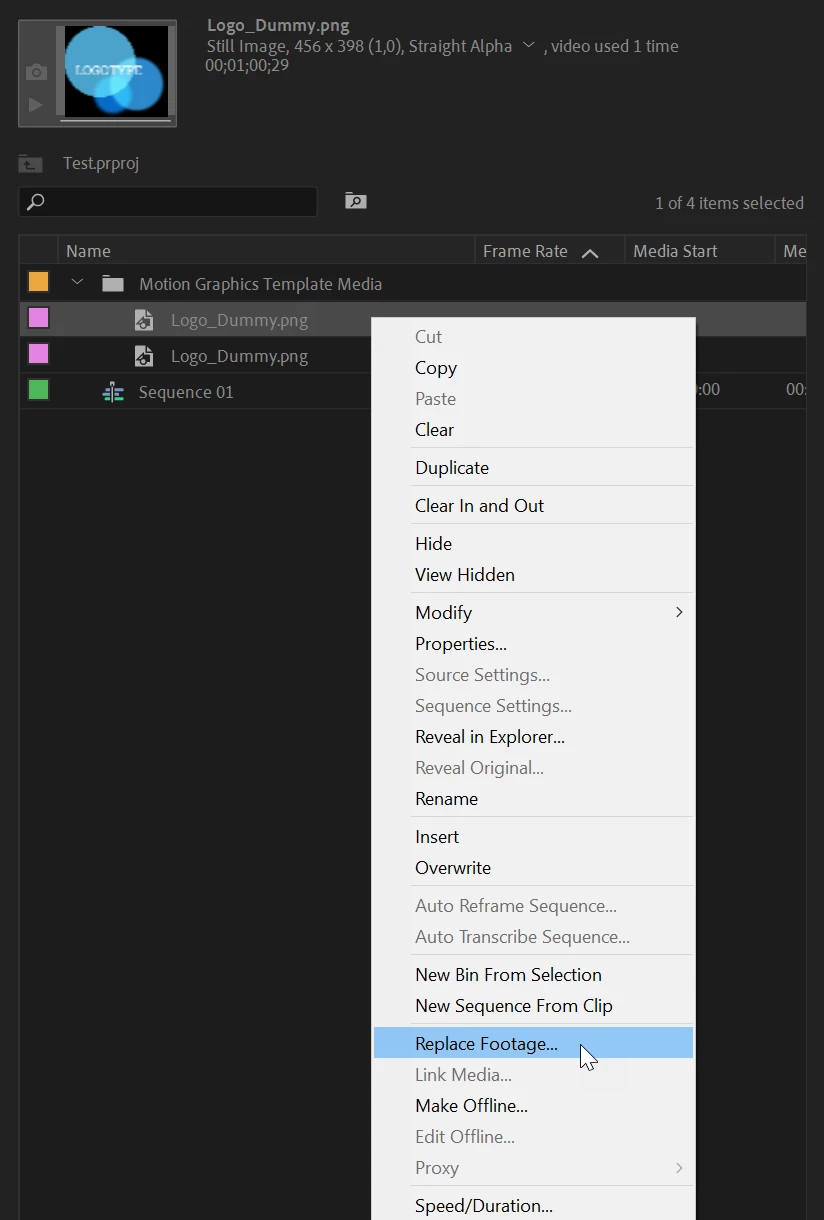
Open template in Project window.

Rightclick on dummy > Replace footage


2 replies

HSC5C2BAuthor
Participant
September 8, 2021

Many thanks Ann for your swift answer. That's great

Participant
April 22, 2023

I am so happy to see this thread! But I can not for the life of me get it to open in a project window, did you guys do it? 

Participant
April 22, 2023

*how did you guys do it? 

Ann Bens
Community Expert
Ann BensCommunity ExpertCorrect answer
Community Expert
September 8, 2021

Open template in Project window.

Rightclick on dummy > Replace footage


Cendrinet
Participant
November 18, 2021

I was looking for a solution to this template logotype issue and I was so happy to find your answer but then I don't get all these options when I right click. I'm completely new to Premiere. Please help! 

Ann Bens
Community Expert
Community Expert
November 18, 2021

That is because your are clicking in the wrong place.

You need to click on the clip in the Project window. Look closely at my screenshot.