
inges59913955
Participant
January 5, 2018
Answered

Change time display - only frames option

  • January 5, 2018
  • 3 replies
  • 41252 views

Dear all,

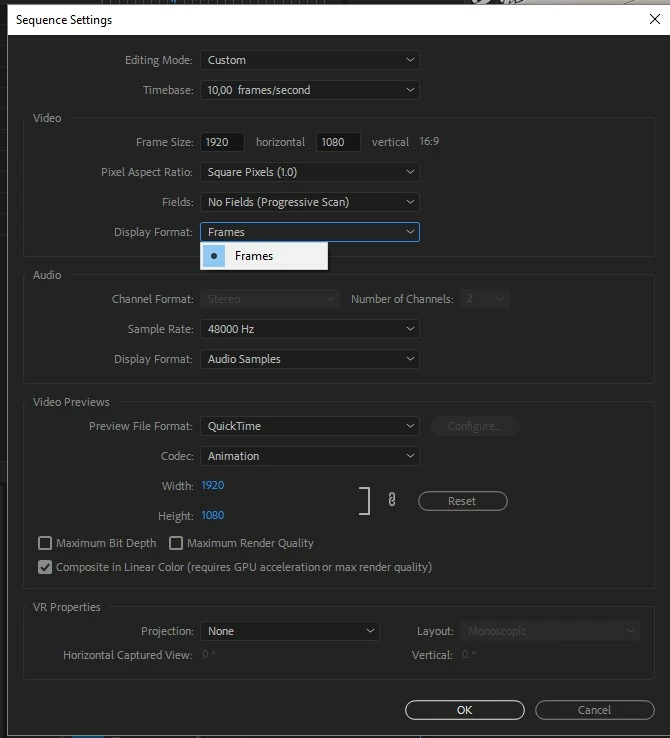
First time I ask a question here, but I'm really stuck. I want to change my timecode display format from frames to seconds. I found numerous tutorials, however they don't work for me. If I take a look at my sequence settings, the only option I can choose is ' frames'  and all the other options seem to have disappeared. I added a screenshot. Can anyone help me with this problem?

Thanks! Regards, Inge
This topic has been closed for replies.
Correct answer Ann Bens

You only have frames as the framerate is set to 10 fps.

3 replies

vinayb19587739
Participant
March 10, 2020

Set the Timebase or frames to 30fps, then other options will appear

inges59913955
Participant
January 5, 2018

Thanks, that's the answer, my framerate was way off!

Ann Bens
Community Expert
Ann BensCommunity ExpertCorrect answer
Community Expert
January 5, 2018

You only have frames as the framerate is set to 10 fps.

Mau7rice
Known Participant
April 6, 2018

I have the same problem but mine does say 30 frames per second. Is there a shortcut or something to change back to hours;mins;seconds ?

Participant
May 10, 2018

My sequence is set to 59.85 frames/second and the display format is locked to Frames. Timecode is not available. What is the remedy?